What You Will Build
In this tutorial, we will scale a RAG API built with FastAPI and Docker. We will continue with the same production RAG assistant from the previous tutorials rather than creating a new application from scratch.
Our current system already includes authentication, rate limiting, Redis caching, structured logging, Prometheus metrics, and OpenTelemetry tracing. However, it still effectively behaves as a single RAG API instance.
Client
  │
  ▼
FastAPI
  │
  ▼
RAG Pipeline
  │
  ├── Retrieval
  ├── Reranking
  └── LLM
  │
  ▼
Answer
This architecture works well at moderate traffic levels, but every request competes for the resources of the same application instance.
From One RAG API to Multiple Replicas
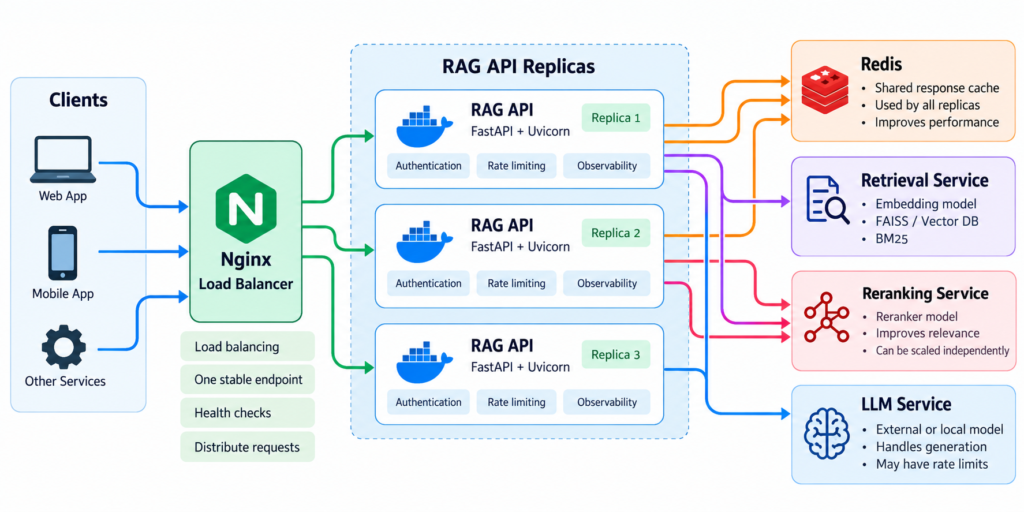
We will evolve the architecture so requests can be processed by multiple API instances:
                     Clients
                        │
                        ▼
                  Load Balancer
                        │
          ┌─────────────┼─────────────┐
          │             │             │
          ▼             ▼             ▼
      RAG API       RAG API       RAG API
      Replica 1     Replica 2     Replica 3
          │             │             │
          └─────────────┼─────────────┘
                        ▼
                  Shared Redis
The load balancer distributes incoming requests between replicas. Redis remains shared so cached RAG responses and other shared cache data are available regardless of which API instance receives the next request.
Workers and Replicas Are Different
We will examine two common ways to increase concurrency:
One Container
│
├── Worker 1
├── Worker 2
└── Worker 3


Multiple Containers
│
├── RAG API Replica 1
├── RAG API Replica 2
└── RAG API Replica 3
Multiple FastAPI workers create additional application processes inside a server or container. Multiple replicas create separate application instances that can be distributed across infrastructure.
This distinction matters for RAG because each process may load its own embedding model, reranker, FAISS index, and other large resources into memory.
RAG Scaling Is Not Only About FastAPI
A normal web API may spend much of its time waiting for databases or external services. A RAG request can involve several expensive stages:
Request
   │
   ▼
Embedding
   │
   ▼
Vector + BM25 Search
   │
   ▼
Reranking
   │
   ▼
LLM Generation
   │
   ▼
Response
Adding more API workers does not automatically make all of these stages faster. CPU usage, GPU memory, model loading, vector indexes, external LLM rate limits, and Redis connections can all become bottlenecks.
For that reason, learning how to scale a RAG API requires looking at the complete request path rather than only increasing the number of FastAPI processes.
What We Will Implement
By the end of this tutorial, we will have a practical architecture with:
- multiple FastAPI workers;
- multiple Docker replicas of the RAG API;
- load balancing between API instances;
- shared Redis caching;
- a strategy for models and vector indexes;
- load testing for concurrent requests;
- production scaling considerations.
The goal is not simply to run more copies of the application. We want to understand which components can scale horizontally, which resources are duplicated, and where new bottlenecks appear as concurrency increases.
This gives us a foundation to scale a RAG API deliberately: first identify the constrained resource, then add capacity at the appropriate layer and verify the result with measurements.
Prerequisites
Before we scale a RAG API, we need the production-oriented application built throughout the previous tutorials. The exact implementation can differ, but the API should already expose the RAG pipeline through FastAPI and run successfully in Docker.
Our existing endpoint looks approximately like this:
@app.post(
    "/ask",
    dependencies=[
        Depends(verify_api_key)
    ]
)
@limiter.limit(RAG_RATE_LIMIT)
async def ask(
    request: Request,
    body: AskRequest
):
    answer = ask_rag(
        body.question,
        request_id=request.state.request_id
    )

    return {
        "answer": answer
    }
Behind the endpoint, the RAG pipeline performs retrieval, reranking, context construction, and LLM generation.
Existing Docker Deployment
We will start with one API container and the shared Redis service added in the previous tutorial:
services:

  rag-api:
    build: .
    environment:
      REDIS_URL: redis://redis:6379/0

    ports:
      - "8000:8000"

    depends_on:
      - redis

  redis:
    image: redis:7-alpine
    restart: unless-stopped
The application currently runs one logical API instance:
Client
   │
   ▼
localhost:8000
   │
   ▼
RAG API Container
   │
   ├── Redis
   │
   └── RAG Pipeline
Keep Application State Outside the API Instance
Horizontal scaling becomes much easier when API replicas are effectively stateless. A request should not depend on temporary Python variables created by a previous request handled by the same process.
Shared state that must survive between requests should live in an appropriate external system. Our Redis cache already follows this principle:
RAG API 1 ──┐
            │
RAG API 2 ──┼──► Shared Redis
            │
RAG API 3 ──┘
This means any replica can process the next request and still access the same Redis-backed cache.
Know What Each Process Loads
Before increasing the worker count, identify the resources initialized by the application:
Embedding model
Reranking model
FAISS index
BM25 index
Redis client
LLM client
This matters because multiple worker processes may create multiple copies of large in-memory resources. A 2 GB model loaded by four independent workers can become a memory problem long before CPU capacity is exhausted.
Verify the Baseline First
Before attempting to scale a RAG API, confirm that one instance works correctly and record basic measurements such as request latency, CPU usage, memory consumption, and error rate.
Single RAG API
      │
      ▼
Baseline
│
├── requests/sec
├── p95 latency
├── CPU
├── memory
└── errors
Without a baseline, running three replicas instead of one tells us very little about whether the system actually scaled.
With the existing Docker deployment working and the baseline established, we can begin by identifying which parts of the RAG request are most likely to limit throughput before deciding where to add capacity.
Step 1 — Understand the RAG API Bottlenecks
Before adding workers or replicas, we need to know what actually limits throughput. To scale a RAG API effectively, identify the slow or resource-intensive stages instead of assuming that FastAPI itself is the bottleneck.
Break Down the Request Path
A typical request contains several operations with very different resource requirements:
Request
   │
   ├── Embedding        → CPU / GPU
   ├── Vector Search    → CPU / Memory
   ├── BM25 Search      → CPU / Memory
   ├── Reranking        → CPU / GPU
   └── LLM Call         → Network / External API
   │
   ▼
Response
If the LLM is an external API, adding local CPU cores will not make that service respond faster. If reranking saturates a GPU, adding more FastAPI workers may instead make several processes compete for the same GPU.
Use Existing Traces and Metrics
The observability components from the previous tutorials give us the information needed to locate bottlenecks. An OpenTelemetry trace might show:
POST /ask       2810 ms
│
└── rag.pipeline
    ├── retrieval      95 ms
    ├── reranking     410 ms
    ├── context         8 ms
    └── llm          2250 ms
Prometheus metrics provide the system-level view. Watch how latency, CPU, memory, errors, and request throughput change as concurrency increases.
Distinguish CPU-Bound and I/O-Bound Work
This distinction affects how we scale.
CPU / GPU Bound
├── embedding generation
├── reranking
└── some retrieval operations

I/O Bound
├── Redis requests
├── remote databases
└── external LLM APIs
Additional worker processes can help use multiple CPU cores for CPU-bound operations, but they also duplicate process memory. Asynchronous execution is especially useful for I/O-bound operations, but it does not create additional CPU capacity for heavy model inference.
Find the Saturation Point
Suppose one RAG API instance behaves like this:
Concurrency   p95 Latency
     1           2.4 s
     5           2.8 s
    10           4.1 s
    20           8.7 s
The sharp latency increase indicates that some resource is becoming saturated. CPU, GPU, memory, external API limits, and connection pools should then be examined before increasing capacity.
This is the central rule when you scale a RAG API: find the constrained resource first. Scaling the wrong layer can increase infrastructure cost without increasing useful throughput.
With the likely bottlenecks identified, we can test the simplest form of additional concurrency: running multiple FastAPI worker processes.
Step 2 — Run Multiple FastAPI Workers
The simplest way to increase the processing capacity of one RAG API container is to run multiple worker processes. Each worker can handle requests independently, allowing the server to use multiple CPU cores.
Start Multiple Uvicorn Workers
If the application currently starts with:
uvicorn main:app \
  --host 0.0.0.0 \
  --port 8000
we can start several workers with:
uvicorn main:app \
  --host 0.0.0.0 \
  --port 8000 \
  --workers 4
The architecture changes from one process to several:
RAG API Container
│
├── Worker 1
├── Worker 2
├── Worker 3
└── Worker 4
Incoming requests can now be processed by different workers. This is one way to scale a RAG API vertically within the resources available to a single machine or container.
Each Worker Is a Separate Process
Workers do not automatically share Python memory. If the application loads a FAISS index, embedding model, or reranker during startup, each worker may maintain its own process-level resources.
Worker 1 → Model + FAISS
Worker 2 → Model + FAISS
Worker 3 → Model + FAISS
Worker 4 → Model + FAISS
This can significantly increase memory consumption. For example, a large model that fits comfortably with one worker may exhaust available RAM when four independent workers are started.
More Workers Do Not Always Mean More Throughput
Suppose four workers share one GPU:
Worker 1 ──┐
Worker 2 ──┤
Worker 3 ──┼──► GPU
Worker 4 ──┘
The workers may simply compete for the same constrained resource. Similar problems occur when all workers reach the same external LLM rate limit or saturate available CPU capacity.
Worker count should therefore be tested rather than calculated from a generic formula. Compare one, two, and four workers while monitoring throughput, p95 latency, memory, CPU or GPU utilization, and errors.
1 worker  → measure
2 workers → measure
4 workers → measure
Multiple workers are useful when they increase concurrency without exhausting shared resources. But they still leave the application on one host. To scale a RAG API beyond a single container or machine, the next step is to run multiple RAG API replicas.
Step 3 — Scale the RAG API with Multiple Containers
Multiple workers increase concurrency inside one container, but they are still limited by the resources of one host. The next step to scale a RAG API is horizontal scaling: running several independent API containers.
Run Multiple RAG API Replicas
Instead of one container with several processes, we can run several copies of the same application:
                Incoming Requests
                       │
          ┌────────────┼────────────┐
          ▼            ▼            ▼
      RAG API 1    RAG API 2    RAG API 3
Because every replica uses the same application image, we do not need separate Dockerfiles or source code for each instance.
First, remove the fixed container_name and host port from the scalable API service:
services:

  rag-api:
    build: .

    environment:
      REDIS_URL: redis://redis:6379/0

    depends_on:
      - redis

  redis:
    image: redis:7-alpine
    restart: unless-stopped
We can then start multiple instances with Docker Compose:
docker compose up \
  -d \
  --scale rag-api=3
Docker now runs three instances of the same service:
rag-api-1
rag-api-2
rag-api-3
Why Remove the Fixed Host Port?
Three containers cannot all bind directly to the same host port:
rag-api-1 ──► host:8000
rag-api-2 ──► host:8000  ← conflict
rag-api-3 ──► host:8000  ← conflict
Instead, the API replicas remain inside the Docker network. A load balancer will expose one public endpoint and distribute requests between them.
Client
   │
   ▼
:8000
   │
   ▼
Load Balancer
   │
   ├──► rag-api-1:8000
   ├──► rag-api-2:8000
   └──► rag-api-3:8000
Replicas Need External Shared State
A request may reach rag-api-1 and the next request from the same client may reach rag-api-3. Application correctness should not depend on which replica receives it.
Our Redis architecture already supports this:
rag-api-1 ──┐
rag-api-2 ──┼──► Redis
rag-api-3 ──┘
The same principle applies to other persistent or shared state. Local process memory should not be used for data that another replica must access.
Workers vs. Replicas
The distinction is now clear:
Workers
└── multiple processes
    inside an API instance

Replicas
└── multiple independent
    API instances
A production deployment can use both, but more workers multiplied by more replicas also means more processes, more memory consumption, and potentially more copies of models and vector indexes.
Horizontal replication gives us the infrastructure needed to scale a RAG API beyond one application instance. However, clients still need a single endpoint. In the next step, we will place a load balancer in front of the replicas and distribute incoming requests between them.
Step 4 — Add Load Balancing
Multiple replicas provide additional capacity, but clients need one stable endpoint. To scale a RAG API horizontally, we can place a reverse proxy in front of the FastAPI containers and let it distribute requests between them.
Add Nginx as the Load Balancer
The architecture becomes:
Clients
   │
   ▼
Nginx
   │
   ├──► rag-api-1
   ├──► rag-api-2
   └──► rag-api-3
Create nginx.conf:
events {}

http {

    upstream rag_backend {
        server rag-api:8000;
    }

    server {
        listen 80;

        location / {
            proxy_pass http://rag_backend;

            proxy_set_header Host $host;
            proxy_set_header X-Real-IP $remote_addr;

            proxy_set_header X-Forwarded-For
                $proxy_add_x_forwarded_for;

            proxy_set_header X-Forwarded-Proto
                $scheme;
        }
    }
}
Inside the Docker Compose network, the service name rag-api can resolve to the service replicas. Nginx forwards incoming requests to the backend service instead of exposing each API container separately.
For more details about round-robin, least-connected, weighted routing, and other strategies, see the official NGINX HTTP load balancing documentation.
Add Nginx to Docker Compose
services:

  nginx:
    image: nginx:alpine

    ports:
      - "8000:80"

    volumes:
      - ./nginx.conf:/etc/nginx/nginx.conf:ro

    depends_on:
      - rag-api

  rag-api:
    build: .

    environment:
      REDIS_URL: redis://redis:6379/0

    depends_on:
      - redis

  redis:
    image: redis:7-alpine
    restart: unless-stopped
Now start three API replicas:
docker compose up \
  -d \
  --build \
  --scale rag-api=3
Clients continue using one address:
http://localhost:8000/askbut requests can be handled by different RAG API instances behind Nginx.
Do We Need Sticky Sessions?
For our current architecture, normally no. The API should not depend on a client returning to the same replica:
Request 1 → rag-api-1

Request 2 → rag-api-3

Request 3 → rag-api-2
Shared cache data lives in Redis, while persistent knowledge and other required resources should be available to every replica. This keeps the API horizontally scalable.
Sticky sessions become relevant only when application behavior depends on instance-local state. Avoiding that dependency is generally the cleaner design for this RAG API.
Load Balancing Does Not Remove Backend Limits
Adding replicas increases API capacity only when downstream resources can support the additional traffic.
3 API Replicas
      │
      ├──► Redis
      ├──► Vector Resources
      └──► LLM Provider
If all replicas reach the same LLM rate limit or compete for one constrained GPU, the bottleneck simply moves downstream.
A load balancer therefore helps us scale a RAG API by distributing requests, but it does not create unlimited capacity. In the next step, we will examine one of the shared components already used by every replica: Redis.
Step 5 — Share Redis Across RAG API Replicas
Once several API replicas are running, they should not maintain independent response caches. To scale a RAG API correctly, all replicas can connect to the same Redis service.
Why the Cache Must Be Shared
Consider a response generated by the first replica:
Request 1
   │
   ▼
rag-api-1
   │
   ▼
Generate Answer
   │
   ▼
Shared Redis
   │
   └── cache result
The next identical request may reach another replica:
Request 2
   │
   ▼
rag-api-3
   │
   ▼
Shared Redis
   │
   └── HIT
        │
        ▼
   Cached Answer
Because both instances use the same Redis server, the second request benefits from the result generated by the first.
Use the Same Redis Configuration
Each API replica receives the same connection URL:
environment:
  REDIS_URL: redis://redis:6379/0
Docker’s internal service name provides a stable destination:
rag-api-1 ──┐
            │
rag-api-2 ──┼──► redis:6379
            │
rag-api-3 ──┘
No application change is required because the caching layer already reads REDIS_URL from the environment.
Do Not Use Process-Local Caches for Shared Results
A Python dictionary works only inside the process that created it:
rag-api-1
└── local cache A

rag-api-2
└── local cache B

rag-api-3
└── local cache C
This fragments the cache and can produce inconsistent state between replicas. Process-local caching may still be useful for carefully selected immutable resources, but data that must be shared across requests and replicas belongs in an external store such as Redis.
Redis Can Become a Bottleneck Too
As the number of replicas grows, Redis receives more concurrent traffic:
1 replica  ──► Redis

5 replicas ──► Redis

20 replicas ─► Redis
Monitor Redis latency, memory usage, connection count, hit rate, and errors as API capacity increases. If Redis reaches its own resource limits, adding more FastAPI replicas will no longer improve the complete system.
Shared Redis helps us scale a RAG API without tying cached state to a particular replica. But RAG applications also contain much larger process-level resources: embedding models, rerankers, BM25 structures, and vector indexes. We need to decide how those resources should behave when the number of API instances increases.
Step 6 — Handle Models and Vector Indexes When Scaling
Models and vector indexes require special attention when we scale a RAG API. Unlike Redis, these resources are often loaded directly into application memory, so adding workers and replicas can multiply their memory requirements.
Understand Resource Duplication
Suppose one RAG process loads:
Embedding model    1.2 GB
Reranker           1.0 GB
FAISS index        2.0 GB
Other data         0.3 GB
-------------------------
Total              4.5 GB
Running four independent processes can potentially require much more memory than running one:
Worker 1 → Model + Reranker + FAISS
Worker 2 → Model + Reranker + FAISS
Worker 3 → Model + Reranker + FAISS
Worker 4 → Model + Reranker + FAISS
This is why increasing the worker count blindly can make a RAG deployment less stable rather than faster.
Small Indexes Can Stay with Each Replica
For a relatively small knowledge base, loading the FAISS and BM25 indexes into every replica can be a reasonable design:
RAG API 1 → FAISS + BM25
RAG API 2 → FAISS + BM25
RAG API 3 → FAISS + BM25
Retrieval remains local and fast, and each replica can process requests independently. The trade-off is duplicated memory and the need to keep every replica on the same index version.
Larger Systems Can Separate Retrieval
As indexes or models grow, retrieval can become an independent service:
RAG API Replicas
       │
       ▼
Retrieval Service
       │
       ├── Embedding Model
       ├── FAISS / Vector DB
       └── BM25
This avoids loading the same large resources into every API replica and allows retrieval capacity to scale independently from HTTP API capacity.
The same principle can apply to reranking or local LLM inference. A GPU-backed model service, for example, can manage batching and GPU memory centrally instead of allowing many FastAPI workers to compete for the same device.
Scale Components Independently
A larger RAG architecture may therefore evolve into:
Load Balancer
      │
      ▼
RAG API Replicas
      │
      ├──► Shared Redis
      ├──► Retrieval Service
      ├──► Reranking Service
      └──► LLM Service
This architecture is more complex, so it should not be introduced without a measurable reason. For smaller deployments, keeping retrieval inside each API replica is often simpler and faster.
The important lesson when you scale a RAG API is that different components have different scaling characteristics. FastAPI, retrieval, reranking, Redis, and model inference do not necessarily need the same number of replicas.
Once these resource boundaries are understood, we can test whether the scaled architecture actually handles more concurrent requests than the original single-instance deployment.
Test the Scaled RAG API
After adding workers, replicas, load balancing, and shared Redis, we need to verify that the architecture actually increases useful capacity. To scale a RAG API successfully, we should compare the new deployment against the single-instance baseline rather than simply confirm that several containers are running.
Verify the Running Replicas
Start three API replicas:
docker compose up \
  -d \
  --scale rag-api=3
Then check the containers:
docker compose psYou should see the load balancer, Redis, and multiple RAG API instances.
Send Concurrent Requests
For a simple load test, we can use a tool such as hey against the single public Nginx endpoint:
hey \
  -n 100 \
  -c 10 \
  -m POST \
  -H "Content-Type: application/json" \
  -H "X-API-Key: your-api-key" \
  -d '{"question":"What is hybrid search?"}' \
  http://localhost:8000/ask
Here, -n 100 sends 100 requests and -c 10 keeps up to 10 requests running concurrently.
Avoid Testing Only Cached Responses
Our Redis response cache can make repeated identical questions extremely fast:
First request  → RAG Pipeline
Next 99        → Redis HIT
That tests Redis and the API layer more than the actual RAG pipeline. To measure RAG scaling, also test a set of different questions or temporarily separate cached and uncached benchmarks.
Compare the Results
Run the same workload against different configurations:
1 replica  → measure
2 replicas → measure
3 replicas → measure
Compare:
- requests per second;
- median and p95 latency;
- error rate;
- CPU and memory usage;
- Redis latency;
- retrieval and LLM span duration.
If three replicas consume three times the resources but throughput barely improves, another component is probably limiting the system.
More Replicas
     │
     ▼
No Throughput Increase
     │
     ▼
Find New Bottleneck
     │
     ├── CPU / GPU
     ├── Retrieval
     ├── Redis
     └── LLM Provider
This measurement loop is how we should scale a RAG API: increase capacity at one layer, run the same workload, compare the results, and locate the next bottleneck before adding more infrastructure.
Production Scaling Considerations
A production deployment needs more than additional containers. When we scale a RAG API, we also need to control overload, handle failed replicas, and ensure that new instances can start and stop safely.
Add Health Checks
A load balancer should send traffic only to healthy API instances. Add a lightweight endpoint:
@app.get("/health")
async def health():
    return {
        "status": "ok"
    }
The health check should be inexpensive. It should not execute retrieval or call the LLM every time the load balancer checks the service.
Use Timeouts and Concurrency Limits
Without limits, a sudden traffic spike can create more concurrent RAG operations than the infrastructure can process:
Traffic Spike
     │
     ▼
Too Many Requests
     │
     ├── CPU saturation
     ├── GPU saturation
     ├── memory pressure
     └── LLM rate limits
Rate limiting, request timeouts, queues, and concurrency controls can protect expensive downstream resources. It is often better to reject or delay excess work than to allow every request to become extremely slow.
Keep Startup Predictable
RAG replicas may need to load models and indexes before they are ready to receive traffic. A container that has started is not necessarily ready:
Container Starts
      │
      ▼
Load Models
      │
      ▼
Load Indexes
      │
      ▼
Ready for Traffic
Production orchestration should distinguish application startup from readiness, especially when initialization takes several seconds or minutes.
Plan for Graceful Shutdown
When a replica is replaced or removed, active requests should be allowed to finish when possible. Otherwise, scaling events and deployments can interrupt LLM calls or other long-running RAG operations.
This becomes increasingly important as request duration grows and the number of replicas changes dynamically.
Scale on the Right Signal
CPU utilization is useful, but it may not describe the true bottleneck of a RAG workload. Useful scaling signals can include:
CPU / GPU utilization
Concurrent requests
p95 latency
Queue depth
Memory usage
LLM rate-limit errors
For example, adding replicas because CPU is high makes sense only if additional replicas actually have access to additional CPU capacity. Adding ten containers on the same saturated machine does not create ten times more compute.
Watch Downstream Capacity
Horizontal scaling can amplify pressure on every shared dependency:
More API Replicas
       │
       ├──► More Redis Connections
       ├──► More Retrieval Queries
       └──► More LLM Requests
The API layer may scale successfully while Redis, the vector database, GPU inference service, or external LLM provider becomes the next bottleneck.
Prefer Incremental Scaling
The safest approach is iterative:
Measure
   │
   ▼
Find Bottleneck
   │
   ▼
Add Capacity
   │
   ▼
Load Test
   │
   └────────► Measure Again
This prevents unnecessary architectural complexity. A small RAG application may need only two API replicas and shared Redis, while a much larger system may eventually separate retrieval, reranking, and inference into independently scalable services.
The objective when you scale a RAG API is not to maximize the number of workers or containers. It is to increase reliable throughput while keeping latency, resource consumption, and failure behavior under control.
Where to Go Next
At this point, the RAG assistant has evolved from a local application into a production-oriented API with authentication, rate limiting, observability, caching, and horizontal scaling. Learning how to scale a RAG API is only one part of operating the complete system reliably.
If you want to revisit the deployment foundation, see Dockerize a RAG Assistant with FastAPI and Deploy a RAG Assistant with FastAPI.
For API protection, continue with Add Authentication and Rate Limiting to a RAG API. This becomes particularly important as additional replicas increase the number of requests the application can accept concurrently.
To understand what happens across those replicas, use Add Logging and Monitoring to a RAG API together with Add Distributed Tracing to a RAG API with OpenTelemetry. Metrics show system-wide behavior, while traces help identify whether latency comes from retrieval, reranking, Redis, or the LLM.
Caching is another important part of the architecture. How to Add Caching to a RAG API with Redis explains the shared cache used by the replicas in this tutorial.
Finally, infrastructure capacity should not be confused with RAG quality. Use Evaluate a RAG System in Python to measure retrieval and answer quality independently from API performance.
Together, these components provide the foundation needed to scale a RAG API while still measuring its performance, reliability, and answer quality as separate engineering concerns.
Frequently Asked Questions
What is the difference between FastAPI workers and replicas?
Workers are separate application processes running on the same host or inside the same container. Replicas are separate application instances, usually running as different containers. Both increase concurrency, but replicas provide a stronger foundation for horizontal scaling across multiple machines.
How many workers should a RAG API use?
There is no universal number. Start with a small worker count and benchmark the application. Local embedding models, rerankers, FAISS indexes, and other memory-heavy resources can be duplicated between processes, so additional workers may increase memory consumption faster than throughput.
Does adding more replicas make individual RAG requests faster?
Usually not. Replicas primarily increase the number of requests the system can process concurrently. If one request spends two seconds waiting for an external LLM, adding replicas does not automatically reduce those two seconds. It can, however, prevent concurrent requests from waiting behind each other when API capacity is the bottleneck.
Can FAISS be shared between multiple containers?
The same immutable FAISS index file can be made available to several containers, but each application process normally works with its own in-process index and consumes memory accordingly. If the vector collection becomes large, frequently updated, or needs independent scaling, moving retrieval behind a dedicated service or vector database may be more appropriate.
Why does a scaled RAG API need a load balancer?
A load balancer gives clients one stable endpoint and distributes incoming requests across available replicas. This allows us to scale a RAG API without requiring clients to know which individual container should process each request.
Does Redis need to be shared between replicas?
Yes, if cached results must be available regardless of which replica receives the next request. A shared Redis instance allows one replica to create a cache entry and another replica to reuse it. The same principle applies to other state that must remain consistent across API instances.
Can Docker Compose be used to scale a production RAG API?
Docker Compose is useful for learning, testing, and relatively simple deployments on a single host. Larger production environments often require infrastructure that can schedule containers across machines, monitor replica health, replace failed instances, and adjust capacity automatically.
What should trigger automatic scaling?
The best signal depends on the actual bottleneck. CPU or GPU utilization, memory pressure, concurrent requests, queue depth, p95 latency, and downstream rate-limit errors can all provide useful information. Scaling decisions should be based on measurements rather than container count alone.
Does horizontal scaling improve RAG answer quality?
No. Horizontal scaling increases system capacity and availability; it does not directly improve retrieval relevance or answer accuracy. RAG quality should be evaluated separately using retrieval and generation metrics.
What is the most important rule when scaling a RAG API?
Measure before and after every significant change. To scale a RAG API effectively, identify the current bottleneck, add capacity where it is needed, repeat the same load test, and verify that throughput or reliability actually improves.
Conclusion
A single FastAPI instance is enough to build and validate a RAG application, but production traffic eventually requires a different architecture. In this tutorial, we learned how to scale a RAG API by moving from one application process to multiple workers and then to multiple Docker replicas behind a load balancer.
We also saw why scaling the HTTP layer is only part of the problem. Redis must provide shared state across replicas, while embedding models, rerankers, FAISS indexes, and BM25 structures can consume additional memory every time they are loaded into another process. External LLM providers, GPUs, retrieval services, and Redis can also become bottlenecks even when the FastAPI layer has plenty of available capacity.
Measure
   │
   ▼
Find the Bottleneck
   │
   ▼
Scale the Required Component
   │
   ▼
Load Test
   │
   ▼
Measure Again
This cycle is more important than any particular worker or replica count. Horizontal scaling should produce a measurable improvement in throughput, latency under load, or reliability. If it does not, the limiting resource is somewhere else in the RAG pipeline.
The practical goal is therefore not simply to run more containers. It is to scale a RAG API while keeping the application stateless where possible, sharing the state that must be shared, controlling expensive resources, and measuring the complete system as traffic increases.