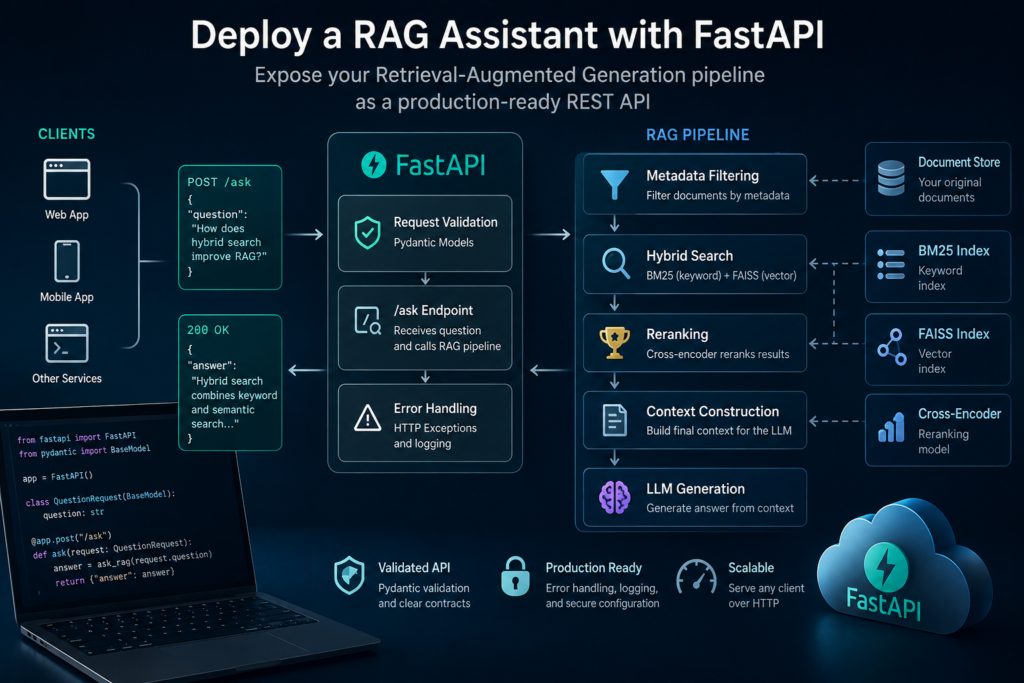
What You Will Build
In this tutorial, you will learn how to deploy a RAG assistant with FastAPI and expose an existing Retrieval-Augmented Generation pipeline through a REST API. Instead of calling your RAG functions directly from Python, external applications will be able to send questions over HTTP and receive generated answers as JSON responses.
The API will act as a lightweight interface between a client application and the RAG pipeline you built in the previous tutorials.
The complete request flow will look like this:
Client Application
        │
        ▼
   HTTP Request
        │
        ▼
     FastAPI
        │
        ▼
   /ask Endpoint
        │
        ▼
    RAG Pipeline
        │
        ▼
Retrieve Documents
        │
        ▼
      Rerank
        │
        ▼
   Build Context
        │
        ▼
        LLM
        │
        ▼
   Generated Answer
        │
        ▼
   JSON Response
For example, a client will send a request containing a question:
{
    "question": "How does hybrid search improve RAG?"
}
The FastAPI application will pass the question to your RAG pipeline and return a structured response:
{
    "answer": "Hybrid search combines keyword and semantic retrieval..."
}
What You Will Learn
- How to create a FastAPI application for a RAG system
- How to expose the RAG pipeline through an API endpoint
- How to validate incoming requests with Pydantic
- How to return structured JSON responses
- How to handle API errors
- How to run and test the RAG API locally
- How to prepare the application for production deployment
By the end of this tutorial, you will have a working REST API that connects external applications to your retrieval and generation pipeline. This provides the foundation for integrating your RAG assistant with web interfaces, internal tools, mobile applications, or other backend services.
The goal is not to rebuild the retrieval system. Instead, you will take the existing ask_rag() function and learn how to deploy a RAG assistant with FastAPI as a reusable application service.
Prerequisites
Before you deploy a RAG assistant with FastAPI, you should already have a working Python Retrieval-Augmented Generation pipeline. The API layer will not change how retrieval or generation works. It will simply provide an HTTP interface that allows other applications to access the existing RAG system.
Your project should already include:
- Python 3.10 or later
- A working
ask_rag()function - An indexed document collection
- A retrieval pipeline using FAISS, BM25, or hybrid search
- Cross-encoder reranking if you followed the previous tutorial
- An OpenAI API key
Install FastAPI and Uvicorn:
pip install fastapi uvicornFastAPI provides the web framework and API routing, while Uvicorn runs the application as an ASGI server.
A simple project structure might look like this:
rag-assistant/
│
├── app.py
├── rag.py
├── documents/
├── index/
└── requirements.txt
The rag.py module contains the RAG pipeline developed in the previous tutorials:
def ask_rag(question):
    candidate_documents = hybrid_search(
        question,
        top_k=20
    )

    top_documents = rerank_documents(
        question,
        candidate_documents,
        top_k=5
    )

    context = build_context(
        top_documents
    )

    return generate_answer(
        question,
        context
    )
The new app.py file will contain the FastAPI application and connect incoming HTTP requests to this function.
Keeping the API layer separate from the retrieval logic is useful because the same RAG pipeline can later be accessed from different interfaces without rewriting its core components.
With these components in place, you are ready to deploy a RAG assistant with FastAPI. In the next step, you’ll create the FastAPI application and run your first local API server.
Step 1 — Prepare the RAG Pipeline
Before creating the API layer, make sure the RAG pipeline can be called from a single reusable function. This separation keeps the retrieval logic independent from FastAPI and makes the application easier to test, maintain, and extend.
A clean RAG function might look like this:
def ask_rag(question):
    candidate_documents = hybrid_search(
        question,
        top_k=20
    )

    top_documents = rerank_documents(
        question,
        candidate_documents,
        top_k=5
    )

    context = build_context(
        top_documents
    )

    answer = generate_answer(
        question,
        context
    )

    return answer
The important point is that this function should know nothing about HTTP requests, JSON responses, or FastAPI routes. Its only responsibility is to receive a question and return an answer.
This creates a simple architecture:
FastAPI
   │
   ▼
ask_rag(question)
   │
   ▼
Retrieval
   │
   ▼
Reranking
   │
   ▼
Context
   │
   ▼
LLM
   │
   ▼
Answer
If your current RAG code is spread across several scripts, refactor it into a module such as rag.py. The API application can then import the function directly:
from rag import ask_ragThis separation becomes especially valuable later when you add testing, authentication, logging, background jobs, or multiple API endpoints.
When you deploy a RAG assistant with FastAPI, the API should act only as the interface layer. The retrieval and generation pipeline should remain reusable on its own.
In the next step, you’ll create the FastAPI application, define the first route, and connect it to your existing RAG function.
Step 2 — Create a FastAPI Application
Now you can create the web application that will expose your RAG pipeline through HTTP. FastAPI makes this relatively simple because routes, request validation, and JSON responses can be defined directly in Python.
Create a new file called app.py and import FastAPI together with your existing RAG function:
from fastapi import FastAPI

from rag import ask_rag

app = FastAPI(
    title="RAG Assistant API",
    version="1.0.0"
)
The FastAPI() object represents your application. All API endpoints will be registered on this object.
For the complete framework reference, routing examples, request handling, and deployment guidance, see the official FastAPI documentation:
Before connecting the RAG pipeline, add a simple health endpoint:
@app.get("/health")
def health():
    return {
        "status": "ok"
    }
This endpoint does not call the language model or search the knowledge base. It simply confirms that the API application is running and responding to requests.
Start the local server with Uvicorn:
uvicorn app:app --reloadHere, the first app refers to the app.py module, while the second refers to the FastAPI instance created inside that module. The --reload option automatically restarts the development server when the source code changes.
Once the server is running, the health endpoint can be accessed at:
http://127.0.0.1:8000/healthFastAPI also automatically generates interactive API documentation. Open:
http://127.0.0.1:8000/docsThe documentation interface will display your available endpoints and allow you to send test requests directly from the browser.
At this point, the API server is running, but it is not yet connected to the RAG assistant. In the next step, you’ll create an /ask endpoint that accepts a user question and passes it to the retrieval and generation pipeline.
Step 3 — Build the RAG API Endpoint
Now that the FastAPI application is running, you can connect it to the RAG pipeline. The goal is to create an endpoint that receives a question from a client, passes it to ask_rag(), and returns the generated answer as JSON.
For now, define a simple request model and create the /ask endpoint:
from pydantic import BaseModel

class QuestionRequest(BaseModel):
    question: str


@app.post("/ask")
def ask(request: QuestionRequest):

    answer = ask_rag(
        request.question
    )

    return {
        "answer": answer
    }
The client can now send an HTTP POST request containing a question:
{
    "question": "How does hybrid search improve RAG?"
}
FastAPI converts the JSON request into a QuestionRequest object. The endpoint extracts the question and sends it to the existing RAG pipeline.
The internal request flow now looks like this:
POST /ask
     │
     ▼
JSON Request
     │
     ▼
QuestionRequest
     │
     ▼
ask_rag(question)
     │
     ▼
Hybrid Retrieval
     │
     ▼
Reranking
     │
     ▼
LLM
     │
     ▼
Generated Answer
     │
     ▼
JSON Response
If the RAG pipeline returns:
Hybrid search combines keyword retrieval
with semantic vector search.
FastAPI automatically serializes the Python dictionary into a JSON response:
{
    "answer": "Hybrid search combines keyword retrieval with semantic vector search."
}
This means that any application capable of sending HTTP requests can now communicate with your RAG assistant. A web frontend, mobile application, internal business tool, or another backend service does not need to know how FAISS, BM25, reranking, or the LLM work internally.
This separation is one of the main advantages when you deploy a RAG assistant with FastAPI. The RAG pipeline remains responsible for retrieval and generation, while FastAPI provides a stable interface that other applications can use.
The endpoint works, but the current request model accepts any string, including an empty question. In the next step, you’ll improve the API by using Pydantic validation to control what data the endpoint accepts.
Step 4 — Validate Requests with Pydantic
When you deploy a RAG assistant with FastAPI, the API should validate incoming data before passing it to the retrieval pipeline. Invalid or empty requests should be rejected at the API layer rather than reaching FAISS, BM25, the reranker, or the language model.
FastAPI integrates directly with Pydantic, allowing you to define validation rules using Python models. Update the request model so that the question cannot be empty:
from pydantic import BaseModel, Field

class QuestionRequest(BaseModel):
    question: str = Field(
        min_length=3,
        max_length=1000
    )
The min_length rule prevents empty or extremely short questions, while max_length limits unexpectedly large input.
You can also define a response model:
class AnswerResponse(BaseModel):
    answer: str
Then specify that model directly in the endpoint:
@app.post(
    "/ask",
    response_model=AnswerResponse
)
def ask(request: QuestionRequest):

    answer = ask_rag(
        request.question
    )

    return AnswerResponse(
        answer=answer
    )
Now the API has an explicit contract:
Request

{
    "question": "What is RAG reranking?"
}

        ↓

Validation

        ↓

RAG Pipeline

        ↓

Response

{
    "answer": "RAG reranking..."
}
If a client sends an invalid request, FastAPI automatically returns a validation error instead of executing the RAG pipeline.
For example:
{
    "question": ""
}
This request fails the minimum-length requirement, so unnecessary retrieval and LLM calls are avoided.
Validation becomes increasingly important when you deploy a RAG assistant with FastAPI for real applications. The API is no longer controlled only by your Python code: browsers, mobile applications, internal services, and external clients may all send requests to the same endpoint.
Pydantic therefore creates a clear boundary between untrusted client input and the RAG pipeline. In the next step, you’ll add error handling for failures that occur after a request has successfully passed validation.
Step 5 — Add Error Handling
Request validation protects the API from malformed input, but errors can still occur inside the RAG pipeline. Vector search may fail, an external model API may be unavailable, or another component may raise an unexpected exception. When you deploy a RAG assistant with FastAPI, these failures should be handled without exposing internal application details to the client.
FastAPI provides HTTPException for returning controlled HTTP errors. Import it together with FastAPI:
from fastapi import FastAPI, HTTPExceptionThen wrap the RAG call in a try block:
@app.post(
    "/ask",
    response_model=AnswerResponse
)
def ask(request: QuestionRequest):

    try:
        answer = ask_rag(
            request.question
        )

        return AnswerResponse(
            answer=answer
        )

    except Exception:
        raise HTTPException(
            status_code=500,
            detail="Unable to generate answer"
        )
If the RAG pipeline fails, the client now receives a predictable response:
{
    "detail": "Unable to generate answer"
}
The HTTP status code also communicates the type of failure:
200  Successful request
422  Request validation failed
500  Internal RAG pipeline error
In a real application, the original exception should normally be written to application logs while the client receives only a safe error message.
import logging

logger = logging.getLogger(__name__)

try:
    answer = ask_rag(
        request.question
    )

except Exception:
    logger.exception(
        "RAG pipeline failed"
    )

    raise HTTPException(
        status_code=500,
        detail="Unable to generate answer"
    )
This separation is important. Detailed logs help developers diagnose failures, but returning stack traces, API credentials, file paths, or internal infrastructure information to clients can expose unnecessary details about the application.
You can later introduce more specific error handling for known failure types, such as retrieval errors, model API timeouts, or unavailable dependencies. This makes it possible to return more meaningful status codes and decide which failures should be retried.
When you deploy a RAG assistant with FastAPI, predictable failure behavior is just as important as successful responses. Clients need to know whether a request was invalid, the service failed internally, or the answer was generated successfully.
With request validation and basic error handling in place, the API is ready for end-to-end testing. In the next step, you’ll send real HTTP requests to the /ask endpoint and verify the complete RAG request-response cycle.
Step 6 — Run and Test the RAG API
Now that the API includes request validation and error handling, you can test the complete request-response cycle. Before you deploy a RAG assistant with FastAPI to a production environment, verify that the local API correctly accepts questions, calls the RAG pipeline, and returns structured responses.
Start the development server from your project directory:
uvicorn app:app --reloadIf the application starts successfully, Uvicorn will make the API available locally at:
http://127.0.0.1:8000First, check the health endpoint:
curl http://127.0.0.1:8000/healthYou should receive:
{
    "status": "ok"
}
Next, send a question to the RAG assistant:
curl -X POST \
  "http://127.0.0.1:8000/ask" \
  -H "Content-Type: application/json" \
  -d '{"question":"How does reranking improve RAG retrieval?"}'
The request travels through the complete application:
HTTP Request
      │
      ▼
Request Validation
      │
      ▼
/ask Endpoint
      │
      ▼
RAG Retrieval
      │
      ▼
Reranking
      │
      ▼
LLM Generation
      │
      ▼
JSON Response
A successful response might look like this:
{
    "answer": "Reranking improves RAG retrieval by reordering candidate documents according to their relevance to the user's query."
}
You can also test the endpoint using FastAPI’s automatically generated interactive documentation:
http://127.0.0.1:8000/docsOpen the POST /ask endpoint, select Try it out, enter a question, and execute the request. This is useful during development because you can inspect the request body, response body, and HTTP status code without building a separate client application.
Do not test only successful requests. Send invalid input as well:
{
    "question": ""
}
The request should be rejected by Pydantic validation before the RAG pipeline runs. You should also test unavailable model services or other controlled failures to confirm that your error handling returns the expected HTTP response.
When you deploy a RAG assistant with FastAPI, these tests provide a basic end-to-end check that the API layer and RAG pipeline work together correctly. For larger applications, the same requests can later become automated integration tests.
At this point, the RAG assistant is accessible through a working REST API. In the next step, you’ll prepare the application for production by reviewing configuration, server settings, security, logging, and other concerns that should not remain in development mode.
Step 7 — Prepare the API for Production
A development server is enough for local testing, but production deployment requires additional preparation. When you deploy a RAG assistant with FastAPI for real users or applications, configuration, security, logging, concurrency, and resource usage become part of the system architecture.
The first rule is to keep sensitive configuration outside the source code. API keys and other secrets should be loaded from environment variables rather than written directly into Python files.
import os

OPENAI_API_KEY = os.getenv(
    "OPENAI_API_KEY"
)

if not OPENAI_API_KEY:
    raise RuntimeError(
        "OPENAI_API_KEY is not configured"
    )
This allows different environments to use different credentials without modifying the application code.
Disable Development Reloading
The --reload option used earlier is intended for development. It watches source files and automatically restarts the server when they change.
For production, run the application without it:
uvicorn app:app \
  --host 0.0.0.0 \
  --port 8000
The exact production server configuration depends on where the application is deployed. A container, virtual machine, or managed cloud platform may start and supervise the FastAPI application differently.
Load Models Once
Embedding models, FAISS indexes, BM25 indexes, and cross-encoders should not normally be recreated for every request. Load reusable resources when the application starts and share them across requests when the libraries and deployment architecture allow it.
reranker = load_reranker()
vector_index = load_vector_index()
documents = load_documents()
Loading these components once can significantly reduce request latency and avoid unnecessary memory and CPU usage.
Add Logging and Monitoring
Production logs should provide enough information to diagnose failures and understand system behavior without storing sensitive user content unnecessarily.
logger.info(
    "RAG request completed"
)
Useful operational measurements can include request latency, retrieval latency, LLM latency, error rates, token usage, and the number of documents retrieved or reranked.
Protect the API
The API built in this tutorial currently accepts requests from any client that can reach the server. A public deployment will usually require additional controls such as authentication, HTTPS, request-size limits, rate limiting, and appropriate CORS configuration.
These controls are especially important because every successful request may trigger embedding generation, retrieval, reranking, and an external LLM call. An unprotected endpoint can therefore consume significant computational resources or API credits.
Think About Concurrency
A local RAG assistant may process only one or two requests at a time, while a deployed service can receive many concurrent requests. Retrieval operations, model inference, and external API calls can become bottlenecks as traffic increases.
Before increasing server workers blindly, consider the resources used by the RAG pipeline. Multiple processes may each load their own copy of embedding models, cross-encoders, and vector indexes, substantially increasing memory consumption.
When you deploy a RAG assistant with FastAPI, production readiness therefore involves more than exposing an endpoint. The API, retrieval pipeline, models, infrastructure, and external services must operate together reliably under real workloads.
At this stage, however, you already have the essential application architecture: a validated REST API receives a question, calls the existing RAG pipeline, handles failures, and returns a structured response. The infrastructure used to host and scale that application can be treated as a separate deployment layer.
Where to Go Next
You now know how to deploy a RAG assistant with FastAPI and expose a complete Retrieval-Augmented Generation pipeline through a REST API. The assistant is no longer limited to a local Python script: web applications, internal tools, mobile clients, and other services can communicate with it through standard HTTP requests.
The complete architecture now looks like this:
Client Application
        ↓
     FastAPI
        ↓
Request Validation
        ↓
    /ask Endpoint
        ↓
Metadata Filtering
        ↓
Hybrid Search
(BM25 + FAISS)
        ↓
Cross-Encoder Reranking
        ↓
   Build Context
        ↓
       LLM
        ↓
  JSON Response
If you followed the complete practical series, you have progressively built the major components of a modern RAG application:
- Build a RAG System in Python — create the basic Retrieval-Augmented Generation pipeline.
- Build a Vector Search Engine with FAISS — implement semantic vector retrieval.
- Build a Document Q&A Assistant in Python — generate answers from your own documents.
- Add Conversation Memory to Your AI Assistant in Python — preserve conversational context.
- Build Metadata Filtering for RAG in Python — restrict retrieval using structured metadata.
- Build Hybrid Search for RAG in Python — combine lexical and semantic retrieval.
- Build Reranking for RAG in Python — improve result ordering with a cross-encoder.
- Evaluate a RAG System in Python — measure retrieval and answer quality.
At this point, the RAG system has moved through the complete path from document retrieval to an application-accessible API. The next improvements depend less on adding retrieval components and more on operating the system reliably in a real environment.
Natural next steps include containerizing the application with Docker, adding authentication and rate limiting, introducing automated tests, monitoring latency and errors, and deploying the service to cloud infrastructure.
Once you can deploy a RAG assistant with FastAPI as a stable API service, these infrastructure improvements can be added without changing the core retrieval and generation architecture.
Frequently Asked Questions
Why should I deploy a RAG assistant with FastAPI?
FastAPI provides a simple way to expose a Python RAG pipeline through a REST API. This allows web applications, mobile clients, internal tools, and other backend services to send questions to the assistant without needing direct access to the retrieval or generation code.
Do I need to rebuild my RAG pipeline for FastAPI?
No. The retrieval and generation logic should remain independent from the API layer. FastAPI can import an existing function such as ask_rag(), pass the user’s question to it, and return the generated answer as JSON.
Why use Pydantic with a RAG API?
Pydantic validates incoming request data before it reaches the RAG pipeline. This helps reject empty, malformed, or unexpectedly large requests before they trigger retrieval, reranking, or LLM calls.
Can FastAPI handle multiple RAG requests?
Yes, but actual throughput depends on the complete pipeline. Embedding generation, vector search, cross-encoder inference, external LLM calls, available memory, and server configuration can all affect concurrency and response time.
Should I use Uvicorn in production?
Uvicorn can run FastAPI applications in production, but the appropriate configuration depends on the deployment environment. Containers, virtual machines, and managed cloud services may use different process-management and scaling strategies. Development options such as --reload should not be used in production.
How do I secure a RAG API?
A production API may require authentication, HTTPS, rate limiting, request-size limits, controlled CORS settings, and secure management of API keys. These protections become particularly important when each request can trigger computationally expensive retrieval and LLM operations.
What should I monitor after deployment?
When you deploy a RAG assistant with FastAPI, useful operational metrics include request latency, retrieval and reranking time, LLM latency, error rates, token usage, and resource consumption. These measurements can help identify bottlenecks and unexpected changes in application behavior.
Conclusion
In this tutorial, you learned how to deploy a RAG assistant with FastAPI and transform an existing Python Retrieval-Augmented Generation pipeline into a REST API that other applications can access.
You created a FastAPI application, exposed the RAG pipeline through an /ask endpoint, validated incoming requests with Pydantic, added basic error handling, and tested the complete request-response cycle.
You also prepared the application for production by separating configuration from source code, loading expensive RAG components efficiently, introducing logging, and considering security and concurrency.
The final application architecture now looks like this:
Client
   ↓
FastAPI
   ↓
Validation
   ↓
RAG Pipeline
   ↓
Retrieval
   ↓
Reranking
   ↓
LLM
   ↓
Answer
   ↓
JSON Response
The most important architectural principle is separation of responsibilities. FastAPI handles communication with clients, while the RAG pipeline remains responsible for retrieval, context construction, reranking, and answer generation. This makes both parts easier to develop, test, and replace independently.
Once you deploy a RAG assistant with FastAPI, the system is no longer just a local AI experiment. It becomes an application service that can be connected to websites, business applications, internal knowledge systems, and other software through a standard API.
From here, you can move deeper into production infrastructure: containerize the RAG API with Docker, add authentication and rate limiting, implement automated tests, introduce monitoring, and deploy the service to cloud infrastructure.