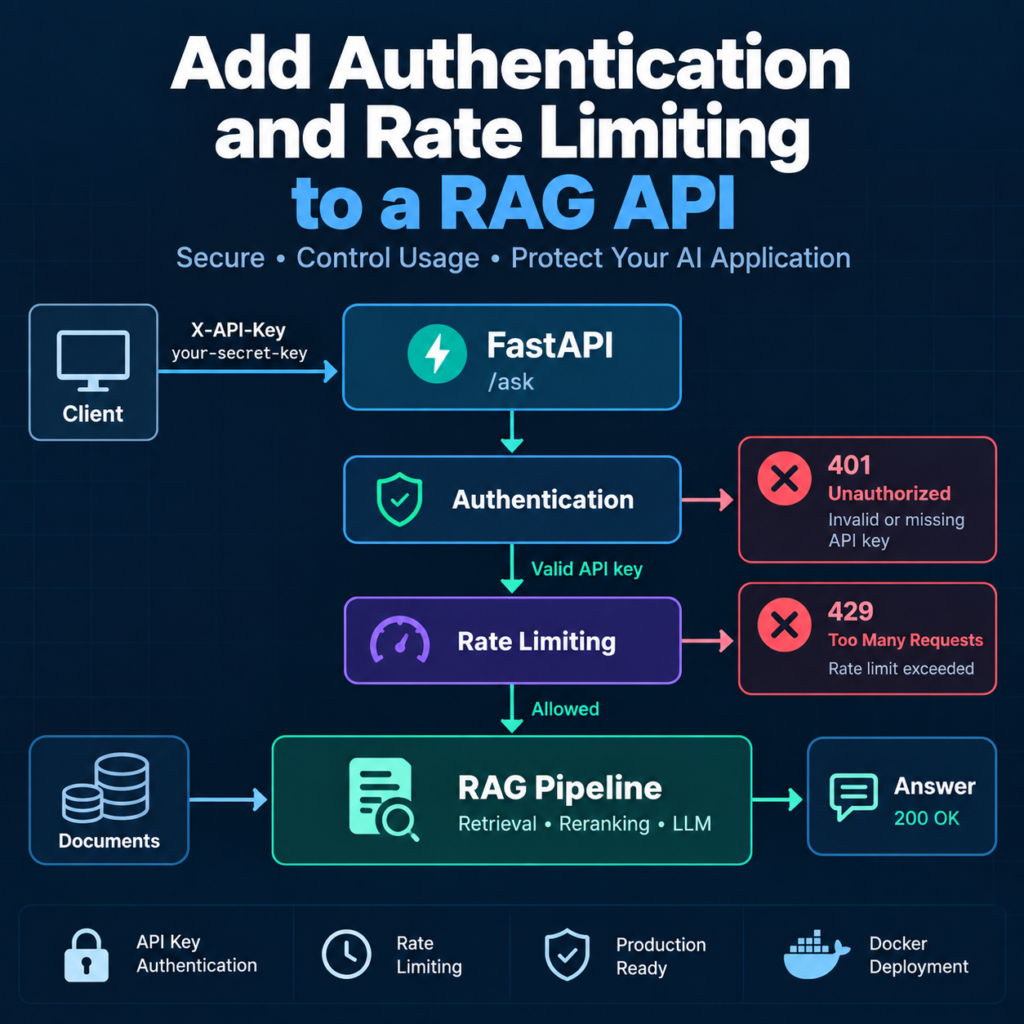
What You Will Build
In this tutorial, you will learn how to add authentication and rate limiting to a RAG API built with FastAPI. The goal is to protect the RAG assistant from unauthorized access and prevent individual clients from sending an excessive number of requests.
The starting point is the containerized FastAPI application from the previous tutorials. The existing /ask endpoint already connects HTTP requests to the complete Retrieval-Augmented Generation pipeline:
Client
   │
   ▼
FastAPI
   │
   ▼
Metadata Filtering
   │
   ▼
Hybrid Search
BM25 + FAISS
   │
   ▼
Cross-Encoder Reranking
   │
   ▼
Context Construction
   │
   ▼
LLM
   │
   ▼
JSON Response
This architecture works, but any client that can reach the endpoint can potentially send requests to it. That creates two immediate production concerns.
First, the API needs a way to determine whether a request is allowed to access the RAG assistant. Second, even an authorized client should not be able to generate an unlimited number of expensive retrieval and LLM requests.
You will add two protection layers before requests reach the RAG pipeline:
Client
   │
   ▼
HTTP Request
   │
   ▼
API Key Authentication
   │
   ├── Invalid Key ─────► 401 Unauthorized
   │
   ▼
Rate Limiter
   │
   ├── Too Many Requests ──► 429
   │
   ▼
FastAPI /ask
   │
   ▼
RAG Pipeline
   │
   ▼
JSON Response
Authentication Layer
For authentication, the client will send an API key in an HTTP header:
X-API-Key: your-secret-api-keyFastAPI will extract the header and validate the key before allowing the request to continue. FastAPI provides dedicated API-key security utilities that integrate with dependencies and OpenAPI, which makes this cleaner than manually reading arbitrary headers in every endpoint.
A valid request will look like this:
POST /ask

X-API-Key: your-secret-api-key
Content-Type: application/json

{
    "question": "How does hybrid search improve RAG?"
}
If the key is missing or invalid, the request will be rejected before the expensive RAG pipeline runs.
Rate Limiting Layer
Authentication answers the question:
Is this client allowed to use the API?Rate limiting answers a different question:
How frequently can this client use the API?For example, you might allow:
10 requests per minuteWhen the client exceeds the configured limit, the API will return:
HTTP 429 Too Many RequestsThis is particularly important for RAG applications because one request may trigger vector retrieval, BM25 search, cross-encoder reranking, and an external LLM call. Protecting the endpoint therefore helps control both infrastructure load and model API costs.
What You Will Learn
- Why authentication and rate limiting are important for a production RAG API
- How to add API key authentication with FastAPI
- How to protect the
/askendpoint - How to add request rate limits
- How to identify clients for rate limiting
- How to return correct authentication and rate-limit errors
- How to keep API keys outside the application code
- How to test authorized, unauthorized, and rate-limited requests
By the end of this tutorial, you will know how to add authentication and rate limiting to a RAG API without changing the underlying retrieval and generation pipeline.
The resulting architecture creates a clear security boundary around the expensive part of the application: requests must first pass authentication and usage controls before they can trigger retrieval, reranking, and LLM generation.
Prerequisites
Before you add authentication and rate limiting to a RAG API, you should already have a working FastAPI application that exposes the RAG pipeline through an HTTP endpoint.
This tutorial continues the application developed in the previous guides, so the project should already include:
- Python 3.10 or later
- A working FastAPI application
- A
POST /askendpoint - A functional RAG pipeline
- BM25 and FAISS retrieval
- Cross-encoder reranking
- An LLM configured for answer generation
- Environment variables for sensitive configuration
- Docker if you are running the API inside a container
A simplified project structure might look like this:
rag-assistant/
│
├── app.py
├── rag.py
├── requirements.txt
├── Dockerfile
├── .dockerignore
│
├── documents/
│
└── index/
    └── faiss.index
Starting FastAPI Application
Your existing app.py may already contain a request model and the /ask endpoint:
from fastapi import FastAPI
from pydantic import BaseModel, Field

from rag import ask_rag

app = FastAPI(
    title="RAG Assistant API",
    version="1.0.0"
)


class QuestionRequest(BaseModel):
    question: str = Field(
        min_length=3,
        max_length=1000
    )


class AnswerResponse(BaseModel):
    answer: str


@app.get("/health")
def health():
    return {
        "status": "ok"
    }


@app.post(
    "/ask",
    response_model=AnswerResponse
)
def ask(request: QuestionRequest):

    answer = ask_rag(
        request.question
    )

    return AnswerResponse(
        answer=answer
    )
At this stage, the endpoint works but has no access control:
Client
   │
   ▼
POST /ask
   │
   ▼
FastAPI
   │
   ▼
RAG Pipeline
Any client capable of reaching the API can call /ask and trigger the retrieval and generation pipeline.
Install the Required Packages
FastAPI already provides the security utilities we will use for API key authentication. For rate limiting, this tutorial will use slowapi, a rate-limiting extension designed for Starlette and FastAPI applications.
Install the required packages:
pip install fastapi uvicorn slowapiThen add slowapi to your project dependencies:
fastapi
uvicorn
slowapi
openai
sentence-transformers
faiss-cpu
rank-bm25
numpy
For production builds, continue using the exact dependency versions that you have tested rather than relying indefinitely on unpinned package versions.
Prepare the API Key
The authentication key should not be written directly into app.py. Store it as an environment variable instead:
RAG_API_KEY=replace-with-a-long-random-secretIf you use a local .env file, make sure it is excluded from both Git and the Docker build context:
# .gitignore
.env

# .dockerignore
.env
The application will read this value when it starts and use it to validate incoming requests.
Verify the Existing RAG API
Before adding security controls, start the current application:
uvicorn app:app \
  --host 0.0.0.0 \
  --port 8000
Then verify the health endpoint:
curl http://localhost:8000/healthAnd send a normal RAG request:
curl -X POST \
  "http://localhost:8000/ask" \
  -H "Content-Type: application/json" \
  -d '{"question":"What is hybrid search?"}'
The request should succeed without credentials. That behavior is exactly what we will change in the following steps.
With the existing API working, you are ready to add authentication and rate limiting to a RAG API. We will begin by examining why these controls should sit in front of the retrieval and LLM pipeline rather than being added deep inside the RAG logic.
Step 1 — Why a RAG API Needs Protection
A RAG API is different from a simple static endpoint. A single request can trigger several computationally expensive operations, including document retrieval, vector search, reranking, context construction, and an external LLM call.
If the /ask endpoint is publicly reachable without protection, anyone who discovers the API can potentially trigger those operations repeatedly.
Unprotected Client
        │
        ▼
    POST /ask
        │
        ▼
   Vector Search
        │
        ▼
     Reranking
        │
        ▼
    LLM Request
        │
        ▼
   API Response
This creates several problems that should be addressed before treating the service as a production API.
Unauthorized API Access
Without authentication, FastAPI has no way to distinguish an approved application from an unknown client.
For example, this request would reach the RAG pipeline directly:
curl -X POST \
  "https://api.example.com/ask" \
  -H "Content-Type: application/json" \
  -d '{"question":"Explain vector search"}'
If the endpoint is publicly accessible, knowledge of the URL may be enough to use the service.
Adding authentication changes the request flow:
Client
   │
   ▼
API Key
   │
   ▼
Authentication
   │
   ├── Invalid ──► Reject
   │
   ▼
POST /ask
   │
   ▼
RAG Pipeline
The expensive retrieval and generation stages run only after the request has passed the authentication layer.
LLM Requests Have a Cost
A traditional API endpoint may perform a database lookup and return a small JSON object. A RAG request can perform considerably more work.
One RAG Request
      │
      ├── Metadata Filtering
      ├── BM25 Search
      ├── FAISS Search
      ├── Cross-Encoder Reranking
      ├── Context Construction
      └── LLM Generation
The LLM call may also consume tokens through a paid external API. An uncontrolled stream of requests can therefore increase both infrastructure load and API costs.
Authentication prevents unknown clients from freely accessing the service, but authentication alone does not control how frequently an authorized client can send requests.
Authentication and Rate Limiting Solve Different Problems
When you add authentication and rate limiting to a RAG API, the two mechanisms should be treated as separate controls.
Authentication determines whether a client has permission to access the endpoint:
Who are you?

Are you allowed to use this API?
Rate limiting controls how frequently that client can use the endpoint:
How many requests can you send
during a specific time period?
For example, an authenticated client might be allowed to send:
10 requests / minuteThe first ten requests can proceed normally. Additional requests during the same rate-limit window can be rejected before they trigger expensive RAG operations.
Authenticated Client
        │
        ▼
    Rate Limiter
        │
        ├── Within Limit
        │       │
        │       ▼
        │   RAG Pipeline
        │
        └── Limit Exceeded
                │
                ▼
        429 Too Many Requests
Protect the Expensive Endpoint
Not every endpoint necessarily needs the same protection. A lightweight health endpoint, for example, may need to remain available to container platforms, load balancers, or monitoring systems:
GET /health
    │
    ▼
{"status": "ok"}
The /ask endpoint is different because it triggers the expensive RAG workflow.
A practical API architecture can therefore apply stronger controls specifically to the protected endpoint:
FastAPI
│
├── GET /health
│      │
│      └── Health Check
│
└── POST /ask
       │
       ▼
   Authentication
       │
       ▼
   Rate Limiting
       │
       ▼
   RAG Pipeline
API Keys Are Not User Authentication
In this tutorial, we will use an API key because it provides a simple and practical authentication mechanism for a private API or service-to-service communication.
For example:
Frontend Backend
      │
      │ X-API-Key
      ▼
   RAG API
However, a single shared API key is not a replacement for a complete user identity system.
If individual users need accounts, permissions, login sessions, or different access levels, the architecture should use an appropriate identity solution such as OAuth2 or OpenID Connect rather than trying to build a full authentication system around one shared secret.
FastAPI includes security utilities for API keys, OAuth2, HTTP authentication, and related security schemes. The official FastAPI Security documentation provides additional examples of these mechanisms.
Place Security Before the RAG Pipeline
The main architectural principle is simple: reject invalid or excessive requests as early as possible.
HTTP Request
      │
      ▼
Authentication
      │
      ▼
Rate Limiting
      │
      ▼
Input Validation
      │
      ▼
RAG Retrieval
      │
      ▼
Reranking
      │
      ▼
LLM Generation
There is little benefit in performing vector search, loading context, or calling an LLM before discovering that the request should have been rejected.
This is why learning how to add authentication and rate limiting to a RAG API is an important production step. These controls create a protective layer around the expensive retrieval and generation pipeline without requiring you to redesign the RAG system itself.
In the next step, you will implement API key authentication using FastAPI’s security utilities and validate the key before allowing a request to access protected resources.
Step 2 — Add API Key Authentication with FastAPI
Now you can implement the first protection layer: API key authentication. FastAPI provides the APIKeyHeader security utility, which can extract an API key from an HTTP header and integrate the authentication scheme with the application’s OpenAPI documentation.
The client will send the key using this header:
X-API-Key: your-secret-api-keyThe application will compare the supplied value with the secret stored in the RAG_API_KEY environment variable.
Load the API Key from the Environment
Start by loading the expected key when the application starts:
import os

RAG_API_KEY = os.getenv(
    "RAG_API_KEY"
)

if not RAG_API_KEY:
    raise RuntimeError(
        "RAG_API_KEY is not configured"
    )
This prevents the application from accidentally starting without authentication configured.
Do not use a fallback such as:
RAG_API_KEY = os.getenv(
    "RAG_API_KEY",
    "default-key"
)
A predictable default secret could unintentionally make the protected API accessible after a deployment configuration error.
Create the API Key Security Scheme
Import APIKeyHeader from FastAPI:
from fastapi.security import APIKeyHeader

api_key_header = APIKeyHeader(
    name="X-API-Key",
    auto_error=False
)
The name parameter tells FastAPI which HTTP header contains the credential.
Setting auto_error=False allows us to handle missing credentials ourselves and return the response we want from the authentication dependency.
Create an Authentication Dependency
Next, create a reusable function that validates the supplied API key:
import secrets

from fastapi import (
    Depends,
    HTTPException,
    status
)

async def verify_api_key(
    api_key: str | None = Depends(
        api_key_header
    )
):
    if (
        api_key is None
        or not secrets.compare_digest(
            api_key,
            RAG_API_KEY
        )
    ):
        raise HTTPException(
            status_code=status.HTTP_401_UNAUTHORIZED,
            detail="Invalid or missing API key"
        )

    return api_key
The dependency performs two checks:
API Key Missing?
      │
      ├── Yes ──► 401 Unauthorized
      │
      ▼
Compare Supplied Key
with Expected Key
      │
      ├── Different ──► 401 Unauthorized
      │
      ▼
Authentication Successful
Why Use secrets.compare_digest()?
You could compare two strings using:
if api_key != RAG_API_KEY:
    ...
For secrets, however, Python provides secrets.compare_digest(), which is designed for comparing confidential values while reducing timing information that could otherwise leak through ordinary equality comparisons.
The API key remains a simple shared-secret authentication mechanism, but using an appropriate comparison function is a small improvement that costs almost nothing to implement.
Reuse Authentication as a Dependency
The important advantage of FastAPI dependencies is that the authentication logic does not need to be copied into every endpoint.
Instead of writing this:
@app.post("/ask")
def ask(request: QuestionRequest):

    # manually read header
    # manually validate key
    # run RAG pipeline

    ...
you define authentication once:
verify_api_key()and attach it to endpoints that require protection.
Protected Endpoint
       │
       ▼
FastAPI Dependency
       │
       ▼
verify_api_key()
       │
       ├── Reject
       │
       └── Continue
This keeps authentication separate from retrieval and generation logic. The RAG pipeline does not need to know anything about HTTP headers or API keys.
Keep the Security Boundary Outside the RAG Pipeline
Avoid modifying ask_rag() to accept or validate API credentials:
# Avoid this design

def ask_rag(
    question,
    api_key
):
    verify_key(api_key)

    # retrieval
    # reranking
    # generation
Instead, keep the responsibilities separate:
FastAPI
   │
   ├── Authentication
   ├── Request Validation
   │
   ▼
ask_rag(question)
   │
   ├── Retrieval
   ├── Reranking
   └── Generation
This separation makes the RAG pipeline easier to test and reuse. The same ask_rag() function could later be called from another trusted interface without carrying FastAPI-specific authentication code with it.
Authentication Flow
After adding the security dependency, the authentication layer is ready:
Client
   │
   │ X-API-Key
   ▼
APIKeyHeader
   │
   ▼
verify_api_key()
   │
   ├── Missing Key
   │      └──► 401
   │
   ├── Invalid Key
   │      └──► 401
   │
   └── Valid Key
          │
          ▼
     Protected Route
This is the first major step required to add authentication and rate limiting to a RAG API. Unauthorized requests can now be rejected before they reach expensive retrieval and LLM operations.
The authentication function exists, but the /ask endpoint is not protected until the dependency is attached to the route. In the next step, you will connect verify_api_key() to the RAG endpoint and test requests with valid, invalid, and missing credentials.
Step 3 — Protect the RAG Endpoint
The authentication dependency is now ready, but it does not protect anything until you attach it to the endpoint that should require authorization. In this step, you will connect verify_api_key() to POST /ask so that unauthorized requests are rejected before the RAG pipeline runs.
Add Authentication to /ask
The simplest approach is to declare the API key dependency directly in the endpoint:
@app.post(
    "/ask",
    response_model=AnswerResponse
)
def ask(
    request: QuestionRequest,
    api_key: str = Depends(
        verify_api_key
    )
):
    answer = ask_rag(
        request.question
    )

    return AnswerResponse(
        answer=answer
    )
FastAPI resolves dependencies before executing the endpoint function. This means verify_api_key() runs before ask_rag().
The request flow now becomes:
POST /ask
    │
    ▼
Extract X-API-Key
    │
    ▼
verify_api_key()
    │
    ├── Invalid ──► 401 Unauthorized
    │
    ▼
Question Validation
    │
    ▼
ask_rag()
    │
    ▼
JSON Response
An invalid request never reaches vector search, reranking, or the LLM.
Use a Route-Level Dependency When You Do Not Need the Key
In this example, the endpoint does not actually use the API key after authentication. It only needs to know whether authentication succeeded.
FastAPI therefore allows you to declare the dependency at the route level:
@app.post(
    "/ask",
    response_model=AnswerResponse,
    dependencies=[
        Depends(verify_api_key)
    ]
)
def ask(
    request: QuestionRequest
):
    answer = ask_rag(
        request.question
    )

    return AnswerResponse(
        answer=answer
    )
This version keeps the endpoint signature focused on the data it actually uses.
Both approaches protect the route. Use the first when the authenticated credential or identity is needed inside the endpoint, and the second when authentication simply acts as a gate before the endpoint executes.
Keep the Health Endpoint Public
You do not necessarily need to protect every route.
The health endpoint can remain unchanged:
@app.get("/health")
def health():
    return {
        "status": "ok"
    }
This gives infrastructure components a lightweight way to check whether the service is running:
GET /health
     │
     └──► Public


POST /ask
     │
     ▼
Authentication
     │
     ▼
RAG Pipeline
Whether a health endpoint should be publicly reachable from the internet is an infrastructure decision. The important point is that it does not need the same application-level protection as an endpoint that triggers costly RAG operations.
Test a Request Without an API Key
Send the same request that worked before authentication was added:
curl -X POST \
  "http://localhost:8000/ask" \
  -H "Content-Type: application/json" \
  -d '{"question":"What is hybrid search?"}'
The request should now be rejected:
HTTP/1.1 401 Unauthorized

{
    "detail": "Invalid or missing API key"
}
Most importantly, ask_rag() is never executed.
Test an Invalid API Key
Next, send a key that does not match RAG_API_KEY:
curl -X POST \
  "http://localhost:8000/ask" \
  -H "Content-Type: application/json" \
  -H "X-API-Key: wrong-key" \
  -d '{"question":"What is hybrid search?"}'
The result should again be:
HTTP/1.1 401 UnauthorizedTest a Valid API Key
Now send the configured credential:
curl -X POST \
  "http://localhost:8000/ask" \
  -H "Content-Type: application/json" \
  -H "X-API-Key: your-secret-api-key" \
  -d '{"question":"What is hybrid search?"}'
The request can now continue through the complete RAG pipeline:
Valid API Key
      │
      ▼
FastAPI /ask
      │
      ▼
Metadata Filtering
      │
      ▼
BM25 + FAISS
      │
      ▼
Reranking
      │
      ▼
Context
      │
      ▼
LLM
      │
      ▼
Answer
Authentication Does Not Limit Usage
The endpoint is now protected from clients that do not possess the API key, but an authorized client can still send requests continuously:
Valid Client
    │
    ├── Request 1 ──► RAG
    ├── Request 2 ──► RAG
    ├── Request 3 ──► RAG
    ├── Request 4 ──► RAG
    └── Request N ──► RAG
Every request may perform vector retrieval, cross-encoder inference, and an LLM call. Authentication alone therefore does not protect the application from excessive legitimate traffic, accidental request loops, or abuse by a client whose key has been exposed.
This distinction is fundamental when you add authentication and rate limiting to a RAG API. Authentication controls access, while rate limiting controls usage after access has been granted.
The protected endpoint now provides the first half of that security layer. In the next step, you will add rate limiting so that even authenticated clients cannot send unlimited requests to the RAG pipeline.
Step 4 — Add Rate Limiting
Authentication now prevents unknown clients from accessing the RAG assistant, but authorized clients can still send an unlimited number of requests. The next step is to add rate limiting so that the API can control how frequently each client reaches the expensive retrieval and generation pipeline.
When you add authentication and rate limiting to a RAG API, rate limiting provides an important second layer of protection. A valid API key proves that a client is allowed to use the service, but it does not mean that the client should be allowed to generate hundreds of requests every second.
Create the Rate Limiter
This tutorial uses slowapi to apply request limits to FastAPI endpoints. Start by importing the required components:
from slowapi import Limiter
from slowapi.errors import RateLimitExceeded
from slowapi.util import get_remote_address
from slowapi.middleware import SlowAPIMiddleware
from slowapi import _rate_limit_exceeded_handler
Then create the limiter:
limiter = Limiter(
    key_func=get_remote_address
)
The key_func determines how requests are grouped for rate limiting. For now, get_remote_address uses the client’s network address as the rate-limit identifier.
The basic flow becomes:
Incoming Request
       │
       ▼
Client Address
       │
       ▼
Rate Limit Counter
       │
       ├── Within Limit ──► Continue
       │
       └── Exceeded ──────► HTTP 429
Connect the Limiter to FastAPI
Attach the limiter to the application state:
app.state.limiter = limiterThen register the handler for requests that exceed the configured limit:
app.add_exception_handler(
    RateLimitExceeded,
    _rate_limit_exceeded_handler
)
Add the SlowAPI middleware:
app.add_middleware(
    SlowAPIMiddleware
)
The application now has the infrastructure required to enforce request limits.
Add a Limit to the RAG Endpoint
For example, suppose each client should be allowed to send no more than ten RAG requests per minute.
Import Request from FastAPI:
from fastapi import RequestThen add the rate-limit decorator to /ask:
@app.post(
    "/ask",
    response_model=AnswerResponse,
    dependencies=[
        Depends(verify_api_key)
    ]
)
@limiter.limit("10/minute")
def ask(
    request: Request,
    body: QuestionRequest
):
    answer = ask_rag(
        body.question
    )

    return AnswerResponse(
        answer=answer
    )
SlowAPI requires the endpoint to include a Request parameter because it uses information from the incoming HTTP request when determining the rate-limit key.
Understand the New Request Flow
After you add authentication and rate limiting to a RAG API, a request must pass multiple checks before the RAG pipeline executes:
Client
   │
   ▼
POST /ask
   │
   ▼
API Key Authentication
   │
   ├── Invalid ──► 401
   │
   ▼
Rate Limiter
   │
   ├── Exceeded ──► 429
   │
   ▼
Request Validation
   │
   ▼
RAG Pipeline
   │
   ├── Metadata Filtering
   ├── BM25 + FAISS
   ├── Reranking
   └── LLM
   │
   ▼
JSON Response
The key advantage is that excessive requests can be rejected without executing expensive retrieval and generation operations.
Test the Rate Limit
Start the FastAPI application and send several authenticated requests:
curl -X POST \
  "http://localhost:8000/ask" \
  -H "Content-Type: application/json" \
  -H "X-API-Key: your-secret-api-key" \
  -d '{"question":"What is semantic search?"}'
Requests within the configured limit should continue to receive normal RAG responses.
Once the client exceeds ten requests during the one-minute window, the API should reject additional requests with:
HTTP/1.1 429 Too Many RequestsThe client must wait until sufficient capacity becomes available under the configured rate-limit policy before requests can proceed normally again.
Choose Limits Based on the Cost of the Endpoint
The value 10/minute is only an example. There is no universal rate limit for every RAG application.
A lightweight endpoint could support a relatively high request rate:
@limiter.limit("100/minute")An expensive RAG endpoint using large reranking models and long LLM contexts might require a much lower limit:
@limiter.limit("5/minute")The appropriate value depends on factors such as:
- LLM API cost per request
- Average prompt and context size
- Embedding and reranking compute requirements
- Expected number of simultaneous users
- Available CPU, GPU, and memory resources
- External model-provider rate limits
- Expected API response latency
Use Different Limits for Different Endpoints
Rate limits do not have to be identical across the application.
For example:
GET /health
No expensive RAG operations
        │
        └── Higher limit or no application limit


POST /ask
Retrieval + Reranking + LLM
        │
        └── 10 requests / minute
This lets you protect expensive routes without unnecessarily restricting lightweight infrastructure endpoints.
Rate Limiting Protects More Than the LLM
It is easy to think about rate limiting only as a way to reduce LLM API costs, but the entire RAG pipeline consumes resources.
Request
  │
  ├── BM25 CPU Work
  ├── FAISS Search
  ├── Cross-Encoder Inference
  ├── Memory Usage
  ├── Network Calls
  └── LLM Tokens
Even if the LLM provider has its own usage limits, your FastAPI service can become overloaded before a request reaches the external model.
For this reason, learning how to add authentication and rate limiting to a RAG API protects both the external model budget and the infrastructure running retrieval and reranking.
One Important Limitation
The current implementation identifies clients using their network address. This is convenient for a first implementation, but it is not always the correct production identity.
For example, many users may appear behind the same proxy or gateway:
User A ──┐
User B ──┼──► Proxy ──► RAG API
User C ──┘
From the API’s perspective, those requests may appear to come from the same address. Conversely, infrastructure that trusts forwarded client-address headers incorrectly can allow those identifiers to be spoofed.
So while the current implementation demonstrates how to add authentication and rate limiting to a RAG API, production systems need a deliberate strategy for identifying individual clients.
In the next step, you will improve this design by examining different client identifiers and deciding whether rate limits should be applied by IP address, API key, authenticated identity, or another trusted identifier.
Step 5 — Identify Clients and Set Request Limits
The first rate-limiting implementation used the client’s network address as the identifier. This is useful for demonstrating the mechanism, but production systems need a more deliberate answer to an important question: what exactly represents one client?
When you add authentication and rate limiting to a RAG API, the identifier determines which requests share the same usage counter. Choosing the wrong identifier can either block legitimate users or allow clients to bypass the intended limits.
Option 1 — Rate Limit by IP Address
The implementation from the previous step uses:
from slowapi.util import get_remote_address

limiter = Limiter(
    key_func=get_remote_address
)
This creates a separate rate-limit counter for each detected client address:
192.0.2.10
    │
    └── 10 requests / minute

192.0.2.20
    │
    └── 10 requests / minute
IP-based limits can be useful as a general abuse-control layer, particularly for unauthenticated endpoints. However, an IP address is not the same thing as an authenticated user or application.
Several legitimate clients may share one public IP address:
Client A ──┐
Client B ──┼──► Corporate Network
Client C ──┘          │
                      ▼
                 Public IP
                      │
                      ▼
                   RAG API
If the limit is applied only to that public address, all three clients may share the same request allowance.
Option 2 — Rate Limit by API Key
Because the RAG API already authenticates requests with an API key, the key can also represent a client for rate-limiting purposes.
Create a function that extracts the key:
def get_api_key_identifier(
    request: Request
):
    return request.headers.get(
        "X-API-Key",
        "anonymous"
    )
Then configure the limiter:
limiter = Limiter(
    key_func=get_api_key_identifier
)
The conceptual result is:
API Key A
   │
   └── 10 requests / minute


API Key B
   │
   └── 10 requests / minute


API Key C
   │
   └── 10 requests / minute
This is more useful when different applications or customers receive different API keys because each credential gets an independent usage counter.
Do Not Log Raw API Keys
Although the example above demonstrates the concept clearly, using the raw secret as an internal identifier is not ideal for a production system.
Secrets should not appear unnecessarily in logs, monitoring tools, storage keys, or debugging output.
A better design is to associate each credential with a non-secret client identifier:
Secret API Key
      │
      ▼
Authentication Lookup
      │
      ▼
Client ID
      │
      ▼
Rate Limit Counter
For example:
client_web_app
client_mobile_app
client_partner_01
The secret proves authorization, while the stable client ID is used for accounting and rate limiting.
Return a Client Identity from Authentication
As the authentication system grows, the verification function can return information about the authenticated client instead of returning the secret itself.
A simplified configuration might look like this:
API_CLIENTS = {
    os.getenv("WEB_APP_API_KEY"): {
        "client_id": "web_app"
    },
    os.getenv("PARTNER_API_KEY"): {
        "client_id": "partner"
    }
}
The authentication dependency can then resolve a secret to a client identity:
async def verify_api_key(
    api_key: str | None = Depends(
        api_key_header
    )
):
    if api_key is None:
        raise HTTPException(
            status_code=401,
            detail="Missing API key"
        )

    client = API_CLIENTS.get(
        api_key
    )

    if client is None:
        raise HTTPException(
            status_code=401,
            detail="Invalid API key"
        )

    return client
For a small tutorial application this mapping can demonstrate the architecture, but real credential stores should be designed so secrets are not unnecessarily duplicated in application configuration or exposed through diagnostic output.
Set Different Limits for Different Clients
Once requests have a trusted client identity, different usage policies become possible.
Internal Application
        │
        └── 60 requests / minute


Standard Client
        │
        └── 10 requests / minute


Batch Service
        │
        └── 30 requests / minute
This becomes useful when you add authentication and rate limiting to a RAG API used by several applications with different traffic patterns.
For example, a public-facing application might generate occasional interactive questions, while an internal service could require a larger request allowance.
Combine Per-Client and Global Limits
Per-client limits solve only part of the problem. Imagine that 100 valid clients are each allowed to send ten requests per minute:
100 clients
     ×
10 requests / minute
     =
1000 requests / minute
Every individual client may remain within its limit while the total workload still exceeds the capacity of the RAG service.
A production architecture may therefore use multiple layers:
Incoming Traffic
       │
       ▼
Global Infrastructure Limit
       │
       ▼
Per-Client Rate Limit
       │
       ▼
Concurrency Control
       │
       ▼
RAG API
       │
       ▼
LLM Provider Limits
The application-level limiter is only one component of the overall traffic-control strategy.
Rate Limits and Concurrency Limits Are Different
A rate limit controls how many requests are accepted during a period of time:
10 requests / minuteA concurrency limit controls how many expensive requests can execute simultaneously:
Maximum 4 active RAG requestsThis distinction matters because RAG requests can have relatively long response times. A client could remain within a per-minute limit while several expensive LLM requests are executing at the same time.
Request 1 ───────────────►
Request 2 ───────────────►
Request 3 ───────────────►
Request 4 ───────────────►
Request 5 ───────────────►

        Same Time Window
For high-traffic deployments, both rate and concurrency controls may be necessary.
Be Careful Behind Reverse Proxies
If the FastAPI application runs behind a reverse proxy, load balancer, or cloud gateway, the network address visible to the application may belong to the proxy rather than the original client.
Client
   │
   ▼
Load Balancer
   │
   ▼
Reverse Proxy
   │
   ▼
FastAPI
Forwarded headers can carry the original address, but they should be trusted only when the proxy infrastructure is configured correctly. Accepting client-controlled forwarding headers without a trusted proxy boundary can allow address-based controls to be bypassed.
Choose an Identifier That Matches Your Authentication Model
A practical rule is to make the rate-limit identity match the actual security architecture:
Public Endpoint
      │
      └── IP-based protection


Service-to-Service API
      │
      └── API client identity


User Application
      │
      └── Authenticated user ID


Multi-Tenant RAG
      │
      └── Tenant ID + policy
This is why the process to add authentication and rate limiting to a RAG API should not stop at simply adding a decorator. The API must know which trusted identity owns the request and which usage policy applies to that identity.
With authentication and client-level rate limiting in place, the next concern is how the API communicates failures. In the next step, you will handle authentication errors and rate-limit errors consistently so clients can distinguish an invalid credential from a temporary usage-limit rejection.
Step 6 — Handle Authentication and Rate Limit Errors
A protected API should not only reject invalid requests; it should also return predictable HTTP responses that client applications can handle correctly. Authentication failures and rate-limit failures represent different problems and should therefore use different status codes.
When you add authentication and rate limiting to a RAG API, a client should be able to distinguish between an invalid credential, an excessive request rate, invalid input, and an internal RAG pipeline failure.
Use the Correct HTTP Status Codes
The main responses in our protected RAG API are:
200 OK
    │
    └── Request completed successfully


401 Unauthorized
    │
    └── API key missing or invalid


422 Unprocessable Content
    │
    └── Request validation failed


429 Too Many Requests
    │
    └── Rate limit exceeded


500 Internal Server Error
    │
    └── RAG pipeline failed
Keeping these responses distinct makes the API easier to integrate with web applications, mobile clients, internal services, and automated systems.
Return a Clear Authentication Error
The authentication dependency already rejects missing and invalid credentials:
async def verify_api_key(
    api_key: str | None = Depends(
        api_key_header
    )
):
    if (
        api_key is None
        or not secrets.compare_digest(
            api_key,
            RAG_API_KEY
        )
    ):
        raise HTTPException(
            status_code=401,
            detail="Invalid or missing API key"
        )

    return api_key
A client without valid credentials receives:
HTTP/1.1 401 Unauthorized

{
    "detail": "Invalid or missing API key"
}
The response explains the category of failure without revealing the expected API key or other sensitive information.
Do Not Reveal Why a Secret Failed
Avoid overly detailed responses such as:
{
    "detail":
    "Your API key has the correct prefix,
    but the final 12 characters are incorrect"
}
Authentication responses should provide enough information for legitimate clients to identify the problem without exposing details that could help someone guess or reconstruct a credential.
A generic message is usually sufficient:
{
    "detail": "Invalid or missing API key"
}
Handle Rate Limit Errors
SlowAPI can return an HTTP 429 response when a client exceeds its configured limit.
The application setup should include:
from slowapi.errors import (
    RateLimitExceeded
)

from slowapi import (
    _rate_limit_exceeded_handler
)

app.add_exception_handler(
    RateLimitExceeded,
    _rate_limit_exceeded_handler
)
After the configured limit is exceeded:
Valid API Key
      │
      ▼
Rate Limit Check
      │
      ├── Available
      │      │
      │      ▼
      │   RAG Pipeline
      │
      └── Exceeded
             │
             ▼
      429 Too Many Requests
Unlike a 401 response, a 429 response does not mean the credential is invalid. The client is authenticated but has temporarily exceeded the permitted request rate.
Handle Errors from the RAG Pipeline Separately
Authentication and rate limiting should not hide application failures. The retrieval or generation pipeline may still fail because of an unavailable model provider, corrupted index, network error, or another runtime problem.
Wrap the RAG call with controlled exception handling:
import logging

logger = logging.getLogger(
    __name__
)


@app.post(
    "/ask",
    response_model=AnswerResponse,
    dependencies=[
        Depends(verify_api_key)
    ]
)
@limiter.limit("10/minute")
def ask(
    request: Request,
    body: QuestionRequest
):
    try:
        answer = ask_rag(
            body.question
        )

        return AnswerResponse(
            answer=answer
        )

    except Exception:
        logger.exception(
            "RAG pipeline failed"
        )

        raise HTTPException(
            status_code=500,
            detail="Unable to generate answer"
        )
The server logs can preserve diagnostic information for developers while the public API returns a controlled response:
HTTP/1.1 500 Internal Server Error

{
    "detail": "Unable to generate answer"
}
Do Not Return Internal Exceptions to Clients
Avoid returning the raw exception:
except Exception as error:
    return {
        "error": str(error)
    }
Internal exceptions can contain file paths, service names, model information, database details, or other implementation data that should not necessarily be exposed to an API client.
Log detailed errors on the server and return a controlled public message instead.
Keep Error Handling Before and Around Expensive Operations
After you add authentication and rate limiting to a RAG API, the complete request path should clearly separate security failures from application failures:
HTTP Request
     │
     ▼
Authentication
     │
     ├── Failed ──────► 401
     │
     ▼
Rate Limit
     │
     ├── Exceeded ────► 429
     │
     ▼
Input Validation
     │
     ├── Invalid ─────► 422
     │
     ▼
RAG Pipeline
     │
     ├── Failed ──────► 500
     │
     ▼
Successful Answer
     │
     ▼
200 OK
This architecture also helps with monitoring. Instead of treating every failed request as the same type of problem, you can measure authentication failures, rate-limit events, validation failures, and RAG pipeline errors independently.
Think About Client Retry Behavior
Different errors should result in different client behavior.
401 Unauthorized
    │
    └── Check credentials
        Do not blindly retry


429 Too Many Requests
    │
    └── Wait before retrying


500 Internal Server Error
    │
    └── Retry carefully
        with backoff
A client that immediately retries every 429 response can make rate-limit problems worse. Production clients should use controlled retry behavior and respect rate-limit information provided by the API or surrounding infrastructure.
Log Security Events Without Logging Secrets
Authentication failures and rate-limit events are useful operational signals, but never include raw API keys in logs.
Useful log information might include:
timestamp
request_id
client_id
endpoint
status_code
rate_limit_event
response_time
Avoid:
raw_api_key
authorization_secret
LLM_provider_key
complete_credentials
This becomes increasingly important as you add authentication and rate limiting to a RAG API used by multiple clients. Logs should help diagnose abuse and reliability problems without becoming another location where credentials can leak.
The API now handles authentication failures, excessive usage, invalid requests, and RAG pipeline errors as separate conditions. In the next step, you will move the remaining security and rate-limit settings into environment variables so that policies can change between development and production without modifying the application code.
Step 7 — Configure Security with Environment Variables
Authentication and rate-limiting policies should be configurable without editing the application source code. Development, staging, and production environments may require different API keys, request limits, model settings, and logging behavior.
When you add authentication and rate limiting to a RAG API, environment variables provide a simple way to separate these deployment-specific settings from the FastAPI application itself.
Move Security Settings Outside the Code
Instead of defining configuration directly in app.py:
RAG_API_KEY = "my-secret-key"
RATE_LIMIT = "10/minute"
load the values from the environment:
import os

RAG_API_KEY = os.getenv(
    "RAG_API_KEY"
)

RAG_RATE_LIMIT = os.getenv(
    "RAG_RATE_LIMIT",
    "10/minute"
)
The API key has no default value because starting a protected production API without a configured secret should be treated as an error.
The rate limit can have a reasonable default because it is a policy setting rather than a credential.
Validate Required Secrets at Startup
Failing during application startup is safer than discovering a missing API key after the service is already accepting traffic.
if not RAG_API_KEY:
    raise RuntimeError(
        "RAG_API_KEY is not configured"
    )
If several required secrets exist, validate them together:
required_variables = [
    "RAG_API_KEY",
    "OPENAI_API_KEY"
]

missing = [
    variable
    for variable in required_variables
    if not os.getenv(variable)
]

if missing:
    raise RuntimeError(
        "Missing required environment variables: "
        + ", ".join(missing)
    )
A deployment with incomplete configuration will now fail immediately rather than exposing a partially configured RAG service.
Use the Configurable Rate Limit
Replace the hardcoded decorator:
@limiter.limit("10/minute")with:
@limiter.limit(
    RAG_RATE_LIMIT
)
The protected endpoint becomes:
@app.post(
    "/ask",
    response_model=AnswerResponse,
    dependencies=[
        Depends(verify_api_key)
    ]
)
@limiter.limit(
    RAG_RATE_LIMIT
)
def ask(
    request: Request,
    body: QuestionRequest
):
    try:
        answer = ask_rag(
            body.question
        )

        return AnswerResponse(
            answer=answer
        )

    except Exception:
        logger.exception(
            "RAG pipeline failed"
        )

        raise HTTPException(
            status_code=500,
            detail="Unable to generate answer"
        )
You can now change the usage policy without modifying or rebuilding the application source code.
Create Environment-Specific Configuration
For local development, a .env file might contain:
RAG_API_KEY=development-secret
OPENAI_API_KEY=your-provider-key
RAG_RATE_LIMIT=30/minute
A production environment could use:
RAG_API_KEY=production-secret
OPENAI_API_KEY=production-provider-key
RAG_RATE_LIMIT=10/minute
The application code remains identical:
Same FastAPI Application
          │
          ├── Development Config
          │      └── 30/minute
          │
          ├── Staging Config
          │      └── 20/minute
          │
          └── Production Config
                 └── 10/minute
This flexibility is one of the practical benefits when you add authentication and rate limiting to a RAG API through configuration rather than hardcoded values.
Pass Security Configuration to Docker
If the RAG API runs inside the Docker container created in the previous tutorial, pass the environment file when starting it:
docker run \
  -d \
  --name rag-api \
  -p 8000:8000 \
  --env-file .env \
  -v rag-data:/app/data \
  rag-assistant:1.2.0
The Docker image does not need to contain the actual API key:
Docker Image
    │
    ├── FastAPI
    ├── RAG Pipeline
    ├── Authentication Logic
    └── Rate-Limiting Logic

Runtime Environment
    │
    ├── RAG_API_KEY
    ├── OPENAI_API_KEY
    └── RAG_RATE_LIMIT
This allows the same image to move between environments while credentials and policies remain specific to each deployment.
Do Not Copy the .env File into Docker
Make sure the Docker build context excludes the local environment file:
# .dockerignore

.env
.env.*
*.log
__pycache__/
.git/
The file should also remain outside Git:
# .gitignore

.env
.env.*
A Docker image may be pushed to a registry, copied to another machine, or inspected by other systems. Credentials should not travel with the image.
Use Secret Management in Production
A local .env file is convenient for development, but larger production environments commonly provide dedicated secret-management mechanisms.
Secret Manager
      │
      ▼
Deployment Platform
      │
      ▼
Environment / Secret Injection
      │
      ▼
Docker Container
      │
      ▼
FastAPI
The application does not need to know how the deployment platform stores the secret. It only needs the expected value to be available securely at runtime.
Separate Secrets from Policies
It is useful to distinguish confidential values from ordinary configuration:
Secrets
│
├── RAG_API_KEY
└── OPENAI_API_KEY


Configuration
│
├── RAG_RATE_LIMIT
├── MODEL_NAME
├── TOP_K
└── LOG_LEVEL
Both can be provided through the runtime environment, but secrets require stricter controls over storage, access, logging, and rotation.
Plan for API Key Rotation
A production API key should not be treated as a permanent credential. Keys may eventually need to be replaced because of scheduled security policies, staff changes, or suspected exposure.
A simple single-key configuration creates this transition:
Old Key
   │
   ▼
Replace Environment Variable
   │
   ▼
Restart Service
   │
   ▼
New Key
For systems that cannot tolerate an immediate credential cutover, a more advanced design can temporarily accept multiple active credentials:
Client A ──► Key Version 1 ──┐
                             ├──► RAG API
Client B ──► Key Version 2 ──┘
After clients migrate to the new credential, the old key can be revoked.
Keep Configuration Out of the RAG Logic
Even after you add authentication and rate limiting to a RAG API, the retrieval pipeline should remain focused on retrieval and generation:
FastAPI Layer
│
├── Authentication
├── Rate Limiting
├── Request Validation
├── Error Handling
└── Configuration
        │
        ▼
RAG Layer
│
├── Metadata Filtering
├── Hybrid Retrieval
├── Reranking
├── Context Construction
└── Generation
This separation makes the system easier to test, deploy, and extend. Security policies can change without rewriting vector search, and retrieval improvements can be introduced without touching authentication logic.
At this point, you have completed the core implementation required to add authentication and rate limiting to a RAG API: API key validation, protected endpoints, per-client request limits, controlled errors, and externalized configuration are all in place.
In the next section, you will test the protected API end to end and verify successful authentication, invalid credentials, rate-limit enforcement, request validation, and the complete RAG response flow.
Test the Protected RAG API
The security layers are now implemented, so the next step is to test the complete request flow. A protected RAG API should correctly distinguish between authorized requests, missing credentials, invalid API keys, excessive traffic, invalid input, and failures inside the RAG pipeline.
This end-to-end test is important when you add authentication and rate limiting to a RAG API because each security component may work independently while configuration or integration errors still prevent the complete application from behaving correctly.
Start the Protected API
If you are running FastAPI directly during development, configure the required environment variables and start Uvicorn:
uvicorn app:app \
  --host 0.0.0.0 \
  --port 8000
If you are continuing with the Dockerized application from the previous tutorial, start a fresh container:
docker run \
  -d \
  --name rag-api \
  -p 8000:8000 \
  --env-file .env \
  -v rag-data:/app/data \
  rag-assistant:1.2.0
Verify that the application is running:
curl http://localhost:8000/healthExpected response:
{
    "status": "ok"
}
Test a Request Without Authentication
First, send a request without the X-API-Key header:
curl -i -X POST \
  "http://localhost:8000/ask" \
  -H "Content-Type: application/json" \
  -d '{"question":"What is hybrid search?"}'
The request should be rejected:
HTTP/1.1 401 Unauthorized

{
    "detail": "Invalid or missing API key"
}
This verifies that anonymous clients cannot reach the RAG pipeline.
Test an Invalid API Key
Next, send an incorrect credential:
curl -i -X POST \
  "http://localhost:8000/ask" \
  -H "Content-Type: application/json" \
  -H "X-API-Key: invalid-key" \
  -d '{"question":"What is hybrid search?"}'
The API should again return:
HTTP/1.1 401 UnauthorizedA missing credential and an incorrect credential are both rejected before retrieval, reranking, or LLM generation begins.
Test an Authorized RAG Request
Now send the correct API key:
curl -i -X POST \
  "http://localhost:8000/ask" \
  -H "Content-Type: application/json" \
  -H "X-API-Key: your-secret-api-key" \
  -d '{"question":"How does reranking improve RAG?"}'
The request should pass through the complete protected architecture:
Valid API Key
      │
      ▼
Rate Limit Check
      │
      ▼
FastAPI Validation
      │
      ▼
Metadata Filtering
      │
      ▼
BM25 + FAISS
      │
      ▼
Cross-Encoder Reranking
      │
      ▼
Context Construction
      │
      ▼
LLM
      │
      ▼
200 OK
A successful response might look like:
{
    "answer":
    "Reranking improves RAG by reordering..."
}
This confirms that authentication protects access without interfering with the underlying retrieval and generation pipeline.
Test the Rate Limit
To verify rate limiting, send authenticated requests repeatedly until the configured limit is reached.
For a quick local test, you can temporarily use:
RAG_RATE_LIMIT=3/minuteRestart the application after changing the environment variable and send four requests using the same authenticated client.
Request 1 ──► 200 OK
Request 2 ──► 200 OK
Request 3 ──► 200 OK
Request 4 ──► 429 Too Many Requests
The fourth request should be rejected before it triggers another expensive RAG operation.
This is one of the most important checks when you add authentication and rate limiting to a RAG API. A valid credential must not bypass the usage policy associated with that client.
Test Request Validation
Authentication does not replace input validation. Send an authenticated request with an invalid question:
curl -i -X POST \
  "http://localhost:8000/ask" \
  -H "Content-Type: application/json" \
  -H "X-API-Key: your-secret-api-key" \
  -d '{"question":""}'
If QuestionRequest requires a minimum question length, FastAPI should reject the request with a validation error rather than passing the empty question into the RAG pipeline.
Authentication
      │
      ▼
Request Validation
      │
      ├── Invalid ──► 422
      │
      ▼
RAG Pipeline
Verify That Failed Authentication Does Not Call the LLM
A useful production test is to confirm that rejected requests never reach expensive downstream components.
Add temporary diagnostic logging around the RAG call:
logger.info(
    "Starting RAG pipeline"
)

answer = ask_rag(
    body.question
)
Then send a request with an invalid API key.
The log message should not appear. If it does, the authentication check is happening too late in the request flow.
Verify That Rate-Limited Requests Do Not Run RAG
Perform the same check after exceeding the configured request limit.
Allowed Request
      │
      ▼
"Starting RAG pipeline"
      │
      ▼
RAG Response


Rate-Limited Request
      │
      ▼
429
      │
      └── No RAG execution
This confirms that rate limiting actually protects compute resources rather than simply modifying the response after the expensive work has already happened.
Inspect the Application Logs
If the API runs inside Docker, inspect recent logs:
docker logs \
  --tail 100 \
  rag-api
For live testing:
docker logs \
  -f \
  rag-api
Useful events to observe include:
- successful requests
- authentication failures
- rate-limit events
- request validation failures
- RAG pipeline exceptions
- response latency
Do not log the raw X-API-Key, LLM provider credentials, or other secrets while performing these tests.
Verify the Complete Security Flow
After testing each condition, the complete request lifecycle should look like this:
Client Request
      │
      ▼
API Key Authentication
      │
      ├── Invalid ─────────► 401
      │
      ▼
Rate Limit
      │
      ├── Exceeded ────────► 429
      │
      ▼
Request Validation
      │
      ├── Invalid ─────────► 422
      │
      ▼
RAG Pipeline
      │
      ├── Error ───────────► 500
      │
      ▼
Generated Answer
      │
      ▼
200 OK
If all of these tests behave correctly, you have successfully implemented the core workflow required to add authentication and rate limiting to a RAG API.
The API now rejects unauthorized access, restricts excessive requests, validates incoming data, and protects the retrieval and LLM pipeline from unnecessary execution.
However, API keys and an application-level limiter are only part of production security. In the next section, we will examine additional security considerations such as HTTPS, secret rotation, distributed rate limiting, reverse proxies, CORS, request limits, and multi-instance deployments.
Production Security Considerations
The current implementation provides a strong foundation: clients must authenticate before accessing /ask, excessive requests are rate limited, secrets are stored outside the application code, and expensive RAG operations execute only after security checks succeed.
However, when you add authentication and rate limiting to a RAG API for production use, application-level controls are only one part of the security architecture. The deployment environment, network configuration, credential lifecycle, and scaling strategy also affect how well the API is protected.
Use HTTPS in Production
An API key is a secret credential. If requests are sent over an unencrypted HTTP connection, that credential can potentially be exposed while traveling between the client and the server.
Production traffic should therefore use HTTPS:
Client
   │
   │ HTTPS
   ▼
Reverse Proxy / Load Balancer
   │
   ▼
FastAPI
   │
   ▼
RAG Pipeline
TLS encryption protects the API key, request body, retrieved information, and generated response while data is in transit.
The development URL:
http://localhost:8000/askis appropriate for local testing, but a public production endpoint should normally be exposed through HTTPS:
https://api.example.com/askGive Different Clients Different Credentials
A single shared API key is simple, but it becomes increasingly difficult to manage as more applications use the RAG service.
Web Application ──┐
Mobile App ───────┼──► Shared API Key
Partner Service ──┘
If that credential is compromised, replacing it affects every client.
A better production model assigns a separate credential and identity to each authorized application:
Web Application
      │
      └── Key A ──► client_web


Internal Service
      │
      └── Key B ──► client_internal


Partner Service
      │
      └── Key C ──► client_partner
Individual credentials make it possible to revoke one client, rotate keys independently, monitor usage separately, and assign different rate limits.
API Keys Are Not Complete User Authentication
The API key model used in this tutorial works well for private APIs, internal tools, and service-to-service communication.
It should not automatically be treated as a complete authentication system for individual end users.
Service-to-Service
       │
       └── API Key


Individual Users
       │
       └── OAuth2 / OIDC / JWT
           or Identity Provider
If the RAG application needs user accounts, login sessions, roles, permissions, or organization-level access, use an authentication architecture designed for user identity.
Authentication answers who is making the request. Authorization determines what that identity is allowed to access. Production RAG systems often need both.
Protect Retrieved Data with Authorization
This distinction becomes particularly important when RAG operates over private documents.
Consider a multi-tenant knowledge base:
User A
  │
  ▼
Tenant A Documents


User B
  │
  ▼
Tenant B Documents
Authentication alone is not enough. The retrieval layer must prevent User A from retrieving chunks belonging to Tenant B.
The authorization context should therefore influence metadata filtering before vector or keyword retrieval:
Authenticated Identity
        │
        ▼
Authorization Policy
        │
        ▼
Allowed Tenant / Documents
        │
        ▼
Metadata Filter
        │
        ▼
BM25 + FAISS
        │
        ▼
Reranking
        │
        ▼
LLM
This is especially important because a RAG system can expose information through generated answers even when the underlying documents are never returned directly to the client.
Use Shared Rate-Limit Storage When Scaling
A simple rate limiter may work correctly while the API runs as a single process or container. The architecture changes when several application instances handle traffic.
                 ┌──► RAG API 1
Client ──► LB ───┼──► RAG API 2
                 └──► RAG API 3
If every instance maintains an independent counter, a client may effectively receive a separate allowance from every instance.
For example:
API Instance 1
10 requests / minute

API Instance 2
10 requests / minute

API Instance 3
10 requests / minute
A nominal limit of ten requests per minute could therefore behave very differently once requests are distributed across multiple instances.
A scalable architecture generally needs a shared rate-limit state:
RAG API 1 ──┐
RAG API 2 ──┼──► Shared Rate-Limit Store
RAG API 3 ──┘
A shared backend such as Redis is commonly used for this type of distributed counter. The important architectural principle is that all API instances must observe the same usage state when enforcing a global or per-client policy.
Consider Rate Limiting at the Edge
Application-level rate limiting protects the FastAPI endpoint, but production systems may also reject excessive traffic before it reaches the application container.
Internet
   │
   ▼
API Gateway / Reverse Proxy
   │
   ├── Global Rate Limit
   ├── Request Size Limit
   └── Basic Abuse Protection
   │
   ▼
FastAPI
   │
   ├── Authentication
   └── Per-Client Limit
   │
   ▼
RAG Pipeline
Using multiple layers reduces unnecessary work inside the application and provides additional protection against traffic spikes.
This layered approach is particularly useful when you add authentication and rate limiting to a RAG API that performs expensive reranking or external LLM calls.
Limit Request Size
The existing Pydantic model limits the length of the question:
question: str = Field(
    min_length=3,
    max_length=1000
)
That is useful, but production infrastructure can also enforce maximum HTTP request sizes.
Without appropriate limits, clients could send unnecessarily large payloads that consume bandwidth, memory, parsing time, or application resources before the request is rejected.
Incoming Request
       │
       ▼
Request Size Check
       │
       ├── Too Large ──► Reject
       │
       ▼
FastAPI Validation
       │
       ▼
RAG Pipeline
Add Timeouts Around External Services
RAG applications frequently depend on external systems:
RAG API
│
├── Embedding Service
├── Vector Database
├── Reranking Service
└── LLM Provider
A request should not wait indefinitely if one of those systems stops responding.
Production clients and service integrations should use appropriate timeouts. Retry policies should also be bounded so that one failed request does not create a cascade of repeated expensive operations.
Do Not Rely on CORS for API Security
CORS configuration is useful when a browser frontend communicates with FastAPI, but CORS is not an authentication mechanism.
A browser may enforce CORS rules, while another HTTP client can call the API directly:
Browser
   │
   └── CORS Rules


curl / Script / Server
   │
   └── Direct HTTP Request
Therefore, restricting allowed origins does not replace authentication, authorization, or rate limiting.
Rotate and Revoke Credentials
Production credentials need a lifecycle:
Create
  │
  ▼
Distribute
  │
  ▼
Use
  │
  ▼
Rotate
  │
  ▼
Revoke
If each client has a separate identity, a compromised credential can be disabled without affecting every other application using the RAG API.
Avoid printing credentials in logs, embedding them in Docker images, committing them to Git, or exposing them through debugging endpoints.
Monitor Security and Usage Signals
Once you add authentication and rate limiting to a RAG API, the resulting events provide useful operational information.
Useful metrics include:
- requests per client
- 401 authentication failures
- 429 rate-limit responses
- RAG requests per minute
- average response latency
- LLM token usage
- retrieval and reranking latency
- 500-level application errors
For example, a sudden increase in 401 responses may indicate an incorrectly configured client or unauthorized access attempts. A spike in 429 responses may indicate that the current usage policy is too restrictive, a client has entered a request loop, or traffic has increased unexpectedly.
Use Defense in Depth
A production RAG API should not depend on a single security mechanism.
A stronger architecture combines multiple layers:
Internet
   │
   ▼
HTTPS
   │
   ▼
Gateway / Reverse Proxy
   │
   ▼
Authentication
   │
   ▼
Authorization
   │
   ▼
Rate Limiting
   │
   ▼
Request Validation
   │
   ▼
Metadata Access Filters
   │
   ▼
RAG Pipeline
   │
   ▼
LLM
   │
   ▼
Controlled Response
Each layer addresses a different type of risk. Authentication controls who can call the service, authorization controls which data they can access, rate limiting controls how much they can use it, and retrieval filters help ensure that the RAG pipeline searches only information permitted for that identity.
This layered architecture is the production-oriented goal when you add authentication and rate limiting to a RAG API. The implementation from this tutorial provides the application-level foundation, while HTTPS, shared rate-limit storage, credential management, authorization, monitoring, and edge controls make that foundation suitable for larger deployments.
Where to Go Next
You now have a much more complete production RAG stack. The system can retrieve relevant documents, combine keyword and vector search, rerank results, evaluate retrieval quality, expose the pipeline through FastAPI, run inside Docker, and protect expensive endpoints from unauthorized or excessive requests.
If you followed the complete tutorial series, the architecture has evolved from a simple Python RAG prototype into a deployable API:
Documents
    │
    ▼
Chunking
    │
    ▼
Embeddings
    │
    ▼
FAISS Vector Search
    │
    ├──────────────┐
    │              │
    ▼              ▼
Semantic Search   BM25
    │              │
    └──────┬───────┘
           ▼
     Hybrid Search
           │
           ▼
       Reranking
           │
           ▼
   Metadata Filtering
           │
           ▼
      RAG Evaluation
           │
           ▼
        FastAPI
           │
           ▼
     Authentication
           │
           ▼
      Rate Limiting
           │
           ▼
         Docker
           │
           ▼
   Production RAG API
To review or extend individual parts of this architecture, continue with these related tutorials:
- Build a RAG System in Python — build the original retrieval and generation pipeline.
- Build a Vector Search Engine with FAISS — create the vector retrieval layer used by the assistant.
- Build Hybrid Search for RAG in Python — combine BM25 keyword retrieval with FAISS semantic search.
- Build Reranking for RAG in Python — improve retrieval quality with a cross-encoder reranker.
- Evaluate a RAG System in Python — measure retrieval and answer quality before deployment.
- Deploy a RAG Assistant with FastAPI — expose the complete RAG pipeline through a REST API.
- Dockerize a RAG Assistant with FastAPI — package the API and its dependencies into a portable container.
Together, these tutorials cover the major components needed to move from experimental retrieval code to a structured RAG application.
What Should You Build Next?
After you add authentication and rate limiting to a RAG API, the next improvements should focus less on basic API construction and more on operating the system reliably in production.
Useful next steps include:
- adding structured logging and request IDs
- collecting RAG latency and usage metrics
- monitoring retrieval and LLM failures
- adding distributed rate limiting for multiple containers
- implementing user or tenant authorization
- adding Redis for shared application state
- deploying the Dockerized API behind a reverse proxy
- adding automated tests and CI/CD
One particularly useful next step is observability. A production RAG system should make it possible to answer questions such as:
How many RAG requests are running?

How long does retrieval take?

How long does reranking take?

How many tokens does the LLM consume?

Which requests return 401 or 429?

How often does the RAG pipeline fail?

Which component creates the most latency?
Authentication and rate limiting protect the service, but observability helps you understand how that protected service behaves under real traffic.
This creates the next logical stage of the project:
Secure RAG API
      │
      ▼
Logging
      │
      ▼
Metrics
      │
      ▼
Monitoring
      │
      ▼
Production Observability
With these capabilities in place, the project moves beyond simply learning how to add authentication and rate limiting to a RAG API and toward operating a measurable, maintainable, and scalable AI service.
Frequently Asked Questions
Why should I add authentication and rate limiting to a RAG API?
A RAG request can trigger vector search, keyword retrieval, reranking, context construction, and an LLM call. Authentication prevents unauthorized clients from accessing these resources, while rate limiting prevents authorized clients from generating excessive traffic. Together, they help protect infrastructure capacity and control LLM usage costs.
Is an API key enough to secure a RAG API?
An API key is a practical authentication method for private APIs, internal applications, and service-to-service communication. It is not a complete identity system for applications that require individual user accounts, roles, permissions, or login sessions. Those systems typically need OAuth2, OIDC, JWT-based authentication, or an external identity provider.
What HTTP header should contain the API key?
In this tutorial, the client sends the credential through the X-API-Key header:
X-API-Key: your-secret-api-keyFastAPI extracts the value with APIKeyHeader and validates it before allowing the request to reach the protected RAG endpoint.
What rate limit should I use for a RAG API?
There is no universal limit. The correct value depends on traffic volume, retrieval latency, reranking cost, available infrastructure, LLM token usage, and external provider limits. A starting policy such as 10/minute can be tested under realistic workloads and adjusted using production metrics.
Should I rate limit by IP address or API key?
IP-based limiting is useful for basic abuse protection, but authenticated services usually benefit from a stable client identity. Multiple users may share one IP address, and one client may use multiple network addresses. For service-to-service APIs, a non-secret client ID associated with an authenticated API key is generally a better basis for per-client limits.
What happens when a client exceeds the rate limit?
The API should reject additional requests with HTTP 429 Too Many Requests. The rejected request should not continue into vector retrieval, reranking, or LLM generation. This prevents excessive traffic from consuming the resources that rate limiting is intended to protect.
Should the /health endpoint require authentication?
Not necessarily. Health endpoints are often kept lightweight so infrastructure components can verify whether the service is running. Whether /health should be publicly reachable depends on the deployment architecture. Expensive endpoints such as /ask should receive stronger protection.
Can I store the RAG API key in a .env file?
A .env file is convenient for local development, but it should not be committed to Git or copied into a Docker image. Production deployments should inject credentials at runtime, preferably through the secret-management capabilities of the deployment platform.
Does CORS protect a RAG API?
No. CORS controls how browsers interact with resources across origins, but it does not prevent scripts, servers, command-line tools, or other HTTP clients from calling the API directly. CORS does not replace authentication, authorization, or rate limiting.
Will rate limiting work across multiple Docker containers?
Not automatically if every container maintains independent rate-limit state. When several API instances process requests, production deployments generally need a shared rate-limit backend so all instances observe the same counters and usage policies.
How do I protect private documents in a multi-user RAG system?
Authentication alone is insufficient. The authenticated user or tenant identity should be connected to an authorization policy, and that policy should restrict retrieval before documents enter the LLM context. Metadata filtering can help ensure that vector and keyword searches operate only over documents the current identity is permitted to access.
Where should authentication happen in the RAG pipeline?
Authentication should happen before expensive retrieval and generation operations. A useful request sequence is:
Request
   │
   ▼
Authentication
   │
   ▼
Rate Limiting
   │
   ▼
Validation
   │
   ▼
Retrieval
   │
   ▼
Reranking
   │
   ▼
LLM
   │
   ▼
Response
This ordering ensures that unauthorized or excessive requests are rejected before they consume RAG and LLM resources.
What is the main difference between authentication and rate limiting?
Authentication determines whether a client is allowed to access the API. Rate limiting determines how frequently that authorized client can use it. A production system normally needs both controls, which is why it is useful to add authentication and rate limiting to a RAG API as separate security layers.
Conclusion
A production RAG application needs more than accurate retrieval and high-quality LLM responses. Once the assistant is exposed through an API, you also need to control who can access expensive endpoints and how frequently those endpoints can be used.
In this tutorial, you learned how to add authentication and rate limiting to a RAG API built with FastAPI. The implementation started with API key authentication and gradually added endpoint protection, request limits, client identification, controlled error responses, environment-based configuration, and production security considerations.
The final request architecture now looks like this:
Client
   │
   ▼
HTTPS
   │
   ▼
FastAPI
   │
   ▼
API Key Authentication
   │
   ├── Invalid ─────────► 401
   │
   ▼
Rate Limiting
   │
   ├── Exceeded ────────► 429
   │
   ▼
Request Validation
   │
   ├── Invalid ─────────► 422
   │
   ▼
RAG Pipeline
   │
   ├── Metadata Filtering
   ├── BM25 + FAISS
   ├── Reranking
   └── Context Construction
   │
   ▼
LLM
   │
   ▼
JSON Response
This ordering is important. Unauthorized and excessive requests are rejected before they reach vector search, reranking, or the LLM, reducing unnecessary compute usage and helping control external model costs.
You also separated security from the RAG implementation itself. Authentication, rate limiting, validation, and HTTP error handling remain in the API layer, while the RAG pipeline stays focused on retrieval and generation.
API Layer
│
├── Authentication
├── Authorization
├── Rate Limiting
├── Validation
├── Error Handling
└── Configuration
        │
        ▼
RAG Layer
│
├── Metadata Filtering
├── Hybrid Search
├── Reranking
├── Context Construction
└── LLM Generation
For larger deployments, the same architecture can evolve further with unique credentials for each client, shared rate-limit storage, user and tenant authorization, secret rotation, reverse proxies, structured logging, metrics, and monitoring.
Learning how to add authentication and rate limiting to a RAG API is therefore an important step between deploying a working RAG prototype and operating a real production AI service.
At this stage, the project has progressed from a basic Python RAG pipeline to a containerized and protected FastAPI application. The next logical step is to add observability so you can measure request traffic, retrieval latency, reranking performance, LLM usage, errors, and the overall behavior of the RAG system under real workloads.