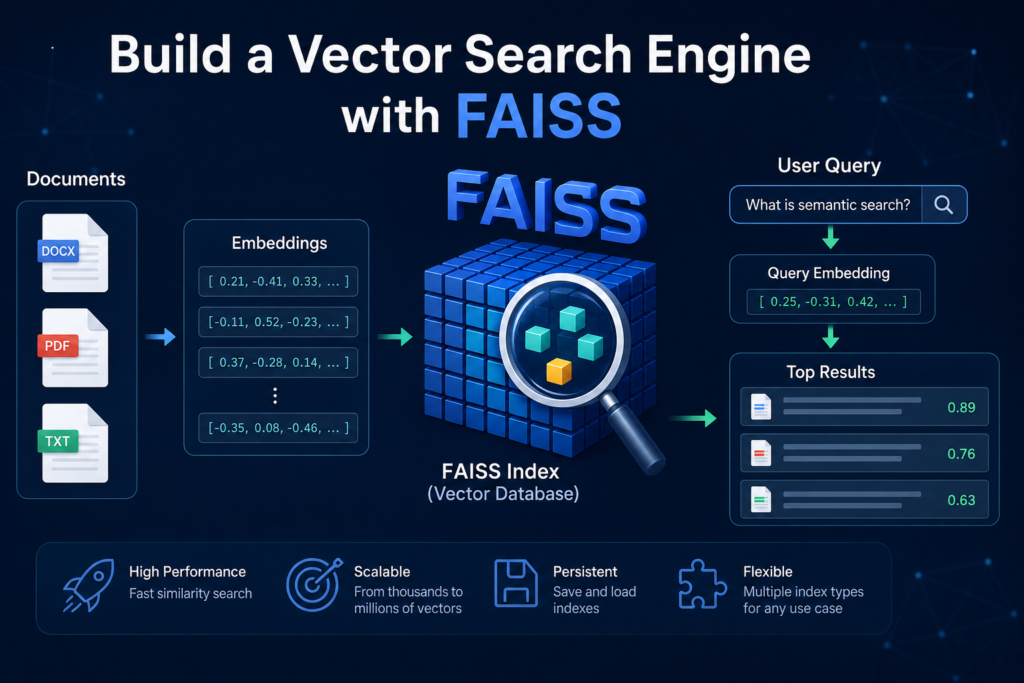
🚀 What You Will Build
In this hands-on tutorial, you will build a vector search engine with FAISS from scratch using Python.
Rather than relying on large AI frameworks, you will implement each component yourself to understand how a vector search engine works behind the scenes.
By the end of this guide, you will build a vector search engine with FAISS that can index document embeddings, perform semantic similarity search, and return the most relevant results in milliseconds.
🧠 What You Will Learn
During this tutorial, you will learn how to:
- prepare documents for indexing
- generate vector embeddings
- create a FAISS index
- perform semantic similarity search
- optimize search performance
- save and reload the index
- build a complete vector search engine with FAISS
Each step builds on the previous one, giving you a practical understanding of modern vector retrieval systems.
🛠 Technologies Used
This project uses a lightweight Python stack that is easy to understand and extend.
You will work with:
- Python
- sentence-transformers
- FAISS
- NumPy
These tools are widely used in AI retrieval systems and provide everything needed to build a fast vector search engine.
📚 Before You Start
This tutorial assumes a basic knowledge of Python.
If you are unfamiliar with embeddings or semantic retrieval, we recommend reading:
Understanding embeddings will make it much easier to understand how FAISS performs vector search.
🎯 Final Result
After completing this tutorial, you will have a fully functional vector search engine capable of:
- indexing thousands of document embeddings
- searching by semantic similarity
- returning the closest matching documents
- saving and loading indexes for later use
This project also serves as the retrieval engine used in many modern RAG applications.
🛠 Prerequisites
Before you build a vector search engine with FAISS, make sure your Python environment is ready.
This tutorial uses only a few lightweight libraries, allowing you to focus on understanding vector search rather than configuring complex AI frameworks.
Install the required packages:
pip install sentence-transformers faiss-cpu numpyNext, create a simple project structure:
vector-search-engine/
│
├── documents/
│     sample.txt
│
├── main.py
├── requirements.txt
└── index/
The documents folder will contain the text files that you want to index, while the index folder will later store the saved FAISS index.
Throughout this tutorial, you will use:
- Python
- sentence-transformers
- FAISS
- NumPy
Sentence Transformers generates vector embeddings, FAISS performs high-speed similarity search, and NumPy provides efficient numerical operations.
By the end of this guide, you will build a vector search engine with FAISS that can index thousands of document embeddings, perform semantic search, and return the most relevant results in just a few milliseconds.
📂 Step 1 — Prepare the Documents
The first step to build a vector search engine with FAISS is preparing the documents that will be indexed.
For simplicity, this tutorial uses plain text files stored inside a documents folder. In real-world applications, the same workflow can be extended to PDFs, Word documents, HTML pages, or database records.
Let’s create a simple document loader.
from pathlib import Path

def load_documents(folder_path):
    documents = []

    for file in Path(folder_path).glob("*.txt"):
        documents.append({
            "filename": file.name,
            "content": file.read_text(encoding="utf-8")
        })

    return documents
Now load the documents:
documents = load_documents("documents")

print(f"Loaded {len(documents)} documents.")
Example output:
Loaded 5 documents.Each document is stored as a Python dictionary containing both the filename and the document content.
Example:
{
    "filename": "python.txt",
    "content": "Python is a high-level programming language..."
}
At this stage, the documents are ready to be converted into vector embeddings.
In this tutorial, each document will be represented by a single embedding. This keeps the implementation simple and allows us to focus on understanding how a vector search engine works.
For larger documents, you would normally split the text into smaller chunks before generating embeddings.
The next step is converting every document into a vector representation that FAISS can index and search efficiently.
🧠 Step 2 — Generate Embeddings
Now it’s time to convert the documents into vector embeddings.
Embeddings are numerical representations of text that capture semantic meaning. Instead of comparing exact keywords, a vector search engine compares embeddings to identify documents with similar meaning.
If you are new to embeddings, we recommend reading:
In this tutorial, we will use the lightweight all-MiniLM-L6-v2 model from Sentence Transformers.
The complete documentation and additional embedding models are available on the official Sentence Transformers website:
Sentence Transformers Documentation
from sentence_transformers import SentenceTransformer
import numpy as np

embedding_model = SentenceTransformer("all-MiniLM-L6-v2")
Generate an embedding for every document:
document_texts = [
    document["content"]
    for document in documents
]

embeddings = embedding_model.encode(
    document_texts,
    convert_to_numpy=True,
    normalize_embeddings=True
)

embeddings = embeddings.astype("float32")
Let’s verify the result:
print(embeddings.shape)Example output:
(5, 384)This means that five documents have been converted into five embedding vectors, each containing 384 numerical values.
The parameter normalize_embeddings=True is important because it prepares the vectors for cosine similarity search. Combined with FAISS, this allows us to compare documents based on semantic similarity instead of exact keyword matching.
At this point, you have completed one of the most important steps required to build a vector search engine with FAISS.
The next step is creating a FAISS index that stores these embeddings and enables high-speed similarity search.
🗄 Step 3 — Create a FAISS Index
Now it’s time to build a vector search engine with FAISS by creating the vector index.
A FAISS index is responsible for storing document embeddings and performing extremely fast similarity searches. Instead of comparing every vector manually, FAISS uses highly optimized algorithms to find the nearest neighbors in milliseconds.
If you would like to learn more about vector indexing and its role in AI retrieval systems, read our guide:
Create a FAISS index:
import faiss

dimension = embeddings.shape[1]

index = faiss.IndexFlatIP(dimension)
Next, add all document embeddings to the index:
index.add(embeddings)

print(f"Indexed {index.ntotal} documents.")
Example output:
Indexed 5 documents.Your vector search engine with FAISS now contains all document embeddings inside a searchable index.
The IndexFlatIP index performs similarity search using the inner product. Because the embeddings were normalized during the previous step, inner product becomes equivalent to cosine similarity, making it an excellent choice for semantic retrieval.
For small and medium-sized datasets, IndexFlatIP is simple, accurate, and requires no training. As your collection grows, FAISS also provides more advanced index types that offer faster search with lower memory usage.
At this stage, your vector search engine with FAISS has completed the indexing process and is ready to receive search queries.
In the next step, you will query the FAISS index and retrieve the most semantically similar documents in just a few milliseconds.
🔎 Step 4 — Search the Vector Index
Your vector search engine with FAISS is now ready to perform semantic search.
The search process consists of three simple steps:
- Convert the user’s query into an embedding.
- Compare it with the indexed document embeddings.
- Return the most similar documents.
Unlike traditional keyword search, FAISS compares vectors based on semantic similarity rather than exact word matching.
If you would like to learn more about semantic retrieval, read our guide:
First, create a search function:
def search(query, top_k=3):
    query_embedding = embedding_model.encode(
        [query],
        convert_to_numpy=True,
        normalize_embeddings=True
    ).astype("float32")

    scores, indices = index.search(query_embedding, top_k)

    results = []

    for score, idx in zip(scores[0], indices[0]):
        results.append({
            "score": float(score),
            "filename": documents[idx]["filename"],
            "content": documents[idx]["content"]
        })

    return results
Now test the vector search engine:
query = "What is semantic search?"

results = search(query)

for result in results:
    print(f"Score: {result['score']:.3f}")
    print(f"File: {result['filename']}")
    print(result["content"][:200])
    print("-" * 60)
Example output:
Score: 0.914
File: semantic-search.txt

Semantic search retrieves documents based on meaning rather than exact keyword matching...
------------------------------------------------------------
Notice that the retrieved document does not need to contain the exact words from the query. Instead, your vector search engine with FAISS compares embeddings and returns documents with the closest semantic meaning.
This ability to understand intent rather than exact keywords is one of the biggest advantages of vector search over traditional keyword-based retrieval.
In the next step, you will learn how to improve the performance of your vector search engine with FAISS as your document collection grows from hundreds to millions of vectors.
⚡ Step 5 — Improve Search Performance
The simple IndexFlatIP index works well for small collections and provides exact nearest-neighbor search. However, as your dataset grows, searching every vector becomes increasingly expensive.
If you plan to build a vector search engine with FAISS for hundreds of thousands or millions of documents, you should consider using more advanced index types.
FAISS provides several indexing strategies, each optimized for different use cases.
| Index Type | Speed | Accuracy | Training Required | Best For |
|---|---|---|---|---|
| IndexFlatIP | Medium | Excellent | No | Small datasets |
| IndexIVFFlat | Fast | Very Good | Yes | Large datasets |
| IndexHNSWFlat | Very Fast | Excellent | No | Production search |
| IndexIVFPQ | Extremely Fast | Good | Yes | Massive datasets |
Using an IVF Index
Unlike IndexFlatIP, an IVF (Inverted File Index) groups vectors into clusters before searching.
This significantly reduces the number of vector comparisons required during a search.
Example:
dimension = embeddings.shape[1]

quantizer = faiss.IndexFlatIP(dimension)

index = faiss.IndexIVFFlat(
    quantizer,
    dimension,
    100
)

index.train(embeddings)

index.add(embeddings)
The number 100 specifies how many clusters the vectors will be divided into.
Finding the right number depends on the size of your dataset and usually requires experimentation.
Choosing the Right Index
There is no single best FAISS index.
For example:
- IndexFlatIP provides exact search and is ideal for learning.
- IndexIVFFlat offers faster searches on larger datasets.
- IndexHNSWFlat is widely used in production environments because it combines high speed with excellent accuracy.
- IndexIVFPQ minimizes memory usage for extremely large collections.
Choosing the appropriate index depends on your priorities, including search speed, memory consumption, and retrieval accuracy.
When you build a vector search engine with FAISS, selecting the right index type often has a greater impact on performance than changing the embedding model itself.
In the next step, you will learn how to save and reload your FAISS index so you don’t need to rebuild it every time your application starts.
💾 Step 6 — Save and Load the Index
After you build a vector search engine with FAISS, you don’t want to recreate the index every time the application starts.
FAISS allows you to save the entire index to disk and load it again whenever your application runs.
Saving the index is especially useful for large document collections because generating embeddings and rebuilding the index can take a significant amount of time.
Save the index:
faiss.write_index(index, "index/vector.index")

print("FAISS index saved successfully.")
Example output:
FAISS index saved successfully.Now load the index back into memory:
loaded_index = faiss.read_index("index/vector.index")

print(f"Loaded index with {loaded_index.ntotal} vectors.")
Example output:
Loaded index with 5 vectors.Once loaded, the index behaves exactly like the original one.
You can immediately perform semantic searches without rebuilding embeddings or recreating the index.
For example:
scores, indices = loaded_index.search(
    query_embedding,
    top_k
)
This simple feature makes a vector search engine with FAISS much more practical for real-world applications.
Instead of rebuilding the search engine after every restart, you only need to update the index when new documents are added or existing documents change.
In the next step, you will combine everything into a complete vector search engine that can index documents, perform semantic retrieval, and return the most relevant search results.
🎯 Step 7 — Build the Complete Search Engine
You have now implemented every major component required to build a vector search engine with FAISS.
The final step is combining these components into a single workflow that loads documents, generates embeddings, creates a searchable index, and returns the most relevant results for any user query.
The complete search pipeline looks like this:
Documents
     │
     ▼
Generate Embeddings
     │
     ▼
Build FAISS Index
     │
     ▼
User Query
     │
     ▼
Generate Query Embedding
     │
     ▼
Similarity Search
     │
     ▼
Top Matching Documents
Now combine everything into one class:
class VectorSearchEngine:

    def __init__(self, embedding_model, index, documents):
        self.embedding_model = embedding_model
        self.index = index
        self.documents = documents

    def search(self, query, top_k=3):

        query_embedding = self.embedding_model.encode(
            [query],
            convert_to_numpy=True,
            normalize_embeddings=True
        ).astype("float32")

        scores, indices = self.index.search(
            query_embedding,
            top_k
        )

        results = []

        for score, idx in zip(scores[0], indices[0]):
            results.append({
                "score": float(score),
                "filename": self.documents[idx]["filename"],
                "content": self.documents[idx]["content"]
            })

        return results
Using the search engine is straightforward:
engine = VectorSearchEngine(
    embedding_model,
    loaded_index,
    documents
)

results = engine.search(
    "What is semantic search?"
)

for result in results:
    print(result["filename"])
    print(result["score"])
At this point, you have successfully built a vector search engine with FAISS that can:
- load documents
- generate embeddings
- build a FAISS index
- perform semantic similarity search
- save and reload the index
- retrieve the most relevant documents
Although this implementation is intentionally simple, it demonstrates the same fundamental workflow used in many AI retrieval systems.
The next section explores how you can extend this search engine with production-ready features and larger datasets.
🚀 Where to Go Next
Congratulations! You have successfully built a vector search engine with FAISS that can index documents, perform semantic similarity search, and return the most relevant results in milliseconds.
While this implementation is intentionally simple, it demonstrates the core workflow used by many modern AI retrieval systems.
From here, you can extend your search engine with more advanced capabilities.
📄 Index Larger Collections
As your document collection grows, experiment with different FAISS index types such as:
- IndexIVFFlat
- IndexHNSWFlat
- IndexIVFPQ
Each index offers different trade-offs between search speed, memory usage, and retrieval accuracy.
⚡ Improve Search Quality
You can improve retrieval performance by adding:
- document chunking
- metadata filtering
- hybrid search
- reranking
- query expansion
These techniques are commonly used in production AI search applications.
🗄 Upgrade Your Infrastructure
FAISS is an excellent local search engine.
For larger deployments, you may want to migrate to production vector databases such as:
- Pinecone
- Weaviate
- Milvus
- pgvector
These platforms provide persistence, scalability, and distributed search capabilities.
🤖 Integrate with a RAG System
A vector search engine is only one component of a Retrieval-Augmented Generation pipeline.
The next logical step is connecting your search engine to a Large Language Model so it can answer questions using the retrieved documents.
If you want to see this in practice, read:
How to Build a RAG System in Python
🎯 Continue Building
Now that you have built a vector search engine with FAISS, you have the foundation for many AI applications, including semantic search systems, document assistants, enterprise knowledge bases, and Retrieval-Augmented Generation pipelines.
❓ Frequently Asked Questions (FAQ)
Can I build a vector search engine with FAISS without using a vector database?
Yes.
FAISS is a standalone vector search library that stores embeddings in memory or on disk. It is an excellent choice for local applications, prototypes, and learning projects.
Why does this tutorial use IndexFlatIP?
IndexFlatIP provides exact nearest-neighbor search and requires no training, making it the ideal index for understanding how FAISS works.
As your dataset grows, you can explore IVF, HNSW, or Product Quantization indexes.
How many documents can FAISS handle?
FAISS scales from a few hundred vectors to millions or even billions of embeddings, depending on the selected index type and available hardware.
Can I search PDF or Word documents?
Yes.
This tutorial uses plain text files for simplicity, but the same workflow can be applied to PDF documents, Microsoft Word files, HTML pages, Markdown files, or database records after extracting their text.
Which embedding model should I use?
The all-MiniLM-L6-v2 model offers an excellent balance between speed and retrieval quality.
For production systems, you may want to compare several embedding models using your own dataset to determine which one delivers the best search performance.
Is FAISS suitable for production?
Absolutely.
Many production AI systems use FAISS for high-performance vector search.
For distributed or cloud-native deployments, organizations often combine FAISS with dedicated vector databases or managed search services.
What’s the difference between a vector search engine and a RAG system?
A vector search engine is responsible for indexing embeddings and retrieving the most relevant documents.
A RAG system builds on top of the search engine by passing the retrieved context to a Large Language Model, which then generates a natural language answer.
In other words, a vector search engine is one of the core building blocks of a modern Retrieval-Augmented Generation pipeline.
🎯 Conclusion
In this tutorial, you learned how to build a vector search engine with FAISS from the ground up.
Starting with a collection of plain text documents, you generated vector embeddings, created a FAISS index, implemented semantic similarity search, optimized indexing strategies, and built a complete search engine capable of retrieving the most relevant documents in milliseconds.
Instead of relying on high-level AI frameworks, you implemented each component step by step, making it easier to understand how modern vector retrieval systems work behind the scenes.
🧠 What You Accomplished
By completing this tutorial, you have successfully built a vector search engine with FAISS that can:
- load and index documents
- generate vector embeddings
- perform semantic similarity search
- retrieve the closest matching documents
- save and reload FAISS indexes
- scale to larger document collections
These are the same core techniques used in semantic search applications, enterprise knowledge bases, recommendation systems, and Retrieval-Augmented Generation pipelines.
🚀 Your Next Challenge
A vector search engine is one of the most important building blocks of modern AI applications.
The next logical step is connecting your search engine to a Large Language Model, allowing it to answer questions using the retrieved context instead of relying solely on its pre-trained knowledge.
This transforms a standalone search engine into a complete Retrieval-Augmented Generation system.
🎯 Final Thought
Building a vector search engine with FAISS is an excellent way to understand the fundamentals of semantic retrieval.
Once you master vector search, you have the foundation needed to build intelligent document search systems, AI assistants, enterprise knowledge bases, and production-ready RAG applications.