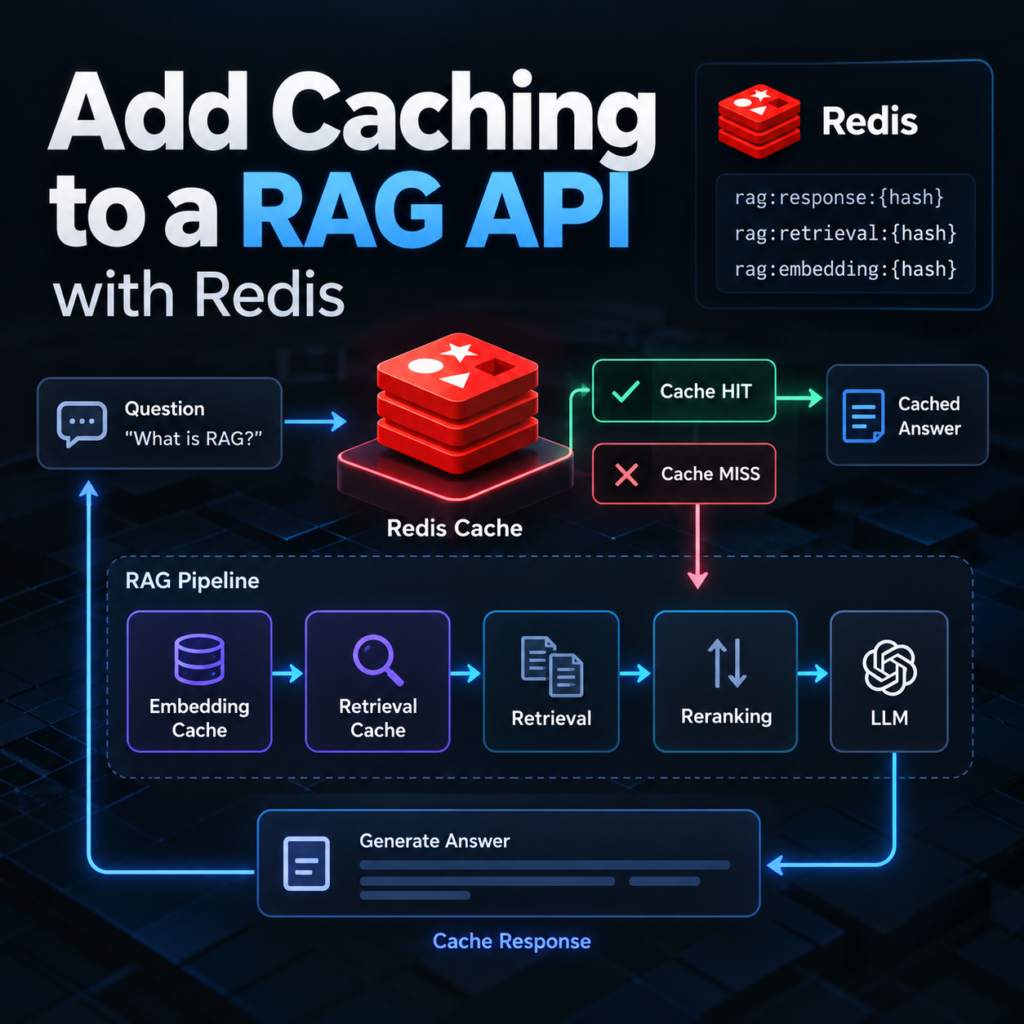
What You Will Build
In this tutorial, we will add caching to a RAG API using Redis. We will continue developing the same production RAG assistant from the previous tutorials rather than creating a separate example application.
Our existing system already exposes the RAG pipeline through FastAPI and includes authentication, rate limiting, structured logging, Prometheus metrics, and OpenTelemetry distributed tracing.
Client
  │
  ▼
FastAPI /ask
  │
  ▼
RAG Pipeline
  │
  ├── Hybrid Retrieval
  ├── Reranking
  ├── Context Building
  └── LLM Generation
  │
  ▼
Answer
Every request currently executes this pipeline even when the same question or intermediate computation has already been processed. That can create unnecessary work.
For example, two identical requests may cause the application to generate the same query embedding, search the same document collection, rerank similar candidates, build the same context, and send another request to the LLM.
Question
   │
   ▼
Embedding
   │
   ▼
Retrieval
   │
   ▼
Reranking
   │
   ▼
Context
   │
   ▼
LLM
   │
   ▼
Answer
Some of these operations are computationally expensive. LLM calls may also introduce external API latency and direct usage costs.
Caching allows us to reuse selected results instead of recomputing them for every request.
Where Redis Fits into the RAG Architecture
We will introduce Redis as a dedicated caching layer beside the RAG application:
                 Client
                    │
                    ▼
              FastAPI /ask
                    │
                    ▼
               Cache Check
                /       \
               /         \
          Cache Hit     Cache Miss
             │             │
             │             ▼
             │        RAG Pipeline
             │             │
             │      ┌──────┴──────┐
             │      │             │
             │   Retrieval       LLM
             │      │             │
             │      └──────┬──────┘
             │             │
             │             ▼
             │        Store Result
             │             │
             └──────┬──────┘
                    ▼
                  Answer

                 Redis
              Cache Storage
However, a RAG system has more than one possible caching point. We do not have to cache only the final answer.
Multiple Levels of RAG Caching
During the tutorial, we will examine several possible cache layers:
Question
   │
   ▼
[Embedding Cache]
   │
   ▼
Embedding
   │
   ▼
[Retrieval Cache]
   │
   ▼
Retrieved Documents
   │
   ▼
Reranking
   │
   ▼
Context
   │
   ▼
LLM
   │
   ▼
[Response Cache]
   │
   ▼
Answer
Each layer solves a different problem.
An embedding cache prevents the application from repeatedly generating the same query embedding. A retrieval cache can reuse search results for repeated queries. A response cache can bypass most of the RAG pipeline when an equivalent request has already been answered.
But these optimizations have different correctness risks. If the underlying knowledge base changes, an old retrieval result or final answer may no longer represent the current documents.
For that reason, learning how to add caching to a RAG API is not simply a matter of putting Redis in front of the LLM.
What We Will Implement
We will extend the existing project with a small caching layer:
rag-assistant/
│
├── main.py
├── rag.py
├── retrieval.py
├── reranking.py
├── monitoring.py
├── tracing.py
│
├── cache.py          <-- new
│
├── Dockerfile
├── docker-compose.yml
└── requirements.txt
The new cache.py module will isolate Redis operations from the rest of the RAG logic. The retrieval and generation code should not need to know how Redis connections, serialization, TTLs, or cache keys are implemented.
By the end of the tutorial, the API will support:
- Redis-backed caching for RAG requests;
- deterministic cache keys;
- expiration with TTL;
- cache invalidation when knowledge changes;
- optional embedding and retrieval caching;
- cache hit and miss metrics;
- safe fallback when Redis is unavailable.
Cache Hits and Cache Misses
Two concepts will appear throughout the implementation.
A cache hit occurs when Redis already contains a valid result:
Request
   │
   ▼
Redis
   │
   ├── HIT
   │
   ▼
Cached Answer
A cache miss means the requested result is not available or has expired:
Request
   │
   ▼
Redis
   │
   ├── MISS
   │
   ▼
RAG Pipeline
   │
   ▼
New Answer
   │
   ▼
Redis
Our goal is not to maximize the cache hit rate at any cost. The goal is to reuse computations only when doing so does not compromise the correctness or freshness of the RAG response.
The Main Challenge: Cache Invalidation
Consider a cached answer created from version 12 of the knowledge base:
Knowledge Base v12
        │
        ▼
     RAG Query
        │
        ▼
  Cached Answer
Later, documents are updated:
Knowledge Base v13
        │
        ▼
     New Query
        │
        ▼
  Old Cached Answer  ← problem
The question may be identical, but the correct answer may have changed.
This makes cache expiration and invalidation central parts of RAG caching architecture. We will therefore design cache keys and TTL policies with knowledge-base changes in mind rather than treating Redis as permanent storage.
By the end, we will have a caching architecture that can reduce repeated computation and LLM calls while preserving the behavior expected from a retrieval-augmented generation system.
Prerequisites
Before we add caching to a RAG API, we need the existing FastAPI application and RAG pipeline from the previous tutorials. We will add Redis to that architecture without changing the core retrieval, reranking, and generation logic.
You should have Python installed and a working RAG API with an /ask endpoint similar to this:
from fastapi import (
    Depends,
    FastAPI,
    Request
)


@app.post(
    "/ask",
    dependencies=[
        Depends(verify_api_key)
    ]
)
@limiter.limit(RAG_RATE_LIMIT)
async def ask(
    request: Request,
    body: AskRequest
):
    request_id = (
        request.state.request_id
    )

    answer = ask_rag(
        body.question,
        request_id=request_id
    )

    return {
        "answer": answer
    }
The endpoint passes the user question to the existing ask_rag() function.
Existing RAG Pipeline
Our simplified RAG pipeline still follows the same sequence used throughout the tutorial series:
def ask_rag(
    question,
    request_id
):
    candidates = hybrid_search(
        question
    )

    reranked = rerank_documents(
        question,
        candidates
    )

    context_documents = (
        reranked[:5]
    )

    context = build_context(
        context_documents
    )

    answer = generate_answer(
        question,
        context
    )

    return answer
At this point, every call executes the complete pipeline:
Question
   │
   ▼
Hybrid Search
   │
   ▼
Reranking
   │
   ▼
Context Building
   │
   ▼
LLM Generation
   │
   ▼
Answer
We will preserve this behavior for cache misses. Redis will provide an alternative fast path when a valid cached result already exists.
Install the Redis Python Client
To add caching to a RAG API, the Python application needs a Redis client. Install the official Redis Python package:
pip install redisAdd it to requirements.txt as well:
fastapi
uvicorn
slowapi
prometheus-client

opentelemetry-api
opentelemetry-sdk
opentelemetry-instrumentation-fastapi
opentelemetry-exporter-otlp-proto-grpc

redis

openai
sentence-transformers
faiss-cpu
rank-bm25
numpy
Redis itself runs as a separate service. The Python package only provides the client used by the RAG API to communicate with that service.
RAG API
   │
   │ Redis client
   ▼
Redis Server
Add the Cache Module
Create a new file:
cache.pyOur project now looks like:
rag-assistant/
│
├── main.py
├── rag.py
├── retrieval.py
├── reranking.py
├── monitoring.py
├── tracing.py
├── cache.py
│
├── Dockerfile
├── docker-compose.yml
└── requirements.txt
We will keep Redis-specific code inside cache.py. This separation is important because caching is infrastructure, not part of the retrieval algorithm itself.
The RAG pipeline should ask the cache for a value without needing to know how the Redis connection or serialization works.
rag.py
  │
  ├── get cached result
  │
  ├── run RAG if necessary
  │
  └── store new result
        │
        ▼
     cache.py
        │
        ▼
      Redis
Redis Configuration
We will configure the Redis connection through an environment variable rather than hard-coding the server address:
REDIS_URL=redis://localhost:6379/0When the API and Redis run as Docker services, the hostname will normally be the Redis service name:
REDIS_URL=redis://redis:6379/0This lets the same application code work in local development and containerized environments.
What We Will Not Change
Adding Redis should not require us to rewrite the RAG system. Hybrid search, FAISS vector retrieval, BM25 retrieval, reranking, context construction, and LLM generation remain independent components.
Instead, RAG API caching becomes another layer around selected expensive operations:
              Cache Layer
                  │
        ┌─────────┴─────────┐
        │                   │
       HIT                 MISS
        │                   │
        ▼                   ▼
Cached Result         Existing RAG Code
This distinction will become important later when we cache different stages independently. A response cache can skip almost the entire pipeline, while an embedding cache only avoids repeated embedding generation.
With the prerequisites ready, we can now add caching to a RAG API at the infrastructure level by connecting Redis to our FastAPI application and Docker environment.
Step 1 — Add Redis to the RAG Architecture
The first implementation step is to connect Redis to the application and create a small reusable cache interface. Before we add caching to a RAG API at the response or retrieval level, the rest of the application needs a reliable way to read and write cached data.
Redis will run independently from FastAPI:
Client
  │
  ▼
FastAPI
  │
  ├──────────────► Redis
  │
  ▼
RAG Pipeline
This separation is useful because Redis can be restarted, scaled, or configured independently from the RAG application.
Start Redis with Docker Compose
Since our RAG assistant is already containerized, add Redis to docker-compose.yml:
services:

  rag-api:
    build: .
    container_name: rag-api

    environment:
      REDIS_URL: redis://redis:6379/0

    depends_on:
      - redis

    ports:
      - "8000:8000"

  redis:
    image: redis:7-alpine
    container_name: rag-redis

    restart: unless-stopped
Inside the Docker network, redis is the service hostname. FastAPI therefore connects to:
redis://redis:6379/0Port 6379 does not need to be published to the host unless you specifically want to access Redis from outside the Docker network.
Start the services:
docker compose up -d --buildThe architecture now becomes:
Docker Network
│
├── rag-api
│      │
│      └── redis://redis:6379
│
└── redis
Create the Redis Client
For connection options, authentication, and client configuration, see the official Redis Python client documentation.
Now open cache.py and create the Redis connection:
import os

import redis


REDIS_URL = os.getenv(
    "REDIS_URL",
    "redis://localhost:6379/0"
)


redis_client = redis.Redis.from_url(
    REDIS_URL,
    decode_responses=True
)
Setting decode_responses=True means Redis responses are returned as Python strings instead of raw bytes. This makes the cache interface easier to use for JSON data.
Create Basic Cache Functions
We do not want the RAG pipeline to call Redis commands directly throughout the application. Instead, create a small abstraction in cache.py:
import json


def get_cache(
    key
):
    value = redis_client.get(
        key
    )

    if value is None:
        return None

    return json.loads(
        value
    )


def set_cache(
    key,
    value,
    ttl=300
):
    redis_client.setex(
        key,
        ttl,
        json.dumps(value)
    )
The rest of the application now interacts with two simple operations:
get_cache(key)

set_cache(
    key,
    value,
    ttl
)
The default TTL is currently 300 seconds, or five minutes. We will design a more deliberate expiration strategy later in the tutorial.
Test the Redis Connection
Before integrating Redis into the RAG pipeline, verify that the application can communicate with it.
redis_client.set(
    "rag:test",
    "connected"
)

value = redis_client.get(
    "rag:test"
)

print(value)
The result should be:
connectedYou can also verify the Redis container:
docker exec \
  -it rag-redis \
  redis-cli ping
Redis should respond:
PONGUse Namespaced Cache Keys
Even at this early stage, we should avoid generic Redis keys such as:
question
answer
result
A better approach is to namespace keys according to their purpose:
rag:response:...
rag:retrieval:...
rag:embedding:...
This becomes important once we add caching to a RAG API at multiple stages. Redis may eventually contain response caches, embeddings, retrieval results, rate-limiting data, and other application state.
Namespacing makes the role of each key explicit:
rag
│
├── response
│
├── retrieval
│
└── embedding
Do Not Make Redis a Hard Dependency
There is one architectural issue with our first implementation. If Redis becomes unavailable, redis_client.get() can raise an exception. We do not want a cache outage to make the entire RAG API unavailable.
Caching is an optimization. The underlying RAG pipeline should still work without it.
Redis available
      │
      ▼
Use Cache


Redis unavailable
      │
      ▼
Run RAG Normally
We can therefore make the cache functions fail gracefully:
def get_cache(
    key
):
    try:
        value = redis_client.get(
            key
        )

        if value is None:
            return None

        return json.loads(
            value
        )

    except redis.RedisError:
        return None


def set_cache(
    key,
    value,
    ttl=300
):
    try:
        redis_client.setex(
            key,
            ttl,
            json.dumps(value)
        )

    except redis.RedisError:
        pass
A Redis failure now behaves like a cache miss. The request continues through the normal RAG pipeline instead of failing because an optimization layer is unavailable.
Request
   │
   ▼
Redis Check
   │
   ├── HIT ──────────► Cached Result
   │
   ├── MISS ─────────► RAG Pipeline
   │
   └── ERROR ────────► RAG Pipeline
In production, we would also log and measure Redis failures rather than silently ignoring them. We will connect caching to our existing observability system later.
At this point, the infrastructure required to add caching to a RAG API is ready. Redis is part of the Docker architecture, the application has a reusable cache interface, and a cache failure does not prevent the RAG pipeline from answering requests.
Next, we can use this infrastructure to implement the first real optimization: caching complete RAG responses so repeated requests can bypass expensive retrieval and LLM generation.
Step 2 — Cache RAG Responses
Now that Redis is connected, we can add caching to a RAG API at the highest level: the final response. If the same request has already produced an answer and the cached value is still valid, the API can return it without executing retrieval, reranking, context construction, or LLM generation again.
This is potentially the most valuable cache because a single cache hit can bypass almost the entire RAG pipeline.
Request
   │
   ▼
Response Cache
   │
   ├── HIT ─────────────► Answer
   │
   └── MISS
          │
          ▼
     Hybrid Search
          │
          ▼
      Reranking
          │
          ▼
       Context
          │
          ▼
         LLM
          │
          ▼
     Store Answer
          │
          ▼
        Answer
Create a Response Cache Key
Redis requires a string key. We could use the question directly:
rag:response:What is hybrid search?But storing arbitrary user input inside Redis keys is not a good design. Questions may be long, contain private information, or include characters that make keys difficult to inspect and manage.
Instead, we can hash the question:
import hashlib


def create_response_cache_key(
    question
):
    normalized = (
        question
        .strip()
        .lower()
    )

    digest = hashlib.sha256(
        normalized.encode(
            "utf-8"
        )
    ).hexdigest()

    return (
        f"rag:response:{digest}"
    )
The original question:
What is hybrid search?becomes a key similar to:
rag:response:
9db1e4f86a0c...
Redis no longer needs the complete question inside the key.
Why Normalize the Question?
Without normalization, these requests would produce different hashes:
What is hybrid search?

what is hybrid search?

  What is hybrid search?
Lowercasing and trimming whitespace makes these simple variations share the same response cache entry.
However, we should not perform aggressive normalization yet. These questions may look similar but have different meanings:
What is NOT supported?

What is supported?
Cache normalization should therefore be deterministic and conservative.
Add Response Caching to the RAG Pipeline
Import the cache functions into rag.py:
from cache import (
    get_cache,
    set_cache
)
Then add the response cache around the existing pipeline:
def ask_rag(
    question,
    request_id
):
    cache_key = (
        create_response_cache_key(
            question
        )
    )

    cached = get_cache(
        cache_key
    )

    if cached is not None:
        return cached["answer"]

    candidates = hybrid_search(
        question
    )

    reranked = rerank_documents(
        question,
        candidates
    )

    context_documents = (
        reranked[:5]
    )

    context = build_context(
        context_documents
    )

    answer = generate_answer(
        question,
        context
    )

    set_cache(
        cache_key,
        {
            "answer": answer
        },
        ttl=300
    )

    return answer
The behavior is now straightforward.
get_cache()
    │
    ├── value exists
    │       │
    │       ▼
    │   return answer
    │
    └── None
            │
            ▼
       execute RAG
            │
            ▼
       set_cache()
            │
            ▼
       return answer
This is the first working implementation to add caching to a RAG API. Repeated requests can now avoid expensive RAG operations entirely.
Test a Cache Miss
Send a question that has not previously been cached:
curl -X POST \
  http://localhost:8000/ask \
  -H "Content-Type: application/json" \
  -H "X-API-Key: your-api-key" \
  -d '{
    "question":
      "What is hybrid search?"
  }'
The first request follows the complete pipeline:
Redis
  │
  ▼
MISS
  │
  ▼
Hybrid Retrieval
  │
  ▼
Reranking
  │
  ▼
Context
  │
  ▼
LLM
  │
  ▼
Redis SET
  │
  ▼
Answer
Test a Cache Hit
Send exactly the same question again:
curl -X POST \
  http://localhost:8000/ask \
  -H "Content-Type: application/json" \
  -H "X-API-Key: your-api-key" \
  -d '{
    "question":
      "What is hybrid search?"
  }'
This time the request can follow a much shorter path:
Redis
  │
  ▼
HIT
  │
  ▼
Answer
No embedding generation, vector search, BM25 search, reranking, context construction, or LLM request is required.
The Performance Difference
Suppose an uncached RAG request takes:
Embedding          40 ms
Retrieval          90 ms
Reranking         210 ms
Context             8 ms
LLM              2400 ms
------------------------
Total            2748 ms
A response-cache hit might require only the Redis lookup plus normal API processing:
Redis lookup        few ms
RAG pipeline        skipped
LLM call            skipped
The exact improvement depends on infrastructure and network latency, but response caching can remove the most expensive parts of repeated requests.
Response Caching Can Also Reduce LLM Costs
Latency is not the only reason to cache RAG responses. If the LLM provider charges according to input and output token usage, repeated identical requests create repeated costs.
Without Cache

Question
  │
  ▼
LLM Call ──► Token Cost

Question
  │
  ▼
LLM Call ──► Token Cost

Question
  │
  ▼
LLM Call ──► Token Cost
With a valid response cache:
First Request
  │
  ▼
LLM Call ──► Token Cost
  │
  ▼
Redis


Repeated Request
  │
  ▼
Redis HIT ──► No LLM Call
For applications with repeated questions, this can make RAG API caching useful for both response time and operating cost.
Do Not Assume Similar Questions Are Equivalent
Our current cache performs exact matching after basic normalization. It does not consider these questions equivalent:
What is RAG?

Explain retrieval-augmented generation.

How does a RAG system work?
A semantic cache could use embeddings to find previously answered questions with similar meaning, but that introduces an important correctness problem: semantic similarity does not guarantee that two questions should receive the same answer.
For this tutorial, we will keep response caching deterministic. The cache will reuse a response only when the cache key identifies the same normalized request.
A More Important Problem Remains
Our current key depends only on the question:
cache_key =
    hash(question)
That is not sufficient for a production RAG system.
Imagine that the documents are updated after an answer has been cached:
Question
   │
   ▼
Knowledge Base v1
   │
   ▼
Answer A
   │
   ▼
Redis


Knowledge Base updated to v2
   │
   ▼
Same Question
   │
   ▼
Redis HIT
   │
   ▼
Old Answer A
The cached answer may now be stale even though the question is identical.
Other changes can have the same effect. A different LLM model, retrieval configuration, metadata filter, prompt version, or user scope may require a different response.
Therefore, to safely add caching to a RAG API, the cache key must represent more than the question itself. In the next step, we will design cache keys that include the state and configuration that can change the resulting RAG answer.
Step 3 — Design Reliable Cache Keys
Our current response cache uses only the normalized question. That works for a simple demonstration, but to safely add caching to a RAG API, the key should represent the inputs that can change the final answer.
Consider the same question executed against two versions of the knowledge base:
Question + Knowledge Base v1 → Answer A

Question + Knowledge Base v2 → Answer B
If both requests use the same cache key, the second request may incorrectly receive Answer A.
Include the Knowledge Base Version
A simple solution is to maintain a version for the indexed knowledge:
KNOWLEDGE_VERSION = "13"Then include it when creating the response cache key:
import hashlib


def create_response_cache_key(
    question,
    knowledge_version
):
    normalized = (
        question
        .strip()
        .lower()
    )

    source = (
        f"{knowledge_version}:"
        f"{normalized}"
    )

    digest = hashlib.sha256(
        source.encode("utf-8")
    ).hexdigest()

    return (
        f"rag:response:{digest}"
    )
Now the same question generates different cache entries when the knowledge base changes:
v12 + question
      │
      ▼
rag:response:abc...


v13 + question
      │
      ▼
rag:response:xyz...
Old entries can remain in Redis until their TTL expires, but they will no longer be returned for requests using the new knowledge version.
Include Other Answer-Changing Inputs
The knowledge base is not the only input that can affect a RAG response. Depending on the application, the key may also need to represent:
- metadata filters;
- prompt version;
- LLM model;
- retrieval configuration;
- tenant or user scope when data access differs.
For example:
source = (
    f"{knowledge_version}:"
    f"{prompt_version}:"
    f"{model_name}:"
    f"{normalized_question}"
)
The rule is simple: if changing a parameter can legitimately change the answer, consider whether that parameter belongs in the cache identity.
Do Not Add Everything to the Key
The opposite mistake is including values that do not affect the result:
request_id
timestamp
trace_id
These values are different for every request. Including them would create a new key every time and effectively eliminate response caching.
Good cache identity:

question
+ knowledge version
+ answer-changing configuration


Bad cache identity:

question
+ request ID
+ timestamp
Designing reliable keys is one of the most important parts when you add caching to a RAG API. Redis can return cached data extremely quickly, but it cannot determine whether two requests should logically share the same result.
With cache identity defined, the next problem is deciding how long cached results should remain valid and how they should be invalidated when the RAG system changes.
Step 4 — Add TTL and Cache Invalidation
Reliable cache keys prevent incompatible requests from sharing results, but cached data should not live forever. When we add caching to a RAG API, we also need a strategy for expiration and invalidation.
Set a TTL for Cached Responses
Our set_cache() function already supports a TTL:
set_cache(
    cache_key,
    {
        "answer": answer
    },
    ttl=300
)
Redis automatically deletes this entry after 300 seconds. A later request becomes a cache miss and runs the RAG pipeline again.
Cache Entry
    │
    ├── 0–300 sec → HIT
    │
    └── after TTL → MISS → RAG Pipeline
There is no universal TTL for RAG. Frequently updated knowledge may require short expiration times, while relatively static documentation can tolerate longer caching.
Invalidate the Cache When Knowledge Changes
TTL alone can still return stale answers between a document update and cache expiration. The knowledge version introduced in the previous step provides a cleaner solution.
KNOWLEDGE_VERSION=13After rebuilding the document index, increment the version:
KNOWLEDGE_VERSION=14New requests immediately generate different cache keys:
v13 + question → old cache entry

v14 + question → new cache entry
This avoids having to search Redis for every response associated with the previous document set. Old entries simply expire according to their TTL.
Use Explicit Deletion When Necessary
Some applications also need immediate deletion of a specific cache entry. Add a small helper:
def delete_cache(
    key
):
    try:
        redis_client.delete(
            key
        )

    except redis.RedisError:
        pass
This is useful when the application knows exactly which cached result became invalid. For large knowledge-base updates, versioning is usually easier than deleting thousands of individual keys.
Combine Versioning and TTL
A practical strategy is to use both mechanisms:
Knowledge Version
      │
      ├── prevents reuse after updates
      │
      ▼
Cache Key

TTL
      │
      └── removes old entries automatically
Versioning protects correctness, while TTL limits how long unused data occupies Redis memory.
This distinction matters when you add caching to a RAG API: expiration is primarily a storage and freshness policy, while invalidation determines whether a cached result is still logically valid for the current RAG system.
Now that response caching has reliable keys and an invalidation strategy, we can move deeper into the pipeline and cache smaller reusable computations such as embeddings and retrieval results.
Step 5 — Cache Embeddings and Retrieval Results
Response caching provides the largest shortcut, but it is not always appropriate. Sometimes we still want to run reranking and LLM generation while avoiding repeated work earlier in the pipeline. To add caching to a RAG API more selectively, we can cache query embeddings and retrieval results.
Cache Query Embeddings
If the same query appears repeatedly, there is little value in generating its embedding every time.
Question
   │
   ▼
Embedding Cache
   │
   ├── HIT ──► Existing Vector
   │
   └── MISS ─► Embedding Model
                    │
                    ▼
                 Redis
We can use the same hashing approach for the key:
def create_embedding_key(
    question,
    model_name
):
    source = (
        f"{model_name}:"
        f"{question.strip().lower()}"
    )

    digest = hashlib.sha256(
        source.encode("utf-8")
    ).hexdigest()

    return (
        f"rag:embedding:{digest}"
    )
Including the embedding model is important because changing models can produce a different vector for the same text.
The cached value can then be used before calling the embedding model:
key = create_embedding_key(
    question,
    embedding_model_name
)

embedding = get_cache(
    key
)

if embedding is None:
    embedding = create_embedding(
        question
    )

    set_cache(
        key,
        embedding,
        ttl=3600
    )
Cache Retrieval Results
We can apply the same pattern around hybrid search:
Question
   │
   ▼
Retrieval Cache
   │
   ├── HIT ──► Candidates
   │
   └── MISS
          │
          ▼
   BM25 + Vector Search
          │
          ▼
       Candidates
          │
          ▼
        Redis
A retrieval cache key should include the knowledge version because document updates can change the search results.
source = (
    f"{knowledge_version}:"
    f"{retrieval_config}:"
    f"{normalized_question}"
)
Metadata filters must also be included when they affect which documents can be retrieved. Otherwise, one request could accidentally reuse results generated for a different filter or data scope.
Choose the Cache Layer Deliberately
Different cache levels provide different shortcuts:
Response Cache
   └── skips almost entire RAG pipeline

Retrieval Cache
   └── skips search

Embedding Cache
   └── skips embedding generation
This does not mean that every production system should enable all three. Each additional cache creates more state, invalidation rules, and operational complexity.
A good approach when you add caching to a RAG API is to start with the expensive repeated operation you can safely reuse, measure its effect, and introduce additional cache layers only when they provide a clear benefit.
Next, we will measure those benefits directly by tracking cache hits, misses, and their effect on RAG API performance.
Step 6 — Measure Cache Performance
Caching should be measured rather than assumed to be useful. After we add caching to a RAG API, we need to know how often Redis actually prevents expensive RAG operations.
Track Cache Hits and Misses
Since our API already uses Prometheus, add two counters:
from prometheus_client import (
    Counter
)


cache_hits = Counter(
    "rag_cache_hits_total",
    "Number of RAG cache hits",
    ["cache_type"]
)

cache_misses = Counter(
    "rag_cache_misses_total",
    "Number of RAG cache misses",
    ["cache_type"]
)
Then record the result of each cache lookup:
cached = get_cache(
    cache_key
)

if cached is not None:
    cache_hits.labels(
        cache_type="response"
    ).inc()

    return cached["answer"]

cache_misses.labels(
    cache_type="response"
).inc()
The same metric can distinguish our cache layers:
cache_type="response"
cache_type="retrieval"
cache_type="embedding"
Calculate the Cache Hit Rate
The most useful high-level metric is the cache hit rate:
hit rate =
hits / (hits + misses)
For example:
Cache hits:    720
Cache misses:  280

Hit rate:      72%
A high hit rate can indicate that caching is eliminating substantial repeated work. A low hit rate is not automatically a problem: it may simply mean that most questions are unique.
Compare Request Latency
Cache effectiveness should also appear in the latency metrics and OpenTelemetry traces created in the previous tutorials.
Cache MISS

retrieval      90 ms
reranking     210 ms
context        10 ms
LLM          2500 ms


Cache HIT

Redis lookup    few ms
RAG stages      skipped
For response caching, another useful metric is the number of LLM calls avoided. This connects caching directly to both latency and token costs.
Measure Before Adding More Cache Layers
When you add caching to a RAG API, more caching is not automatically better. If embedding generation represents only a tiny fraction of total latency, an embedding cache may add complexity without producing a meaningful improvement.
Use cache hit rate, request latency, Redis errors, and avoided expensive operations to decide whether each cache layer is worthwhile.
With caching now measurable, we can examine an equally important question: which parts of a RAG system should actually be cached, and which data is better recomputed for every request.
What Should and Should Not Be Cached in RAG
The technical ability to cache a value does not mean that caching it is useful. When we add caching to a RAG API, each cache layer should be evaluated according to cost, reuse frequency, freshness, and correctness.
Good Candidates for Caching
| Data | Why Cache It? | Main Risk |
|---|---|---|
| Query embeddings | Avoid repeated embedding generation | Embedding model changes |
| Retrieval results | Avoid repeated vector and BM25 search | Knowledge base changes |
| Final responses | Avoid most of the RAG pipeline and LLM calls | Stale or incorrectly shared answers |
Query embeddings are relatively straightforward because identical text processed by the same embedding model can usually reuse the same vector. Retrieval results require stronger invalidation because they depend on the current document index.
Final responses offer the largest potential performance improvement, but they also require the most careful cache identity because the answer may depend on documents, filters, prompts, models, and access scope.
Be Careful with User-Specific Data
Suppose two users ask the same question but have access to different documents:
User A ──► Private Documents A
User B ──► Private Documents B
A cache based only on the question could return User A’s result to User B. In systems with tenant-specific or permission-controlled retrieval, authorization scope must therefore be reflected in the cache design.
Do Not Cache Highly Dynamic Results Blindly
Caching is less useful when the underlying information changes rapidly or every request depends on unique context.
Good reuse
Same input + stable knowledge
        │
        ▼
      Cache


Poor reuse
Unique input + changing knowledge
        │
        ▼
    Recompute
The same applies when an answer intentionally depends on current time, session state, conversation history, or frequently changing external data.
The objective when you add caching to a RAG API is therefore not to cache as much as possible. Cache computations that are expensive, repeated, and safe to reuse. Recompute results when freshness or request-specific context is more important than the performance saved by Redis.
Production Caching Considerations
A local Redis cache is easy to demonstrate, but production introduces failure handling, memory limits, security, and concurrency. These issues should be considered before you add caching to a RAG API under real traffic.
Keep Redis Optional
The RAG pipeline should continue working when Redis is temporarily unavailable:
Redis available
   │
   ├── HIT  → cached result
   └── MISS → RAG pipeline

Redis unavailable
   │
   └────────→ RAG pipeline
Cache errors should be logged and measured, but they should not normally turn a valid RAG request into an API error.
Prevent a Cache Stampede
Imagine that a popular cache entry expires while hundreds of clients request it simultaneously. Every request sees a miss and starts the same expensive RAG pipeline:
100 requests
     │
     ▼
Cache expires
     │
     ▼
100 cache misses
     │
     ▼
100 LLM calls
This is known as a cache stampede. At larger scale, distributed locks or request coalescing can allow one request to regenerate the value while others wait for the result.
Set Redis Memory Policies Deliberately
Redis stores cached data in memory, so cache growth must be controlled. TTLs remove expired entries, while Redis memory limits and eviction policies determine what happens when available cache memory is exhausted.
Monitor memory usage together with hit rate. A large cache with almost no hits may consume resources without providing meaningful performance improvements.
Protect Redis
Redis should not be exposed publicly without a specific reason. In our Docker architecture, the API can access Redis through the internal network without publishing port 6379 to the host.
Internet
   │
   ▼
RAG API
   │
   ▼
Private Network
   │
   ▼
Redis
Production deployments should also use the authentication, encryption, and network controls appropriate for their Redis environment.
Watch Serialization Size
Caching a small answer is different from storing hundreds of retrieved documents or large embedding arrays. Large cache values increase memory consumption and network transfer.
Before caching an intermediate RAG result, compare the cost of recomputing it with the cost of storing and transferring it.
Version the Cache with the Application
Knowledge is not the only thing that changes. A new retrieval algorithm, prompt, embedding model, or serialization format may make existing cache entries incompatible.
A simple application-level version can become part of the key:
rag:v2:response:...
rag:v2:retrieval:...
rag:v2:embedding:...
Deploying an incompatible change can then move the application to v3 without trying to migrate every old cache entry.
Optimize from Measurements
The production strategy should ultimately be driven by observability:
Cache hit rate
Redis latency
Redis errors
Memory usage
RAG latency
LLM calls avoided
        │
        ▼
Caching decisions
When you add caching to a RAG API, Redis should reduce expensive repeated work without becoming another fragile dependency. Start with the cache layer that produces a measurable benefit, monitor it, and add complexity only when production data justifies it.
Where to Go Next
We now have another production layer around the RAG assistant. After learning how to add caching to a RAG API, repeated requests no longer have to execute every expensive operation in the pipeline.
Caching works best together with the other components developed throughout this series:
- Add Distributed Tracing to a RAG API with OpenTelemetry — trace cache hits, misses, and the RAG operations that still execute.
- Add Logging and Monitoring to a RAG API — measure latency, errors, and cache performance with structured logs and Prometheus.
- Add Authentication and Rate Limiting to a RAG API — protect the API and control request volume.
- Dockerize a RAG Assistant with FastAPI — run the API and its supporting services in containers.
- Evaluate a RAG System in Python — verify that performance optimizations do not hide changes in retrieval or answer quality.
The complete production architecture is gradually becoming:
Client
  │
  ▼
FastAPI
  │
  ├── Authentication
  ├── Rate Limiting
  ├── Redis Cache
  │
  ▼
RAG Pipeline
  │
  ├── Retrieval
  ├── Reranking
  └── LLM
  │
  ├── Logs
  ├── Metrics
  └── Traces
The important principle is that caching remains an optimization rather than part of RAG correctness. When you add caching to a RAG API, the underlying retrieval and generation pipeline should remain capable of producing a fresh answer whenever the cache is missing, invalid, expired, or unavailable.
Frequently Asked Questions
Why should I add caching to a RAG API?
Caching can reduce response latency, repeated retrieval work, embedding generation, and unnecessary LLM calls. It is most useful when the RAG application receives repeated or identical requests.
What is the best place to cache a RAG pipeline?
There is no single best layer. Response caching provides the largest shortcut because it can bypass almost the entire pipeline. Retrieval caching avoids repeated searches, while embedding caching prevents repeated vector generation.
Response Cache  → largest shortcut
Retrieval Cache → skips search
Embedding Cache → skips embedding generation
The best choice depends on which operations are expensive and how often their results can safely be reused.
Why use Redis for RAG caching?
Redis provides fast key-value access, TTL-based expiration, atomic operations, and shared storage that can be accessed by multiple API instances. This makes it suitable for production environments where an in-process Python dictionary would not be shared between application replicas.
How long should RAG responses stay in Redis?
The appropriate TTL depends on how quickly the underlying information changes. Static documentation may tolerate longer TTLs, while frequently updated knowledge may require much shorter expiration periods.
TTL should also be combined with explicit cache invalidation or knowledge-base versioning when freshness is important.
What happens when the RAG knowledge base changes?
Cached retrieval results and answers may become stale. One practical solution is to include a knowledge-base version in the cache key. After rebuilding the index, increment the version so new requests no longer use entries created from the previous knowledge base.
Can I cache query embeddings?
Yes. Identical normalized text processed by the same embedding model can often reuse the same query vector. Include the embedding model or its version in the cache key so vectors from incompatible models are not mixed.
Should I use semantic caching for RAG questions?
Semantic caching can reuse answers for questions that are similar rather than identical, but it introduces additional correctness risks. Two questions can have similar embeddings while still requiring different answers.
Exact deterministic caching is therefore a safer starting point when you add caching to a RAG API. Semantic caching should be introduced only when its similarity rules and failure cases can be evaluated properly.
Can cached RAG responses create security problems?
Yes. If users or tenants have access to different documents, a shared cache key based only on the question could expose a response generated from another user’s data. Authorization scope must be part of the cache design whenever retrieval permissions differ.
What happens if Redis goes down?
Caching should normally fail open: the cache lookup fails, but the request continues through the standard RAG pipeline. Redis failures should still be logged and monitored so operational problems are visible.
How do I know whether RAG caching is useful?
Measure cache hits, misses, hit rate, Redis latency, overall request latency, and expensive operations avoided. For response caching, tracking avoided LLM calls can also show the effect on token costs.
The goal when you add caching to a RAG API is not the highest possible hit rate. The goal is to eliminate repeated work while preserving fresh, correct, and properly authorized RAG responses.
Conclusion
Caching can remove a significant amount of repeated work from a production RAG system. In this tutorial, we learned how to add caching to a RAG API with Redis without making the cache responsible for the correctness of the underlying RAG pipeline.
We started with response caching, then designed deterministic cache keys that account for knowledge-base and configuration changes. We added TTL-based expiration and version-based invalidation, and extended the same approach to query embeddings and retrieval results.
Question
   │
   ▼
Response Cache
   │
   ├── HIT ─────────────► Answer
   │
   └── MISS
          │
          ▼
   Embedding Cache
          │
          ▼
   Retrieval Cache
          │
          ▼
      Reranking
          │
          ▼
         LLM
          │
          ▼
     Cache Response
We also connected caching to the observability architecture by measuring hits and misses, and examined production concerns such as Redis failures, cache stampedes, memory usage, security, serialization size, and application versioning.
The most important principle is that caching should remain an optimization. If Redis is unavailable or a cached value is no longer valid, the RAG pipeline must still be able to retrieve current documents and generate a fresh answer.
When you add caching to a RAG API with that principle in mind, Redis can reduce latency and repeated LLM calls while keeping retrieval freshness and answer correctness under control.