What You Will Build
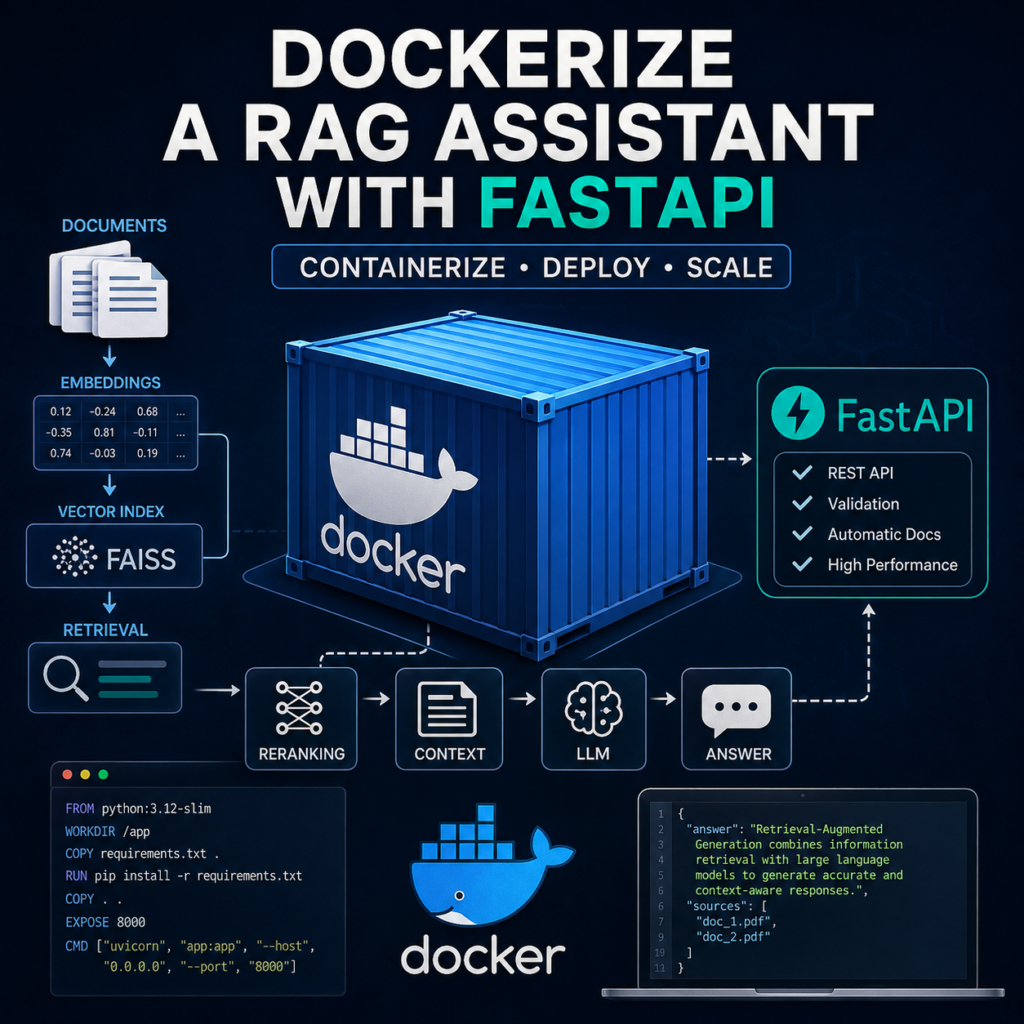
In this tutorial, you will learn how to dockerize a RAG assistant with FastAPI and package the complete Python application into a portable Docker container. Instead of manually configuring Python, dependencies, and application files on every server, you will define the runtime environment once and reproduce it wherever Docker is available.
The container will include the FastAPI application and the Retrieval-Augmented Generation pipeline developed in the previous tutorials. External clients will continue communicating with the same REST API, but the application itself will now run inside an isolated container.
The architecture will look like this:
Client Application
        │
        ▼
   HTTP Request
        │
        ▼
┌───────────────────────────┐
│     Docker Container      │
│                           │
│        FastAPI            │
│           │               │
│           ▼               │
│      RAG Pipeline         │
│           │               │
│           ▼               │
│   Metadata Filtering      │
│           │               │
│           ▼               │
│    BM25 + FAISS Search    │
│           │               │
│           ▼               │
│       Reranking           │
│           │               │
│           ▼               │
│          LLM              │
│                           │
└─────────────┬─────────────┘
              │
              ▼
        JSON Response
You will create a Dockerfile that defines the Python environment, installs project dependencies, copies the application into the image, and starts the FastAPI server with Uvicorn.
You will then build the Docker image and run it as a container:
docker build -t rag-assistant .

docker run \
  -p 8000:8000 \
  rag-assistant
After the container starts, the RAG API will remain accessible through the same HTTP interface used in the previous tutorial:
POST /ask

{
    "question": "How does reranking improve RAG?"
}
What You Will Learn
- How Docker fits into a RAG application architecture
- How to prepare a Python RAG project for containerization
- How to create a Dockerfile for FastAPI
- How to build and run a Docker image
- How to pass API keys using environment variables
- How to handle document data and vector indexes
- How to reduce Docker image size and improve build efficiency
- How to test the containerized RAG API
By the end of this tutorial, you will know how to dockerize a RAG assistant with FastAPI as a self-contained application that can be moved between development machines, servers, and cloud environments without rebuilding its runtime configuration manually.
Docker does not change how retrieval, reranking, or generation works. It creates a consistent environment around those components, giving you a reproducible deployment unit for the RAG application you have already built.
Prerequisites
Before you dockerize a RAG assistant with FastAPI, you should already have a working RAG API that runs locally. Docker will package this existing application, so retrieval, reranking, answer generation, and the FastAPI endpoints should already work before you begin containerization.
Your project should include:
- Python 3.10 or later
- A working FastAPI application
- A reusable RAG pipeline
- An indexed document collection
- FAISS, BM25, or another retrieval system
- A cross-encoder reranker if your pipeline uses reranking
- An OpenAI API key or another configured LLM provider
- Docker installed on your development machine
A simplified project structure might look like this:
rag-assistant/
│
├── app.py
├── rag.py
├── requirements.txt
│
├── documents/
│   └── knowledge.json
│
└── index/
    └── faiss.index
The app.py file contains the FastAPI application and API endpoints:
from fastapi import FastAPI

from rag import ask_rag

app = FastAPI(
    title="RAG Assistant API"
)

@app.get("/health")
def health():
    return {
        "status": "ok"
    }
Your rag.py module should contain the retrieval and generation logic independently from the API layer:
def ask_rag(question):
    candidates = hybrid_search(
        question,
        top_k=20
    )

    documents = rerank_documents(
        question,
        candidates,
        top_k=5
    )

    context = build_context(
        documents
    )

    return generate_answer(
        question,
        context
    )
You also need a requirements.txt file containing the Python dependencies required by the application:
fastapi
uvicorn
openai
sentence-transformers
faiss-cpu
rank-bm25
numpy
For reproducible production builds, you should eventually pin dependency versions rather than always installing the latest releases. This reduces the risk that rebuilding the same Docker image later introduces unexpected dependency changes.
Before creating the container, verify that the application still runs normally outside Docker:
uvicorn app:app \
  --host 0.0.0.0 \
  --port 8000
Then test the health endpoint and at least one real RAG request. Containerization should not be used to hide problems that already exist in the local application.
Once the project works correctly, you are ready to dockerize a RAG assistant with FastAPI. In the next step, you’ll create the Dockerfile that defines exactly how Docker should build and start the application.
Step 1 — Prepare the RAG Project for Docker
Before creating a Docker image, organize the project so that the application code, dependencies, configuration, and RAG data have clearly defined locations. A clean project structure makes Docker builds easier to understand and prevents unnecessary files from being copied into the image.
A practical structure for the application might look like this:
rag-assistant/
│
├── app.py
├── rag.py
├── requirements.txt
├── Dockerfile
├── .dockerignore
│
├── documents/
│   └── knowledge.json
│
└── index/
    └── faiss.index
The application code should remain separate from large datasets and generated files whenever possible. This becomes important when you dockerize a RAG assistant with FastAPI because changing one document should not necessarily force Docker to rebuild the entire application environment.
Create a .dockerignore File
Docker sends the project directory as a build context when creating an image. Without exclusions, local environments, caches, logs, credentials, and other unnecessary files may become part of that context.
Create a .dockerignore file:
__pycache__/
*.pyc
*.pyo
*.log

.venv/
venv/

.git/
.gitignore

.env

.pytest_cache/
.mypy_cache/

README.md
The .env file is particularly important. API keys and other secrets should not be copied into the Docker image.
Keep Configuration Outside the Code
Your Python application should read sensitive configuration from environment variables:
import os

OPENAI_API_KEY = os.getenv(
    "OPENAI_API_KEY"
)

if not OPENAI_API_KEY:
    raise RuntimeError(
        "OPENAI_API_KEY is not configured"
    )
Later, the required value can be supplied when the container starts rather than stored inside the image.
Check Application Paths
Local scripts sometimes depend on absolute file paths that exist only on the developer’s computer:
C:\Users\user\projects\rag\index\faiss.indexSuch paths will not exist inside a Linux-based Docker container. Use paths relative to the application directory instead:
from pathlib import Path

BASE_DIR = Path(__file__).resolve().parent

INDEX_PATH = (
    BASE_DIR /
    "index" /
    "faiss.index"
)
This allows the same code to locate the index whether the application runs locally or inside Docker.
Separate Build-Time and Runtime Data
You should also decide which files belong permanently inside the Docker image and which should remain external.
Application code
Python dependencies
        │
        ▼
   Docker Image


Documents
Vector indexes
Configuration
Secrets
        │
        ▼
Runtime Resources
Small, rarely changing knowledge bases can be packaged directly into the image. Large or frequently updated document collections and vector indexes are usually better treated as external runtime data. Later in this tutorial, you’ll see how Docker volumes can provide persistent storage without rebuilding the image.
This preparation creates a cleaner boundary between application code and application data. When you dockerize a RAG assistant with FastAPI, that separation makes builds more reproducible and makes it easier to update the knowledge base independently from the API itself.
In the next step, you’ll create the actual Dockerfile that installs Python dependencies, copies the application code, and defines how the FastAPI server starts inside the container.
Step 2 — Create a Dockerfile
The Dockerfile describes how Docker should build the environment for your application. It defines the base Python image, installs dependencies, copies the project files, and specifies the command that starts FastAPI.
Create a file named Dockerfile in the root of the project:
FROM python:3.12-slim

WORKDIR /app

COPY requirements.txt .

RUN pip install \
    --no-cache-dir \
    -r requirements.txt

COPY . .

EXPOSE 8000

CMD [
    "uvicorn",
    "app:app",
    "--host",
    "0.0.0.0",
    "--port",
    "8000"
]
This is enough to create a basic container for the RAG API. Let’s examine each instruction before building the image.
Choose the Python Base Image
FROM python:3.12-slimEvery Docker image starts from a base image. Here, we use the slim version of the official Python image because it provides the Python runtime without many unnecessary operating-system packages.
Using a smaller base image helps reduce image size and usually makes deployment and image transfers faster.
Set the Working Directory
WORKDIR /appThis creates and selects /app as the working directory inside the container. The remaining commands will operate relative to this directory.
Install Dependencies Before Copying the Application
COPY requirements.txt .

RUN pip install \
    --no-cache-dir \
    -r requirements.txt
Notice that requirements.txt is copied separately before the rest of the project.
This is intentional. Docker builds images in layers and can reuse previously built layers when their inputs have not changed. If you modify app.py but leave requirements.txt unchanged, Docker can often reuse the dependency installation layer instead of downloading and reinstalling every Python package.
Copy the RAG Application
COPY . .This copies the remaining files from the Docker build context into /app. Files excluded by .dockerignore will not be included.
At this stage, the container filesystem might look like this:
/app
│
├── app.py
├── rag.py
├── requirements.txt
│
├── documents/
│   └── knowledge.json
│
└── index/
    └── faiss.index
Document the API Port
EXPOSE 8000FastAPI will listen on port 8000 inside the container. The EXPOSE instruction documents the intended container port, but it does not automatically make that port accessible from your computer or a remote client.
You will publish the port explicitly when starting the container.
Start FastAPI with Uvicorn
CMD [
    "uvicorn",
    "app:app",
    "--host",
    "0.0.0.0",
    "--port",
    "8000"
]
The CMD instruction defines the default process that runs when the container starts.
Using 0.0.0.0 is essential here. If Uvicorn listens only on 127.0.0.1 inside the container, the API will not be reachable through Docker’s published port from outside the container.
Understand the Docker Build Flow
python:3.12-slim
        │
        ▼
Set /app as WORKDIR
        │
        ▼
Copy requirements.txt
        │
        ▼
Install Python packages
        │
        ▼
Copy application files
        │
        ▼
Configure port 8000
        │
        ▼
Start Uvicorn
When you dockerize a RAG assistant with FastAPI, the Dockerfile becomes the reproducible definition of the application’s runtime environment. Instead of manually preparing Python and installing packages on each server, Docker can rebuild the same environment from these instructions.
For additional information about Dockerfile instructions, image layers, and container builds, see the official Dockerfile documentation.
With the Dockerfile ready, the next step is to turn these instructions into an actual Docker image that can run your RAG assistant.
Step 3 — Build the Docker Image
Now that the Dockerfile is ready, you can build the Docker image that contains the FastAPI application, Python dependencies, and the complete RAG pipeline. This image will become the reusable package from which Docker containers are created.
Open a terminal in the root directory of the project:
rag-assistant/
│
├── app.py
├── rag.py
├── requirements.txt
├── Dockerfile
├── .dockerignore
├── documents/
└── index/
Then build the image:
docker build \
  -t rag-assistant .
The -t option assigns the image a readable name. In this example, the image is called rag-assistant.
The final dot tells Docker to use the current directory as the build context.
What Happens During the Build?
When you dockerize a RAG assistant with FastAPI, Docker processes the instructions in the Dockerfile sequentially.
Dockerfile
    │
    ▼
Download Python Base Image
    │
    ▼
Create /app
    │
    ▼
Copy requirements.txt
    │
    ▼
Install Dependencies
    │
    ▼
Copy RAG Application
    │
    ▼
Create Docker Image
During the first build, Docker may need to download the Python base image and install packages such as FastAPI, FAISS, Sentence Transformers, and the OpenAI SDK. Depending on the machine and model dependencies, this can take some time.
A successful build finishes with an image that contains the runtime required to launch your RAG API.
Verify the Docker Image
After the build completes, list the available images:
docker imagesYou should see an entry similar to:
REPOSITORY      TAG       IMAGE ID       SIZE
rag-assistant   latest    a1b2c3d4e5f6   2.1GB
The exact size will depend heavily on your dependencies. Machine learning libraries, FAISS, PyTorch, and transformer models can make a RAG Docker image significantly larger than a typical FastAPI application.
Use Image Tags
For development, the default latest tag may be sufficient. For repeatable deployments, however, explicit version tags are more useful:
docker build \
  -t rag-assistant:1.0.0 .
Later, after changing the application, you could build another version:
docker build \
  -t rag-assistant:1.1.0 .
This allows multiple application versions to exist on the same machine and makes rollbacks easier if a new release causes problems.
Take Advantage of Docker Layer Caching
The Dockerfile from the previous step copies requirements.txt before copying the rest of the application:
COPY requirements.txt .

RUN pip install \
    --no-cache-dir \
    -r requirements.txt

COPY . .
This ordering becomes especially valuable when you dockerize a RAG assistant with FastAPI. RAG applications often have large Python dependencies, and reinstalling them after every small code change would make development unnecessarily slow.
If requirements.txt remains unchanged, Docker can reuse the dependency layer and rebuild only the layers affected by your updated application files.
requirements.txt unchanged
        │
        ▼
Reuse dependency layer
        │
        ▼
Copy changed Python code
        │
        ▼
Build updated image
Rebuild After Application Changes
A Docker image is immutable. Editing app.py or rag.py on your computer does not automatically modify an image that has already been built.
After changing the application, rebuild it:
docker build \
  -t rag-assistant:1.0.1 .
This reproducibility is one of the main reasons to dockerize a RAG assistant with FastAPI. The image captures the application and its runtime dependencies in a defined deployment artifact rather than relying on the configuration of a particular server.
You now have a Docker image containing the RAG application. In the next step, you’ll start a container from this image, publish the FastAPI port, and send your first request to the containerized RAG assistant.
Step 4 — Run the RAG Assistant in a Container
After building the image, the next step is to start a container and expose the FastAPI application to your local machine. This is the point where the packaged RAG system becomes a running service that can receive HTTP requests.
Start the container with:
docker run \
  --name rag-api \
  -p 8000:8000 \
  rag-assistant:1.0.0
The --name option assigns a readable name to the container, while -p 8000:8000 publishes the FastAPI port.
The port mapping follows this format:
HOST_PORT:CONTAINER_PORT

8000:8000
Requests sent to port 8000 on your computer are forwarded to port 8000 inside the Docker container.
Client
  │
  │ http://localhost:8000
  ▼
Host Port 8000
  │
  ▼
Docker Port Mapping
  │
  ▼
Container Port 8000
  │
  ▼
FastAPI
  │
  ▼
RAG Pipeline
Verify That the Container Is Running
Open another terminal and list active containers:
docker psYou should see the running RAG API:
CONTAINER ID   IMAGE                 PORTS
a1b2c3d4e5f6   rag-assistant:1.0.0   0.0.0.0:8000->8000/tcp
Now test the health endpoint:
curl http://localhost:8000/healthA healthy application should return:
{
    "status": "ok"
}
This confirms that Docker started the container, Uvicorn launched successfully, and FastAPI is reachable through the published port.
Send a Request to the RAG Assistant
Next, test the actual retrieval pipeline rather than relying only on the health endpoint:
curl -X POST \
  "http://localhost:8000/ask" \
  -H "Content-Type: application/json" \
  -d '{"question":"How does hybrid search improve RAG?"}'
The request now crosses the complete containerized architecture:
POST /ask
    │
    ▼
Docker Container
    │
    ▼
FastAPI
    │
    ▼
Pydantic Validation
    │
    ▼
Metadata Filtering
    │
    ▼
BM25 + FAISS
    │
    ▼
Cross-Encoder Reranking
    │
    ▼
Context Construction
    │
    ▼
LLM
    │
    ▼
JSON Response
If you can receive a generated answer, you have successfully completed the basic process required to dockerize a RAG assistant with FastAPI. The API now runs inside Docker instead of depending directly on the Python environment installed on your computer.
Run the Container in the Background
The previous command keeps the container attached to the terminal. For a service such as a RAG API, you will usually want to run it in detached mode.
docker run \
  -d \
  --name rag-api \
  -p 8000:8000 \
  rag-assistant:1.0.0
The -d option starts the container in the background.
You can inspect its logs at any time:
docker logs rag-apiTo follow new log messages continuously:
docker logs -f rag-apiStop and Restart the RAG Container
To stop the running service:
docker stop rag-apiBecause the container still exists, you can start it again without creating a new one:
docker start rag-apiTo remove the stopped container:
docker rm rag-apiRemoving a container does not remove the Docker image. You can create another container from the same rag-assistant:1.0.0 image whenever necessary.
Docker Image
rag-assistant:1.0.0
        │
        ├──► Container A
        │
        ├──► Container B
        │
        └──► Container C
This separation between images and containers is important when you dockerize a RAG assistant with FastAPI. The image is the packaged application, while a container is a running instance of that application.
Check the FastAPI Documentation
Because the application still runs as a normal FastAPI service, its interactive API documentation remains available through the published Docker port:
http://localhost:8000/docsYou can use this interface to inspect the /health and /ask endpoints and send test requests directly from the browser.
At this point, the container works, but the RAG assistant may still require API keys and other configuration values. Hardcoding those credentials into the Docker image would create a security and deployment problem.
In the next step, you’ll configure environment variables so that the same Docker image can run safely in different environments without storing secrets inside the application or image.
Step 5 — Configure Environment Variables
A production RAG application usually depends on configuration values that should not be stored directly in the source code or Docker image. API keys, model names, service URLs, database credentials, and environment-specific settings should be supplied when the container starts.
This separation is especially important when you dockerize a RAG assistant with FastAPI because the same Docker image should be reusable across development, staging, and production environments without rebuilding it for every configuration change.
Read Configuration from Environment Variables
Instead of hardcoding an API key in rag.py, read it from the environment:
import os

OPENAI_API_KEY = os.getenv(
    "OPENAI_API_KEY"
)

if not OPENAI_API_KEY:
    raise RuntimeError(
        "OPENAI_API_KEY is not configured"
    )
You can use the same approach for other settings:
MODEL_NAME = os.getenv(
    "MODEL_NAME",
    "gpt-5-mini"
)

TOP_K = int(
    os.getenv(
        "TOP_K",
        "5"
    )
)

RERANKER_MODEL = os.getenv(
    "RERANKER_MODEL",
    "cross-encoder/ms-marco-MiniLM-L-6-v2"
)
Default values are useful for non-sensitive configuration, while secrets such as API keys should normally have no hardcoded fallback.
Pass Environment Variables to the Container
Docker can inject a variable when the container starts:
docker run \
  -d \
  --name rag-api \
  -p 8000:8000 \
  -e OPENAI_API_KEY="your-api-key" \
  rag-assistant:1.0.0
The value becomes available inside the container through os.getenv(), but it does not need to be embedded into the Docker image.
Multiple configuration values can be supplied in the same command:
docker run \
  -d \
  --name rag-api \
  -p 8000:8000 \
  -e OPENAI_API_KEY="your-api-key" \
  -e MODEL_NAME="gpt-5-mini" \
  -e TOP_K="5" \
  rag-assistant:1.0.0
Use an Environment File
Long docker run commands become difficult to maintain as the number of configuration variables increases. For local development, you can store them in a separate .env file:
OPENAI_API_KEY=your-api-key
MODEL_NAME=gpt-5-mini
TOP_K=5
RERANKER_MODEL=cross-encoder/ms-marco-MiniLM-L-6-v2
Then pass the file when starting the container:
docker run \
  -d \
  --name rag-api \
  -p 8000:8000 \
  --env-file .env \
  rag-assistant:1.0.0
Remember that .env should already be excluded by the .dockerignore file:
.envIf the project is stored in Git, it should also be excluded from the repository:
# .gitignore

.env
Do Not Store Secrets in the Dockerfile
Avoid instructions like this:
ENV OPENAI_API_KEY="your-real-api-key"You should also avoid copying a credentials file into the image:
COPY .env /app/.envSecrets stored during the image build can become part of image layers or otherwise be exposed to people and systems that have access to the image.
A safer architecture keeps the application image and secrets separate:
Docker Image
    │
    │ application code
    │ dependencies
    │ RAG pipeline
    ▼
Container
    ▲
    │
Runtime Configuration
    │
    ├── API keys
    ├── Model settings
    ├── Service URLs
    └── Retrieval parameters
Use Different Configuration Without Rebuilding
One advantage of this approach is that a single image can run with different RAG configurations.
rag-assistant:1.0.0
        │
        ├──► Development
        │     TOP_K=3
        │
        ├──► Staging
        │     TOP_K=5
        │
        └──► Production
              TOP_K=8
You can change retrieval depth, model selection, service endpoints, and similar settings without creating another Docker image.
This is one of the practical benefits when you dockerize a RAG assistant with FastAPI: application code remains fixed in the image while runtime configuration stays flexible.
Validate Required Configuration at Startup
Failing early is usually better than discovering a missing credential only after the first user request reaches the RAG pipeline.
For example:
required_variables = [
    "OPENAI_API_KEY"
]

missing = [
    name
    for name in required_variables
    if not os.getenv(name)
]

if missing:
    raise RuntimeError(
        "Missing required environment variables: "
        + ", ".join(missing)
    )
If a required value is missing, the application will fail during startup and Docker logs will immediately show the configuration problem.
Environment variables solve the configuration problem, but RAG systems introduce another important Docker consideration: data persistence. Document collections, FAISS indexes, metadata, and other retrieval resources may change independently from the application.
In the next step, you’ll learn how to keep RAG data and vector indexes outside the disposable container filesystem using Docker volumes.
Step 6 — Persist RAG Data and Vector Indexes
Containers are designed to be replaceable. If you store your document collection, FAISS index, metadata, or other generated RAG data only inside a running container, those files become tied to that particular container instance.
When you dockerize a RAG assistant with FastAPI, application code and persistent RAG data should usually have separate lifecycles. You should be able to replace the API container without losing the vector index or rebuilding the knowledge base from scratch.
Understand the Container Filesystem
Suppose the application writes an updated FAISS index to:
/app/index/faiss.indexWithout external storage, the architecture looks like this:
Docker Container
│
├── FastAPI
├── RAG Pipeline
│
├── documents/
│   └── knowledge.json
│
└── index/
    └── faiss.index
If that container is removed and a new container is created from the original image, runtime changes to these files are not automatically preserved.
For a RAG system whose knowledge base changes over time, this is usually undesirable.
Use a Docker Volume
Docker volumes provide storage outside the writable filesystem of an individual container.
Create a volume for the RAG data:
docker volume create rag-dataThen mount it into the container:
docker run \
  -d \
  --name rag-api \
  -p 8000:8000 \
  --env-file .env \
  -v rag-data:/app/data \
  rag-assistant:1.0.0
The -v option maps the Docker volume to /app/data inside the container.
Docker Volume
rag-data
    │
    ▼
/app/data
    │
    ├── documents/
    ├── metadata/
    └── index/
         └── faiss.index
    ▲
    │
Docker Container
    │
    └── RAG Pipeline
Now the container can be removed and recreated while the volume remains available.
Organize Persistent RAG Resources
A convenient runtime structure is:
/app
│
├── app.py
├── rag.py
│
└── data/
    │
    ├── documents/
    │   └── knowledge.json
    │
    ├── metadata/
    │   └── metadata.json
    │
    └── index/
        └── faiss.index
Your Python application can define the data directory through an environment variable:
import os
from pathlib import Path

DATA_DIR = Path(
    os.getenv(
        "RAG_DATA_DIR",
        "/app/data"
    )
)

DOCUMENTS_PATH = (
    DATA_DIR /
    "documents" /
    "knowledge.json"
)

INDEX_PATH = (
    DATA_DIR /
    "index" /
    "faiss.index"
)
This makes storage configuration independent from the application code.
Mount a Host Directory During Development
During local development, you may prefer a bind mount instead of a Docker-managed volume. This gives the container direct access to a directory on your computer.
For example:
docker run \
  -d \
  --name rag-api \
  -p 8000:8000 \
  --env-file .env \
  -v ./data:/app/data \
  rag-assistant:1.0.0
The local project can then contain:
rag-assistant/
│
├── app.py
├── rag.py
├── Dockerfile
│
└── data/
    ├── documents/
    ├── metadata/
    └── index/
Changes made to files in the mounted directory are available to the container without rebuilding the Docker image.
Separate Application Updates from Knowledge Updates
This separation is particularly useful in production RAG systems.
Application Update
        │
        ▼
Build New Docker Image
        │
        ▼
Replace Container
        │
        └──────────────┐
                       │
Knowledge Update       │
        │              │
        ▼              ▼
Rebuild Vector Index ──► Persistent Storage
A new application release might require a new Docker image, while adding documents or rebuilding the FAISS index may require only an update to persistent storage.
This means that when you dockerize a RAG assistant with FastAPI, you do not have to package a new multi-gigabyte image every time the knowledge base changes.
Be Careful with FAISS Index Updates
If the application modifies a FAISS index while serving requests, avoid blindly overwriting the active index file. A failed write or interrupted update could leave the retrieval layer with an incomplete file.
A safer workflow is:
New Documents
      │
      ▼
Create New Index
      │
      ▼
Validate Index
      │
      ▼
Save New Version
      │
      ▼
Switch Active Index
      │
      ▼
RAG API Uses New Index
For larger production systems, indexing may eventually become a separate process or service rather than something performed by the FastAPI request-serving container.
Do Not Treat a Docker Volume as a Backup
Persistence and backup are different concerns. A Docker volume prevents data from disappearing when a container is replaced, but important document collections and indexes should still have a separate backup or regeneration strategy.
In many RAG architectures, the vector index can be regenerated from the original documents and metadata. Those source documents are therefore often more important to preserve than the derived index itself.
By separating persistent retrieval data from the container, you can dockerize a RAG assistant with FastAPI without coupling the lifecycle of the knowledge base to the lifecycle of the API service.
The container is now functional and its data can survive application replacements. In the next step, we’ll optimize the Docker image itself, reducing unnecessary files and improving the build process for production deployment.
Step 7 — Optimize the Docker Image
A working container is only the first goal. RAG applications often depend on large machine learning libraries, embedding models, FAISS, and other packages that can make Docker images significantly larger than standard FastAPI services.
When you dockerize a RAG assistant with FastAPI for production, reducing unnecessary files and controlling dependencies can improve build speed, image transfer time, startup behavior, and deployment reliability.
Start with a Slim Python Image
The Dockerfile already uses:
FROM python:3.12-slimThe slim variant contains fewer operating-system packages than the full Python image while still providing a practical base for most Python applications.
However, smaller is not always better. Some machine learning libraries require system packages or compiled dependencies. If installation fails, add only the packages that your application actually needs instead of switching immediately to a much larger general-purpose image.
Pin Python Dependencies
A basic requirements.txt might contain:
fastapi
uvicorn
openai
sentence-transformers
faiss-cpu
rank-bm25
numpy
This works during development, but every future build may install newer package versions.
For a reproducible deployment, pin tested versions:
fastapi==0.x.x
uvicorn==0.x.x
openai==x.x.x
sentence-transformers==x.x.x
faiss-cpu==x.x.x
rank-bm25==x.x.x
numpy==x.x.x
Replace the example placeholders with the exact versions tested in your environment. The goal is not to copy arbitrary version numbers from a tutorial, but to freeze a dependency set that you know works with your RAG pipeline.
This makes it much easier to rebuild the same application later and reduces the chance that an upstream dependency unexpectedly changes its behavior.
Keep the Build Context Small
The .dockerignore file from Step 1 prevents unnecessary files from entering the Docker build context:
__pycache__/
*.pyc
*.log

.venv/
venv/

.git/

.env

.pytest_cache/
.mypy_cache/
For a RAG project, you may also exclude large local resources when they are mounted separately at runtime:
data/
models/
backups/
experiments/
Do this only if those resources are provided through volumes, external storage, or another runtime mechanism. Excluding a required FAISS index without providing it elsewhere will cause the application to fail.
Do Not Package Unnecessary Development Tools
A production RAG API normally does not need notebooks, test datasets, local debugging files, or exploratory scripts inside the final image.
Production Image
│
├── FastAPI application
├── RAG pipeline
├── required Python packages
└── runtime configuration

Not required:
├── notebooks/
├── experiments/
├── local logs/
├── test outputs/
└── development caches/
Keeping these resources outside the image reduces its size and creates a clearer boundary between development and production.
Load Models Once at Startup
Image optimization is not only about disk size. Runtime initialization also matters.
Avoid loading an embedding model or cross-encoder for every API request:
@app.post("/ask")
def ask(request: QuestionRequest):

    reranker = CrossEncoder(
        "cross-encoder/ms-marco-MiniLM-L-6-v2"
    )

    return ask_rag(
        request.question,
        reranker
    )
This repeatedly creates an expensive model object.
Instead, initialize reusable models when the application process starts:
from sentence_transformers import CrossEncoder

reranker = CrossEncoder(
    "cross-encoder/ms-marco-MiniLM-L-6-v2"
)

@app.post("/ask")
def ask(request: QuestionRequest):

    return ask_rag(
        request.question,
        reranker
    )
The same principle applies to embedding models, BM25 indexes, FAISS indexes, and other resources that can safely remain in memory between requests.
Container Startup
       │
       ▼
Load Embedding Model
       │
       ▼
Load FAISS Index
       │
       ▼
Load BM25 Index
       │
       ▼
Load Reranker
       │
       ▼
FastAPI Ready
       │
       ├── Request 1
       ├── Request 2
       └── Request 3
Startup may take longer, but individual requests avoid repeatedly loading the same resources.
Consider Model Download Behavior
Sentence Transformer and cross-encoder models may be downloaded automatically the first time they are loaded. This creates an important deployment decision when you dockerize a RAG assistant with FastAPI.
You can either download models during the image build or allow the container to retrieve them at runtime.
Option A

Docker Build
    │
    ▼
Download Model
    │
    ▼
Model Stored in Image
    │
    ▼
Faster, Predictable Startup


Option B

Docker Build
    │
    ▼
Application Image
    │
    ▼
Container Startup
    │
    ▼
Download Model
Packaging a model in the image increases image size but makes startup more predictable and reduces dependence on external downloads during deployment.
Runtime downloading keeps the application image smaller, but the first startup can be slower and requires network access to the model source.
There is no universal choice. The correct approach depends on model size, deployment frequency, infrastructure, and whether containers are expected to start without external network access.
Use a Non-Root User
Containers run as root by default unless another user is configured. A production image can reduce unnecessary privileges by creating a dedicated application user:
RUN useradd \
    --create-home \
    appuser

RUN chown -R \
    appuser:appuser \
    /app

USER appuser
A simplified production Dockerfile could therefore look like this:
FROM python:3.12-slim

WORKDIR /app

COPY requirements.txt .

RUN pip install \
    --no-cache-dir \
    -r requirements.txt

COPY . .

RUN useradd \
    --create-home \
    appuser \
    && chown -R \
    appuser:appuser \
    /app

USER appuser

EXPOSE 8000

CMD [
    "uvicorn",
    "app:app",
    "--host",
    "0.0.0.0",
    "--port",
    "8000"
]
Check the Final Image Size
After rebuilding the optimized image:
docker build \
  -t rag-assistant:1.1.0 .
Inspect its size:
docker images rag-assistantDo not optimize only for the smallest possible number. A slightly larger image that contains the required models and starts reliably can be more useful than a smaller image that downloads gigabytes of resources every time a new container starts.
The goal when you dockerize a RAG assistant with FastAPI is a predictable deployment artifact: only the required code and dependencies, reproducible package versions, safe permissions, and a clear strategy for models and persistent RAG data.
With the image optimized, the containerized application is ready for an end-to-end test. In the next section, you’ll verify container startup, API health, retrieval, reranking, and generated responses as a single Dockerized RAG system.
Test the Containerized RAG API
Before deploying the application to a remote server or cloud platform, test the complete containerized workflow locally. A successful health check alone is not enough: you should verify that the container can access its configuration, load the vector index, perform retrieval and reranking, call the LLM, and return a valid API response.
This final test is especially important when you dockerize a RAG assistant with FastAPI because some problems appear only inside the container environment, even when the same Python application works correctly on the host machine.
Start a Fresh Container
First, remove any previous test container:
docker stop rag-api
docker rm rag-api
Then start a fresh container from the optimized image:
docker run \
  -d \
  --name rag-api \
  -p 8000:8000 \
  --env-file .env \
  -v rag-data:/app/data \
  rag-assistant:1.1.0
Check that the container is running:
docker psIf the container stops immediately, inspect its logs:
docker logs rag-apiCommon startup problems include missing environment variables, incorrect file paths, unavailable model files, incompatible dependencies, and missing vector indexes.
Test the Health Endpoint
Start with the lightweight health endpoint:
curl http://localhost:8000/healthExpected response:
{
    "status": "ok"
}
This confirms that the container is running and FastAPI can receive HTTP requests, but it does not yet prove that the RAG pipeline works.
Test a Real RAG Request
Send a question that requires retrieval from your knowledge base:
curl -X POST \
  "http://localhost:8000/ask" \
  -H "Content-Type: application/json" \
  -d '{"question":"How does reranking improve retrieval quality?"}'
A successful request should pass through the complete pipeline:
Client
  │
  ▼
POST /ask
  │
  ▼
FastAPI Validation
  │
  ▼
Metadata Filtering
  │
  ▼
Hybrid Retrieval
BM25 + FAISS
  │
  ▼
Cross-Encoder Reranking
  │
  ▼
Top Documents
  │
  ▼
Context Construction
  │
  ▼
LLM
  │
  ▼
JSON Response
A simplified response might look like this:
{
    "answer": "Reranking improves retrieval quality by..."
}
Receiving an answer confirms much more than API availability. It verifies that the Docker container can execute the main components of the RAG pipeline.
Test Request Validation
You should also confirm that Pydantic validation from the FastAPI application still behaves correctly.
Send an invalid request:
curl -X POST \
  "http://localhost:8000/ask" \
  -H "Content-Type: application/json" \
  -d '{"question":""}'
If your request model requires a minimum question length, FastAPI should reject the request instead of sending invalid input into the RAG pipeline.
This verifies that containerization has preserved the API behavior implemented in the previous tutorial.
Verify Persistent Data
Next, confirm that the mounted RAG storage is available inside the container:
docker exec \
  rag-api \
  ls -la /app/data
If your persistent directory contains separate resources, you can inspect them as well:
docker exec \
  rag-api \
  ls -la /app/data/index
The expected FAISS index should be visible:
faiss.indexThis test helps catch incorrect volume paths before deployment.
Test Container Replacement
One of the main reasons to dockerize a RAG assistant with FastAPI is the ability to replace application containers without rebuilding persistent retrieval data.
Stop and remove the running container:
docker stop rag-api
docker rm rag-api
Then create a new one using the same volume:
docker run \
  -d \
  --name rag-api \
  -p 8000:8000 \
  --env-file .env \
  -v rag-data:/app/data \
  rag-assistant:1.1.0
Send the RAG request again:
curl -X POST \
  "http://localhost:8000/ask" \
  -H "Content-Type: application/json" \
  -d '{"question":"What is hybrid search?"}'
If the new container can immediately use the existing knowledge base and vector index, your application and persistent data are correctly separated.
Inspect Runtime Logs
Finally, review the application logs:
docker logs \
  --tail 100 \
  rag-api
For live debugging:
docker logs \
  -f \
  rag-api
In a production RAG system, useful logs can include request IDs, response times, retrieval duration, reranking duration, LLM latency, and errors. Avoid logging API keys, complete credentials, or other sensitive values.
Verify the Complete Deployment Unit
At this point, you should be able to verify the entire containerized system:
Docker Image
    │
    ▼
Container Startup
    │
    ├── Load Configuration
    ├── Load FAISS Index
    ├── Load BM25 Index
    └── Load Reranker
    │
    ▼
FastAPI Ready
    │
    ▼
POST /ask
    │
    ▼
RAG Pipeline
    │
    ▼
Generated Answer
If all of these tests succeed, you have completed the practical workflow required to dockerize a RAG assistant with FastAPI. The application is no longer tied to the Python environment of a single development machine and can be reproduced from the Docker image plus its runtime configuration and persistent data.
The next stage is no longer basic containerization. From here, the project can move toward real production infrastructure: automated container deployment, HTTPS, authentication, rate limiting, health monitoring, centralized logging, and cloud hosting.
Where to Go Next
You now have a complete containerized RAG application: FastAPI exposes the API, Docker provides a reproducible runtime, environment variables manage configuration, and persistent storage keeps documents and vector indexes independent from individual containers.
If you followed the complete tutorial series, your architecture has evolved considerably:
Documents
    │
    ▼
Chunking
    │
    ▼
Embeddings
    │
    ▼
Metadata Filtering
    │
    ▼
Hybrid Search
BM25 + FAISS
    │
    ▼
Cross-Encoder Reranking
    │
    ▼
Context Construction
    │
    ▼
LLM
    │
    ▼
FastAPI
    │
    ▼
Docker Container
    │
    ▼
Client Applications
If you want to revisit individual parts of this architecture, continue with these tutorials:
- Build a RAG System in Python — build the core retrieval and generation pipeline.
- Build a Vector Search Engine with FAISS — create the semantic vector retrieval layer.
- Build a Document Q&A Assistant in Python — connect document retrieval with answer generation.
- Add Conversation Memory to Your AI Assistant in Python — extend the assistant with multi-turn context.
- Build Metadata Filtering for RAG in Python — restrict retrieval using structured document metadata.
- Build Hybrid Search for RAG in Python — combine BM25 keyword retrieval with FAISS semantic search.
- Build Reranking for RAG in Python — improve candidate ordering with a cross-encoder.
- Evaluate a RAG System in Python — measure retrieval and answer quality before deployment.
- Deploy a RAG Assistant with FastAPI — expose the RAG pipeline through a REST API.
Learning how to dockerize a RAG assistant with FastAPI closes an important gap between building an AI application and creating a portable deployment artifact. However, a Docker container by itself is not a complete production infrastructure.
The next logical improvements are authentication, rate limiting, automated testing, HTTPS, centralized logging, monitoring, and deployment to a remote server or cloud platform.
At that stage, the focus shifts from packaging the RAG application to operating it reliably: tracking latency, detecting failed retrievals, monitoring LLM errors, controlling resource usage, and deploying new versions without interrupting users.
Frequently Asked Questions
What does it mean to dockerize a RAG assistant with FastAPI?
To dockerize a RAG assistant with FastAPI means packaging the FastAPI application, RAG pipeline, Python runtime, and required dependencies into a Docker image. Containers created from that image can run the application in a consistent environment across development machines, servers, and cloud infrastructure.
Why use Docker for a RAG application?
RAG applications often depend on many components, including FastAPI, FAISS, embedding models, rerankers, Python libraries, and LLM clients. Docker packages these dependencies into a reproducible environment and reduces configuration differences between development and production systems.
Should a FAISS index be stored inside the Docker image?
It depends on how frequently the index changes. A small, static FAISS index can be included in the image, but frequently updated or large indexes are usually better stored outside the container using a Docker volume or external storage. This allows the knowledge base to change without rebuilding the application image.
Should embedding and reranking models be included in the Docker image?
Models can either be downloaded while the image is built or retrieved when the container starts. Including them increases image size but provides more predictable startup behavior. Runtime downloads can reduce the initial image size but require network access and may make container startup slower.
How should API keys be passed to a Dockerized RAG assistant?
API keys should be provided at runtime through environment variables, secret-management systems, or platform-specific secret stores. They should not be hardcoded in Python files, copied from a .env file into the image, or stored directly in the Dockerfile.
Does Docker make a RAG assistant production-ready?
Docker solves application packaging and runtime consistency, but it does not provide every production requirement. A production RAG API may also need authentication, HTTPS, rate limiting, monitoring, centralized logging, backups, resource limits, automated deployments, and infrastructure for restarting failed containers.
Can multiple RAG containers use the same vector database?
Yes, but the storage architecture matters. Multiple API containers can connect to the same external vector database or retrieval service. Sharing a writable local FAISS index between several containers requires more careful coordination because concurrent updates and index synchronization can create consistency problems.
Why is my RAG Docker image so large?
Machine learning dependencies can add significant size. Libraries such as PyTorch, Sentence Transformers, FAISS, and locally packaged models may produce images that are much larger than a standard FastAPI container. A slim base image, controlled dependencies, a small build context, and a clear strategy for model storage can help reduce unnecessary image size.
Can I deploy the same Docker image to the cloud?
Yes. One of the main reasons to dockerize a RAG assistant with FastAPI is portability. The same image can be used as the deployment artifact for a compatible server or container platform, while environment-specific configuration, secrets, persistent data, networking, and scaling are provided separately.
Conclusion
In this tutorial, you learned how to dockerize a RAG assistant with FastAPI and turn a locally running Retrieval-Augmented Generation application into a portable and reproducible deployment artifact.
You started by preparing the project structure and separating application code from configuration and persistent RAG data. Then you created a Dockerfile, built a Docker image, and launched the FastAPI application inside a container.
You also configured environment variables so that API keys and deployment-specific settings remain outside the image. Docker volumes were used to separate documents, metadata, and FAISS indexes from the lifecycle of individual containers.
Finally, you optimized the Docker image and tested the complete containerized RAG pipeline:
Client
  │
  ▼
Docker Container
  │
  ▼
FastAPI
  │
  ▼
Metadata Filtering
  │
  ▼
Hybrid Search
BM25 + FAISS
  │
  ▼
Cross-Encoder Reranking
  │
  ▼
Context Construction
  │
  ▼
LLM
  │
  ▼
JSON Response
The important architectural change is that the RAG assistant is no longer dependent on the configuration of a particular development machine.
The Docker image defines the application environment, runtime configuration is supplied separately, and persistent retrieval data can survive container replacement.
Learning how to dockerize a RAG assistant with FastAPI is therefore an important step between building a working RAG prototype and operating a deployable AI service.
Docker itself does not solve every production challenge. Authentication, HTTPS, rate limiting, monitoring, automated testing, resource management, backups, and deployment automation still need to be addressed as the system moves toward production.
But you now have a solid deployment foundation: a complete RAG pipeline exposed through FastAPI and packaged as a reproducible Docker container that can be tested locally and moved to compatible server or cloud infrastructure.