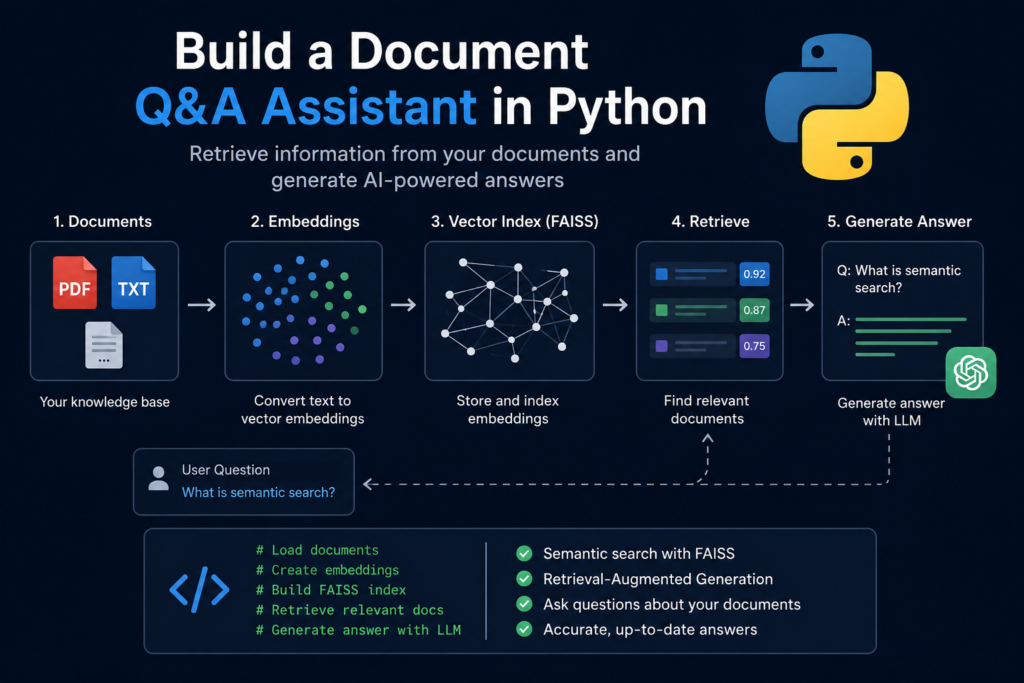
🚀 What You Will Build
In this hands-on tutorial, you will build a document Q&A assistant in Python that can answer questions using your own documents instead of relying solely on a language model’s pre-trained knowledge.
Rather than building each component separately, you will combine document loading, vector search, semantic retrieval, and AI-powered answer generation into a complete interactive application.
By the end of this guide, you will build a document Q&A assistant in Python that can search a collection of documents, retrieve the most relevant information, and generate accurate answers based on that context.
🧠 What You Will Learn
During this tutorial, you will learn how to:
- load and index documents
- generate vector embeddings
- build a searchable FAISS index
- retrieve relevant document passages
- generate answers with a Large Language Model
- create an interactive question-and-answer application
Each step builds toward a complete AI assistant that answers questions using your own knowledge base.
🛠 Technologies Used
This project combines several technologies introduced throughout the previous tutorials.
You will use:
- Python
- sentence-transformers
- FAISS
- OpenAI API
- NumPy
Together, these tools form the foundation of many modern AI retrieval applications.
📚 Before You Start
This tutorial assumes a basic understanding of semantic search and vector retrieval.
If you have not yet built a search engine, we recommend reading:
Build a Vector Search Engine with FAISS
The concepts covered there will help you better understand how document retrieval works inside the assistant.
🎯 Final Result
After completing this tutorial, you will have a fully functional document Q&A assistant that can:
- search your own documents
- retrieve the most relevant information
- answer questions using an LLM
- support interactive conversations from the command line
This project represents a practical AI assistant that can later be extended with PDF support, metadata filtering, hybrid retrieval, memory, and a web interface.
🛠 Prerequisites
Before you build a document Q&A assistant in Python, make sure your development environment is ready.
This tutorial builds upon the previous tutorials by combining vector search with AI-powered answer generation. Instead of focusing on individual components, you will integrate them into a complete interactive application.
Install the required packages:
pip install sentence-transformers faiss-cpu openai python-dotenv numpyCreate the following project structure:
document-qa-assistant/
│
├── documents/
│     sample.txt
│
├── main.py
├── requirements.txt
├── .env
└── index/
The documents folder will store the knowledge base that your assistant searches when answering questions.
Create a .env file and add your OpenAI API key:
OPENAI_API_KEY=your_api_key_hereThroughout this tutorial, you will use:
- Python
- sentence-transformers
- FAISS
- OpenAI API
- NumPy
Sentence Transformers generates document embeddings, FAISS retrieves the most relevant documents, and OpenAI generates natural language answers using the retrieved context.
By the end of this tutorial, you will build a document Q&A assistant in Python that can search your own documents, retrieve the most relevant information, and answer questions through an interactive command-line interface.
📂 Step 1 — Load the Documents
The first step to build a document Q&A assistant in Python is loading the documents that will become the assistant’s knowledge base.
For simplicity, this tutorial uses plain text files stored inside the documents folder. The same workflow can later be extended to PDF, Word, HTML, Markdown, or database content.
Create a document loader:
from pathlib import Path


def load_documents(folder_path):
    documents = []

    for file_path in Path(folder_path).glob("*.txt"):
        text = file_path.read_text(encoding="utf-8").strip()

        if not text:
            continue

        documents.append({
            "filename": file_path.name,
            "content": text
        })

    return documents
Now load the knowledge base:
documents = load_documents("documents")

print(f"Loaded {len(documents)} documents.")
Example output:
Loaded 5 documents.Each document is stored as a Python dictionary containing its filename and text content:
{
    "filename": "semantic-search.txt",
    "content": "Semantic search retrieves information based on meaning..."
}
The empty-file check prevents blank documents from entering the retrieval pipeline and producing low-quality embeddings later.
For this tutorial, each text file will be treated as a single searchable unit. In larger applications, long documents should usually be divided into smaller chunks before indexing.
At this stage, the assistant has access to its source documents, but it cannot search them yet.
The next step is converting the document text into vector embeddings that represent semantic meaning.
🧠 Step 2 — Generate Embeddings
Now it’s time to convert your documents into vector embeddings.
Embeddings capture the semantic meaning of text, allowing the assistant to retrieve relevant information even when the user’s question does not contain the exact words found in the documents.
If you would like to learn more about embeddings, read our guide:
Load the embedding model:
from sentence_transformers import SentenceTransformer
import numpy as np

embedding_model = SentenceTransformer(
    "all-MiniLM-L6-v2"
)
Generate embeddings for every document:
document_texts = [
    document["content"]
    for document in documents
]

embeddings = embedding_model.encode(
    document_texts,
    convert_to_numpy=True,
    normalize_embeddings=True
)

embeddings = embeddings.astype("float32")
Verify the generated embeddings:
print(embeddings.shape)Example output:
(5, 384)This output indicates that five documents have been converted into five embedding vectors, each represented by 384 numerical values.
Normalizing the embeddings prepares them for cosine similarity search, allowing semantically similar documents to be retrieved efficiently.
At this point, your document Q&A assistant in Python has transformed its knowledge base into a machine-readable vector representation.
The next step is building a FAISS index that enables fast semantic search across all document embeddings.
🗄 Step 3 — Build the Search Index
Now it’s time to build a document Q&A assistant in Python by creating the search index.
A vector index is the component that allows the assistant to retrieve relevant documents in milliseconds. Instead of scanning every document one by one, FAISS performs efficient similarity search across all document embeddings.
If you would like to learn more about vector indexing, read our tutorial:
Build a Vector Search Engine with FAISS
Create the FAISS index:
import faiss

dimension = embeddings.shape[1]

index = faiss.IndexFlatIP(dimension)
Add all document embeddings to the index:
index.add(embeddings)

print(f"Indexed {index.ntotal} documents.")
Example output:
Indexed 5 documents.At this point, every document is stored inside a searchable vector index.
Because the embeddings were normalized during the previous step, IndexFlatIP performs cosine similarity search using the inner product. This provides accurate semantic retrieval while keeping the implementation simple.
Your document Q&A assistant in Python can now search documents based on meaning rather than exact keyword matching.
The next step is implementing the retrieval function that finds the most relevant documents for each user question.
🔎 Step 4 — Retrieve Relevant Documents
With the FAISS index in place, the next step is retrieving the documents that best match a user’s question.
This retrieval stage is the core of every document Q&A assistant in Python. Before a language model can generate an accurate answer, the system must first identify the most relevant information from the knowledge base.
If you would like to learn more about semantic retrieval, read our guide:
Create a retrieval function:
def retrieve_documents(query, top_k=3):

    query_embedding = embedding_model.encode(
        [query],
        convert_to_numpy=True,
        normalize_embeddings=True
    ).astype("float32")

    scores, indices = index.search(
        query_embedding,
        top_k
    )

    results = []

    for score, idx in zip(scores[0], indices[0]):
        results.append({
            "score": float(score),
            "filename": documents[idx]["filename"],
            "content": documents[idx]["content"]
        })

    return results
Now test the retrieval process:
query = "What is semantic search?"

results = retrieve_documents(query)

for result in results:
    print(f"Score: {result['score']:.3f}")
    print(f"File: {result['filename']}")
    print(result["content"][:200])
    print("-" * 60)
Example output:
Score: 0.917
File: semantic-search.txt

Semantic search retrieves documents based on meaning rather than exact keyword matching...
------------------------------------------------------------
Notice that the retrieved document does not need to contain the exact words used in the query. Instead, the retrieval process compares vector embeddings and returns the documents with the closest semantic meaning.
At this stage, your document Q&A assistant in Python can already retrieve relevant information from its knowledge base. The final step is connecting a Large Language Model so it can transform the retrieved context into a natural language answer.
🤖 Step 5 — Generate Answers
Your document Q&A assistant in Python can now retrieve relevant documents from the knowledge base.
The final step is passing those retrieved documents to a Large Language Model so it can generate a clear, natural language answer.
If you would like to understand how retrieval and generation work together, read our guide:
First, initialize the OpenAI client:
You can find the complete API reference, authentication guide, and SDK examples in the official OpenAI Developer Documentation:
from openai import OpenAI
from dotenv import load_dotenv
import os

load_dotenv()

client = OpenAI(
    api_key=os.getenv("OPENAI_API_KEY")
)
Now create a function that builds the prompt and generates an answer:
def generate_answer(query, retrieved_documents):

    context = "\n\n".join(
        document["content"]
        for document in retrieved_documents
    )

    prompt = f"""
You are a helpful AI assistant.

Answer the user's question using only the context below.

If the answer cannot be found in the provided documents, respond with:

"I don't know based on the provided documents."

Context:
{context}

Question:
{query}

Answer:
"""

    response = client.chat.completions.create(
        model="gpt-4o-mini",
        messages=[
            {
                "role": "user",
                "content": prompt
            }
        ],
        temperature=0.2
    )

    return response.choices[0].message.content
Test the complete question-answering process:
query = "What is semantic search?"

retrieved_documents = retrieve_documents(query)

answer = generate_answer(
    query,
    retrieved_documents
)

print(answer)
Example output:
Semantic search retrieves information based on meaning rather than exact keyword matching. Instead of comparing words, it compares vector embeddings to identify the most relevant documents.At this point, your document Q&A assistant in Python has completed the entire retrieval and generation workflow. It first retrieves the most relevant documents and then uses that context to generate an accurate answer.
In the next step, you will transform this functionality into an interactive assistant that can answer multiple questions in a continuous conversation.
💬 Step 6 — Build an Interactive Q&A Loop
So far, your document Q&A assistant in Python can answer a single question.
To make it feel like a real AI assistant, let’s allow users to ask multiple questions without restarting the program.
Create a simple interactive loop:
while True:

    question = input("\nYou: ")

    if question.lower() in ["exit", "quit"]:
        print("Assistant: Goodbye!")
        break

    retrieved_documents = retrieve_documents(question)

    answer = generate_answer(
        question,
        retrieved_documents
    )

    print(f"\nAssistant: {answer}")
Example session:
You: What is semantic search?

Assistant:
Semantic search retrieves information based on meaning rather than exact keyword matching.

You: Why are embeddings important?

Assistant:
Embeddings convert text into numerical vectors, allowing semantically similar documents to be retrieved efficiently.

You: exit

Assistant: Goodbye!
With only a few additional lines of code, your document Q&A assistant in Python becomes an interactive application instead of a single-use script.
Although this example uses a command-line interface, the same workflow can later power a web application, chatbot, desktop application, or internal knowledge assistant.
The interaction loop remains the same:
- Receive the user’s question.
- Retrieve the most relevant documents.
- Generate an answer using the retrieved context.
- Wait for the next question.
In the next step, you will combine every component into a complete document Q&A assistant in Python that is easy to reuse and extend.
🎯 Step 7 — Build the Complete Assistant
You have now implemented every major component required to build a document Q&A assistant in Python.
The final step is combining everything into a single application that loads documents, retrieves relevant information, and answers user questions through an interactive interface.
The complete workflow looks like this:
Documents
      │
      ▼
Generate Embeddings
      │
      ▼
Create FAISS Index
      │
      ▼
User Question
      │
      ▼
Retrieve Relevant Documents
      │
      ▼
Generate Answer with LLM
      │
      ▼
Display Response
Now wrap the entire workflow inside a reusable class:
class DocumentQAAssistant:

    def __init__(self, embedding_model, index, documents):
        self.embedding_model = embedding_model
        self.index = index
        self.documents = documents

    def ask(self, question):

        retrieved_documents = retrieve_documents(question)

        answer = generate_answer(
            question,
            retrieved_documents
        )

        return answer
Create an assistant instance:
assistant = DocumentQAAssistant(
    embedding_model,
    index,
    documents
)
Now start asking questions:
while True:

    question = input("\nYou: ")

    if question.lower() in ["exit", "quit"]:
        break

    print("\nAssistant:")
    print(assistant.ask(question))
Example session:
You:
What is Retrieval-Augmented Generation?

Assistant:
Retrieval-Augmented Generation combines semantic search with a Large Language Model. The system first retrieves the most relevant documents before generating an answer.

You:
How does semantic search work?

Assistant:
Semantic search compares vector embeddings instead of exact keywords, allowing documents with similar meaning to be retrieved.

You:
exit
At this point, you have successfully built a document Q&A assistant in Python that combines document retrieval with AI-powered answer generation.
Although this implementation is intentionally simple, it demonstrates the same architecture used by many production AI assistants. Additional features such as conversation memory, metadata filtering, reranking, and web interfaces can all be added on top of this foundation.
The next section explores where to go after building your first document Q&A assistant in Python.
🚀 Where to Go Next
Congratulations! You have successfully built a document Q&A assistant in Python that can search your own documents and generate AI-powered answers based on retrieved context.
While this implementation is intentionally simple, it demonstrates the complete workflow used by many modern Retrieval-Augmented Generation applications.
From here, you can continue improving your assistant with more advanced features.
📄 Support More Document Types
Instead of working with plain text files, extend your assistant to process:
- PDF documents
- Microsoft Word files
- HTML pages
- Markdown files
- web content
- databases
This allows your assistant to work with real-world knowledge bases.
⚡ Improve Retrieval Quality
As your knowledge base grows, you can improve answer quality by adding:
- metadata filtering
- hybrid search
- reranking
- query expansion
- document chunking
These techniques help retrieve more relevant information before answer generation.
🧠 Add Conversation Memory
The current assistant answers each question independently.
A more advanced assistant can remember previous questions, summarize conversations, and use chat history to provide more natural multi-turn interactions.
🌐 Build a User Interface
Instead of using the command line, you can create:
- a web application
- a desktop application
- a chatbot
- a REST API
- an internal company knowledge assistant
The retrieval pipeline remains the same while the user experience becomes much more practical.
🎯 Continue Building
Now that you have built a document Q&A assistant in Python, you have a solid foundation for creating production-ready AI assistants capable of searching documents, answering questions, and supporting real business workflows.
❓ Frequently Asked Questions (FAQ)
Can I build a document Q&A assistant in Python without LangChain?
Yes.
This tutorial demonstrates how to build a document Q&A assistant in Python using only a few lightweight libraries. This approach makes it easier to understand how document retrieval, semantic search, and answer generation work together.
Why does the assistant use FAISS?
FAISS provides fast semantic similarity search over document embeddings.
Instead of scanning every document, it quickly retrieves the most relevant information that is later used by the language model to generate an answer.
Can I use PDF or Word documents?
Absolutely.
This tutorial uses plain text files to keep the implementation simple, but the same workflow can easily be extended to PDF documents, Microsoft Word files, HTML pages, Markdown files, or database records.
How many documents can the assistant search?
There is no fixed limit.
The number of searchable documents depends on the selected FAISS index, available memory, and hardware resources. FAISS can efficiently handle collections ranging from hundreds to millions of document embeddings.
Can I use another embedding model?
Yes.
The all-MiniLM-L6-v2 model is a good starting point because it offers an excellent balance between speed and retrieval quality.
For production applications, you should evaluate different embedding models using your own documents.
Is this assistant suitable for production?
This project demonstrates the core architecture of a modern document Q&A assistant.
Before deploying it in production, you should consider adding authentication, metadata filtering, conversation memory, reranking, monitoring, and scalable vector storage.
What’s the difference between a document Q&A assistant and a RAG system?
A document Q&A assistant is a practical application built on top of a Retrieval-Augmented Generation pipeline.
The RAG system retrieves relevant documents, while the assistant combines retrieval, answer generation, and user interaction into a complete application.
🎯 Conclusion
In this tutorial, you learned how to build a document Q&A assistant in Python from the ground up.
Starting with a collection of documents, you generated vector embeddings, created a FAISS index, implemented semantic retrieval, connected a Large Language Model, and built an interactive assistant capable of answering questions using your own knowledge base.
Instead of relying solely on the language model’s pre-trained knowledge, your assistant retrieves relevant information before generating each response. This Retrieval-Augmented Generation approach produces more accurate, transparent, and up-to-date answers.
🧠 What You Accomplished
By completing this tutorial, you have successfully built a document Q&A assistant in Python that can:
- load documents
- generate vector embeddings
- build a FAISS search index
- retrieve relevant documents
- generate AI-powered answers
- support interactive question-and-answer sessions
These are the same core building blocks used in many modern enterprise AI assistants and internal knowledge systems.
🚀 Your Next Challenge
The assistant you’ve built is intentionally simple, making it easy to understand and extend.
As your applications become more sophisticated, you can add:
- conversation memory
- metadata filtering
- hybrid search
- reranking
- PDF and Word document support
- web interfaces
- REST APIs
- production vector databases
Each new feature builds upon the same retrieval pipeline implemented in this tutorial.
🎯 Final Thought
Building a document Q&A assistant in Python is more than just creating another AI application.
It is an opportunity to understand how modern AI assistants retrieve knowledge, reason over documents, and generate reliable answers.
With this foundation, you are ready to build more advanced Retrieval-Augmented Generation applications for personal projects, business knowledge bases, and production AI systems.