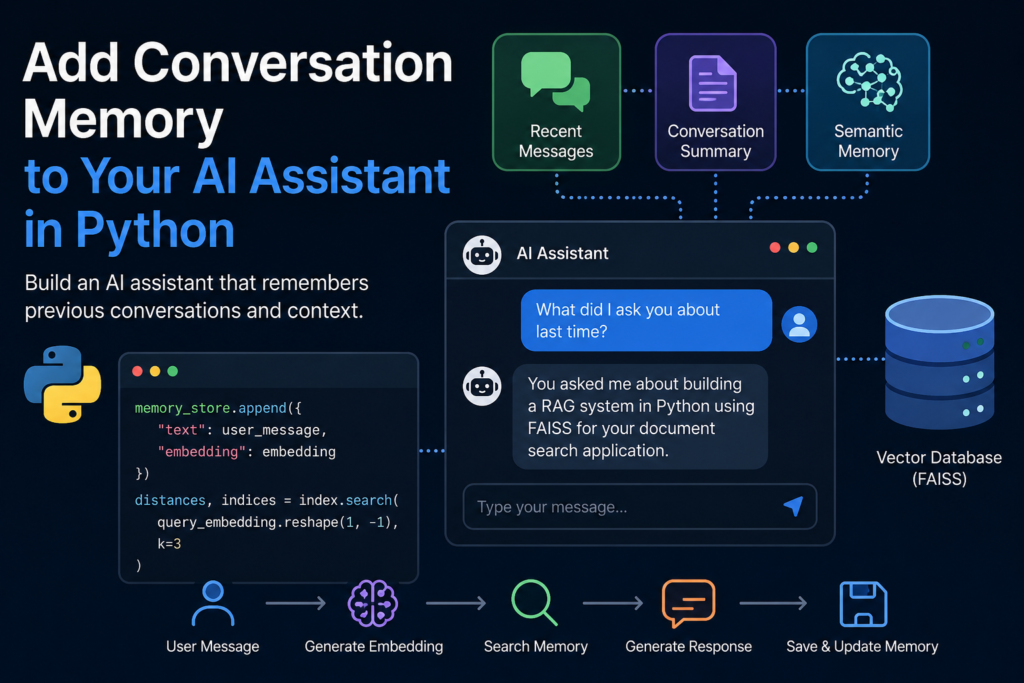
What You Will Build
In this tutorial, you will add conversation memory to your AI assistant in Python. Instead of processing every message as an isolated request, the assistant will use previous messages to understand context and maintain a natural multi-turn conversation.
You will start with a simple conversation history, then add short-term memory, context-window management, summarization for long conversations, and retrieval of relevant past messages.
By the end of the tutorial, you will have a memory-aware AI assistant that can remember important details, follow references from earlier messages, and respond more consistently throughout a conversation.
What You Will Learn
- How to store conversation history in Python
- How to pass recent messages to an LLM as context
- How to manage a limited context window
- How to summarize long conversations
- How to retrieve relevant memories from previous messages
- How to build a complete memory-aware AI assistant
Prerequisites
Before you add conversation memory to your AI assistant in Python, make sure you have completed the previous tutorial, Build a Document Q&A Assistant in Python. This tutorial builds directly on that project and shows how to add conversation memory without changing the overall architecture.
To successfully add conversation memory to your AI assistant in Python, you should already have:
- Python 3.10 or later installed
- An OpenAI API key
- A working document retrieval pipeline
- A FAISS vector index
- Sentence Transformers for generating embeddings
Install the required libraries if they are not already available in your environment:
pip install openai sentence-transformers faiss-cpuThe official OpenAI Developer Documentation includes API references, SDK examples, and authentication guides for integrating memory features into your AI applications.
After completing these prerequisites, you will be ready to add conversation memory to your AI assistant in Python and build a chatbot that understands context across multiple user interactions instead of treating every message as an independent request.
Step 1 — Store Conversation History
The first step to add conversation memory to your AI assistant in Python is storing every message exchanged between the user and the assistant. Without conversation history, an LLM treats each request as a completely new interaction and has no knowledge of what was discussed previously.
The simplest approach is to save each message as an object containing its role and content. Later, this conversation history will be sent to the model so it can generate responses based on the entire discussion instead of a single prompt.
Let’s begin by creating an empty conversation history:
conversation = []Each message consists of two fields:
- role — identifies whether the message belongs to the user or the assistant.
- content — stores the actual text of the message.
Whenever the user sends a new message, append it to the conversation:
conversation.append({
    "role": "user",
    "content": user_message
})
After generating a response, save the assistant’s reply as well:
conversation.append({
    "role": "assistant",
    "content": assistant_reply
})
After several interactions, the conversation history may look like this:
conversation = [
    {
        "role": "user",
        "content": "What is a RAG system?"
    },
    {
        "role": "assistant",
        "content": "A RAG system combines retrieval with a large language model..."
    },
    {
        "role": "user",
        "content": "How does retrieval work?"
    }
]
This simple structure is the foundation for adding conversation memory to your AI assistant in Python. In the next step, we’ll pass recent messages to the language model so it can understand the context of the ongoing conversation.
Step 2 — Use Recent Messages as Context
After you store the conversation history, the next step to add conversation memory to your AI assistant in Python is sending recent messages to the language model. Instead of providing only the latest user request, you include previous messages so the model understands the current context.
The OpenAI Chat Completions API accepts a list of messages. Each message contains a role and its content, allowing the model to follow the conversation naturally.
Prepare the messages that will be sent to the model:
messages = [
    {
        "role": "system",
        "content": "You are a helpful AI assistant."
    }
]

messages.extend(conversation)
Generate a response using the complete conversation history:
from openai import OpenAI

client = OpenAI()

response = client.chat.completions.create(
    model="gpt-4.1-mini",
    messages=messages
)

assistant_reply = response.choices[0].message.content
Finally, store the assistant’s response so it becomes part of the conversation memory:
conversation.append({
    "role": "assistant",
    "content": assistant_reply
})
At this point, your AI assistant no longer answers questions independently. By passing the conversation history with every request, you successfully add conversation memory to your AI assistant in Python and enable natural follow-up questions such as “Can you explain that in more detail?” or “Give me another example.” The model already knows what “that” refers to because it has access to the previous messages.
However, this approach has one limitation. As conversations become longer, the number of messages continues to grow, increasing token usage, response time, and API costs. In the next step, you’ll learn how to manage a limited context window while keeping the most important parts of the conversation.
Step 3 — Manage the Context Window
As you continue to add conversation memory to your AI assistant in Python, the conversation history will eventually become too large to send with every request. Large language models have a limited context window, and sending hundreds of previous messages increases token usage, slows down responses, and raises API costs.
A common solution is to keep only the most recent messages. In many applications, the latest part of the conversation contains enough context for the model to generate accurate responses.
For example, you can keep only the last 10 messages:
MAX_MESSAGES = 10

conversation = conversation[-MAX_MESSAGES:]
If you also use a system prompt, include it separately before adding the recent conversation history:
messages = [
    {
        "role": "system",
        "content": "You are a helpful AI assistant."
    }
]

messages.extend(conversation[-MAX_MESSAGES:])
This sliding window technique provides several advantages:
- Reduces token consumption
- Improves response speed
- Lowers API costs
- Keeps the prompt focused on the current discussion
However, simply removing older messages has an important drawback. The assistant may forget information mentioned earlier in the conversation, such as the user’s preferences, project details, or previous decisions. Although this approach helps add conversation memory to your AI assistant in Python, it only provides short-term memory.
To preserve important information without sending the entire conversation, the next step is to summarize older messages into a compact memory that the assistant can use throughout the discussion.
Step 4 — Summarize Long Conversations
When you add conversation memory to your AI assistant in Python, keeping only the most recent messages is often not enough. Important information from earlier in the conversation may disappear from the context window, causing the assistant to forget user preferences, project details, or previous decisions.
A better approach is to summarize older messages into a compact memory. Instead of sending dozens of previous exchanges to the language model, you replace them with a short summary that preserves the most important information while using far fewer tokens.
For example, imagine the original conversation contains more than fifty messages. Rather than sending the entire history, you can create a summary like this:
conversation_summary = """
The user is building a RAG system in Python.
The project uses FAISS for vector search.
The assistant should provide production-ready code examples.
The user prefers short, practical explanations.
"""
Include this summary as part of the system prompt before sending the recent conversation history:
messages = [
    {
        "role": "system",
        "content": f"""
You are a helpful AI assistant.

Conversation summary:
{conversation_summary}
"""
    }
]

messages.extend(conversation[-MAX_MESSAGES:])
The summary acts as compressed long-term context. The model no longer needs to process every previous message because the essential information has already been preserved.
Using conversation summaries provides several benefits:
- Preserves important information from earlier discussions
- Greatly reduces token usage
- Improves response speed
- Helps maintain consistent answers throughout long conversations
By combining a conversation summary with a sliding context window, you significantly improve the quality of conversation memory in your AI assistant in Python. However, there is still one limitation. A summary contains only general information and may omit specific details that become important later. In the next step, you’ll solve this problem by retrieving only the most relevant memories for each new user request.
Step 5 — Retrieve Relevant Memories
Conversation summaries work well for preserving general context, but they cannot remember every detail. If you want to add conversation memory to your AI assistant in Python that scales to long-term conversations, you need a way to retrieve only the memories that are relevant to the current question.
This approach is very similar to Retrieval-Augmented Generation (RAG). Instead of searching documents, you search previous conversations. Every message can be converted into an embedding and stored in a vector database such as FAISS. When the user asks a new question, the assistant retrieves only the most relevant memories and includes them in the prompt.
The workflow looks like this:
User Question
        │
        ▼
Generate Embedding
        │
        ▼
Search Memory Index
        │
        ▼
Retrieve Relevant Messages
        │
        ▼
Send to LLM
        │
        ▼
Generate Response
Store every conversation message together with its embedding:
memory_store.append({
    "text": user_message,
    "embedding": embedding
})
When a new question arrives, search for the most relevant memories:
query_embedding = model.encode(user_message)

distances, indices = index.search(
    query_embedding.reshape(1, -1),
    k=3
)
Retrieve the matching messages:
relevant_memories = [
    memory_store[i]["text"]
    for i in indices[0]
]
Finally, include these memories in the prompt before generating the response:
messages = [
    {
        "role": "system",
        "content": f"""
Relevant memories:

{chr(10).join(relevant_memories)}
"""
    }
]

messages.extend(conversation[-MAX_MESSAGES:])
This retrieval-based approach allows you to add conversation memory to your AI assistant in Python without sending the entire conversation history. The model receives only the information that is relevant to the current question, resulting in lower token usage, faster responses, and more accurate answers.
You now have three complementary memory techniques working together: a sliding context window for recent messages, conversation summaries for long-term context, and semantic retrieval for specific memories. In the next step, you’ll combine all of these components into a complete memory-aware AI assistant.
Step 6 — Build a Memory-Aware AI Assistant
Now it’s time to combine everything you’ve built to add conversation memory to your AI assistant in Python. Instead of relying on a single technique, a production-ready assistant uses multiple memory mechanisms working together. Recent messages provide immediate context, conversation summaries preserve long-term information, and semantic retrieval brings back important details from previous interactions.
The overall workflow looks like this:
User Message
      │
      ▼
Retrieve Relevant Memories
      │
      ▼
Load Conversation Summary
      │
      ▼
Add Recent Messages
      │
      ▼
Build Prompt
      │
      ▼
OpenAI API
      │
      ▼
Assistant Response
      │
      ▼
Save Conversation
      │
      ▼
Update Memory
The following example demonstrates how these components can work together:
messages = [
    {
        "role": "system",
        "content": f"""
You are a helpful AI assistant.

Conversation summary:
{conversation_summary}

Relevant memories:
{chr(10).join(relevant_memories)}
"""
    }
]

messages.extend(conversation[-MAX_MESSAGES:])

response = client.chat.completions.create(
    model="gpt-4.1-mini",
    messages=messages
)

assistant_reply = response.choices[0].message.content

conversation.append({
    "role": "user",
    "content": user_message
})

conversation.append({
    "role": "assistant",
    "content": assistant_reply
})
With this architecture, your assistant can remember both recent and historical information without exceeding the model’s context window. Most importantly, you add conversation memory to your AI assistant in Python while keeping token usage under control and maintaining fast response times.
This design is also highly scalable. As conversations grow longer, only the most relevant information is sent to the language model. The assistant no longer depends on the full chat history, making it suitable for real-world applications such as customer support, internal knowledge assistants, coding copilots, and document chat systems.
In the next section, you’ll test the assistant with a multi-turn conversation to see how conversation memory improves the quality and consistency of its responses.
Test Multi-Turn Conversations
After you add conversation memory to your AI assistant in Python, the final step is to verify that it can maintain context across multiple interactions. Unlike a stateless chatbot, a memory-aware assistant should understand follow-up questions, remember previous topics, and provide consistent answers throughout the conversation.
Consider the following example:
User:
I'm building a RAG system in Python.

Assistant:
Great! What vector database are you using?

User:
FAISS.

Assistant:
FAISS is an excellent choice for semantic search.

User:
How can I improve its retrieval quality?
Because the assistant remembers the previous conversation, it understands that its refers to the FAISS index rather than asking the user to clarify what they mean.
Without conversation memory, the assistant might respond:
Could you specify what "its" refers to?With conversation memory enabled, the response becomes much more natural:
You can improve FAISS retrieval quality by using better chunking,
higher-quality embeddings, metadata filtering, hybrid search,
or a reranking model.
This simple example demonstrates why developers add conversation memory to their AI assistant in Python. The assistant can understand references, continue previous discussions, and provide responses that feel much more natural than isolated question-and-answer interactions.
As your application grows, you can further improve conversation memory by combining recent messages, conversation summaries, and semantic memory retrieval. This layered approach scales well from small personal assistants to production AI systems serving thousands of users.
Congratulations! You have successfully built an AI assistant that remembers previous conversations, manages its context efficiently, and retrieves relevant memories when needed. In the next section, we’ll explore where to go next and how to continue evolving this assistant into a production-ready AI application.
Where to Go Next
Congratulations! You have successfully learned how to add conversation memory to your AI assistant in Python. Your assistant can now remember previous messages, manage its context window, summarize long conversations, and retrieve relevant memories when needed.
However, conversation memory is only one part of building a production-ready AI assistant. Modern AI applications combine multiple techniques to improve retrieval quality, reduce hallucinations, and provide faster, more accurate responses.
The next tutorials in this series will help you continue improving your assistant:
- Build a RAG System in Python — combine document retrieval with LLMs.
- Build a Vector Search Engine with FAISS — create a fast semantic search engine.
- Build a Document Q&A Assistant in Python — answer questions using your own documents.
- Metadata Filtering — retrieve only documents that match specific criteria.
- Hybrid Search — combine vector search with keyword search for better retrieval accuracy.
- Reranking — improve search quality by reordering retrieved results with a cross-encoder.
- Deploy Your AI Assistant with FastAPI — turn your assistant into a production-ready REST API.
By following this roadmap, you’ll gradually transform a simple chatbot into a scalable AI assistant capable of handling real-world applications such as customer support, internal knowledge bases, coding assistants, and enterprise search systems.
In the next tutorial, you’ll learn how to use metadata filtering to retrieve more relevant information while reducing unnecessary search results.
Frequently Asked Questions
Why should I add conversation memory to my AI assistant in Python?
Without conversation memory, an AI assistant treats every request as a completely new interaction. By adding conversation memory, the assistant can remember previous messages, understand follow-up questions, and maintain a natural conversation across multiple turns.
Is storing the entire conversation history a good idea?
Usually not. As conversations grow longer, sending the complete history increases token usage, API costs, and response time. Most production systems combine a sliding context window, conversation summaries, and semantic memory retrieval instead of keeping every message in the prompt.
What is the difference between conversation memory and RAG?
Conversation memory stores information from previous interactions with the user. Retrieval-Augmented Generation (RAG) retrieves information from external knowledge sources such as documents, databases, or websites. Many production AI assistants combine both techniques to provide accurate and context-aware responses.
Can I use a vector database for conversation memory?
Yes. A vector database such as FAISS allows you to store embeddings of previous messages and retrieve only the memories that are relevant to the current question. This approach scales much better than sending the entire conversation history to the language model.
What is the best approach to add conversation memory to your AI assistant in Python?
A production-ready solution combines several techniques: recent messages for short-term context, conversation summaries for long-term memory, and semantic retrieval to find the most relevant past interactions. This architecture provides high-quality responses while keeping token usage efficient.
Conclusion
In this tutorial, you learned how to add conversation memory to your AI assistant in Python using a practical, production-oriented approach. Instead of treating every user message as an independent request, your assistant can now understand context, remember previous interactions, and generate more consistent responses throughout a conversation.
You implemented conversation history, a sliding context window, conversation summarization, and semantic memory retrieval. Together, these techniques create a scalable memory architecture that improves both response quality and token efficiency.
Although this implementation is relatively simple, the same principles are used in many modern AI applications, including customer support assistants, coding copilots, enterprise knowledge systems, and personal AI assistants. As conversations become longer, combining short-term memory with retrieved long-term memories provides a practical balance between performance, cost, and accuracy.
Adding conversation memory to your AI assistant in Python is an important step toward building production-ready AI systems. In the next tutorials, you’ll continue extending this assistant with metadata filtering, hybrid search, reranking, and deployment techniques that make modern Retrieval-Augmented Generation (RAG) applications even more powerful.