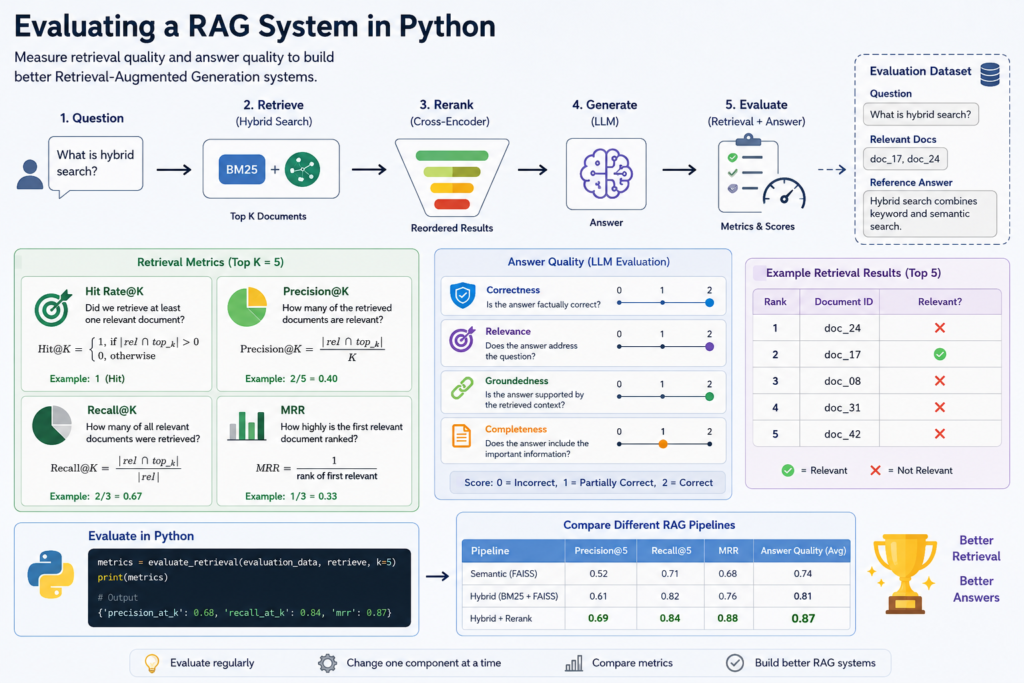
What You Will Build
In this tutorial, you will learn how to evaluate a RAG system in Python using a repeatable testing pipeline. Instead of judging your Retrieval-Augmented Generation (RAG) system by a few successful examples, you will measure how well it retrieves relevant documents and how accurately it answers questions.
A RAG system contains two major stages that should be evaluated separately. First, the retrieval pipeline must find the right information. Second, the language model must use that information to generate a useful and accurate answer. A failure at either stage can reduce the quality of the final response.
The evaluation workflow will look like this:
Evaluation Dataset
        │
        ▼
   Test Questions
        │
        ▼
     RAG System
        │
        ├───────────────┐
        ▼               ▼
Retrieved Documents   Generated Answer
        │               │
        ▼               ▼
Retrieval Metrics    Answer Evaluation
        │               │
        └───────┬───────┘
                ▼
        Evaluation Results
You will create a small evaluation dataset containing test questions and expected relevant documents. Then you will run those questions through the RAG pipeline and compare the retrieved results with the expected results.
What You Will Learn
- Why RAG systems need systematic evaluation
- How to create a reusable RAG evaluation dataset
- How to measure retrieval quality
- How Precision@K, Recall@K, and Mean Reciprocal Rank work
- How to evaluate generated answers separately from retrieval
- How to compare different versions of a RAG pipeline
- How to evaluate a RAG system in Python using repeatable experiments instead of subjective impressions
By the end of this tutorial, you will have a simple evaluation framework that can tell you whether changes such as metadata filtering, hybrid search, or reranking actually improve your RAG system.
Prerequisites
Before you evaluate a RAG system in Python, you should already have a working Retrieval-Augmented Generation pipeline that can retrieve documents and generate answers from the retrieved context.
This tutorial continues the practical RAG system built in the previous guides. Your pipeline may already include semantic search, metadata filtering, hybrid retrieval, and cross-encoder reranking, but the evaluation techniques in this tutorial can also be applied to simpler RAG architectures.
Your project should include:
- Python 3.10 or later
- A collection of indexed document chunks
- A working retrieval function
- A unique ID for each document or chunk
- A function that generates answers from retrieved context
- A small set of representative questions for testing
For example, your retrieval function might already look like this:
def retrieve(query, top_k=5):
    candidate_documents = hybrid_search(
        query,
        top_k=20
    )

    return rerank_documents(
        query,
        candidate_documents,
        top_k=top_k
    )
Each retrieved document should contain a stable identifier so that the evaluation code can compare actual retrieval results with the documents you expected the system to find:
{
    "id": "doc_17",
    "text": "Hybrid search combines keyword and semantic retrieval.",
    "metadata": {
        "category": "rag"
    }
}
You do not need a large benchmark to begin. A carefully selected set of questions can already reveal retrieval failures that are difficult to notice when testing the system manually.
The important requirement is consistency. If you want to evaluate a RAG system in Python and compare different pipeline versions, the same questions and expected results should be used for every experiment.
In the next step, you’ll examine why evaluating retrieval and answer generation separately is essential for understanding where a RAG system succeeds or fails.
Step 1 — Why RAG Evaluation Matters
Building a RAG system is only the beginning. Once the pipeline starts returning plausible answers, it can be tempting to assume that retrieval is working correctly. However, a few successful manual tests do not tell you how reliably the system performs across different questions.
To evaluate a RAG system in Python properly, you need to separate two different questions:
- Did the retrieval pipeline find the right documents?
- Did the language model generate a good answer from those documents?
This distinction is important because the final answer alone does not reveal where a failure occurred.
Consider this example:
Question:
How does hybrid search improve RAG retrieval?

Expected document:
doc_17

Retrieved documents:
doc_04
doc_11
doc_23
doc_31
doc_42
The correct document never reached the language model. Even a powerful LLM cannot reliably generate a grounded answer if the retrieval stage fails to provide the necessary information.
Now consider a different situation:
Question:
How does hybrid search improve RAG retrieval?

Expected document:
doc_17

Retrieved documents:
doc_17
doc_11
doc_23
doc_31
doc_42

Generated answer:
Incomplete or incorrect
Here, retrieval succeeded. The relevant document was available in the context, so the problem is more likely related to answer generation, prompt construction, context handling, or the language model itself.
This gives us two separate evaluation layers:
RAG Evaluation
      │
      ├───────────────┐
      ▼               ▼
Retrieval Quality   Answer Quality
      │               │
      ▼               ▼
Did we find        Did the LLM use
the right docs?    them correctly?
Evaluating these layers separately makes experiments much more useful. If you add hybrid search or reranking and retrieval metrics improve, you have evidence that the change helped document selection. If retrieval stays the same but answer quality improves after changing the prompt, you can attribute the improvement to the generation stage.
This is the main reason to evaluate a RAG system in Python systematically: evaluation turns RAG development from trial and error into measurable experimentation.
In the next step, you’ll create a small evaluation dataset containing questions and expected relevant documents that can be reused every time the RAG pipeline changes.
Step 2 — Create a RAG Evaluation Dataset
To evaluate a RAG system in Python consistently, you need a fixed set of test questions with known expected results. This collection becomes your evaluation dataset and allows you to run the same tests every time you change the retrieval pipeline.
A simple evaluation example can contain a question and the ID of the document that should be retrieved:
evaluation_data = [
    {
        "question": "What is hybrid search?",
        "relevant_docs": ["doc_17"]
    },
    {
        "question": "How does reranking improve retrieval?",
        "relevant_docs": ["doc_24"]
    },
    {
        "question": "Why use metadata filtering in RAG?",
        "relevant_docs": ["doc_31"]
    }
]
Some questions may have more than one relevant document. In that case, include all acceptable document IDs:
{
    "question": "How can I improve retrieval accuracy?",
    "relevant_docs": [
        "doc_17",
        "doc_24",
        "doc_31"
    ]
}
The expected documents should be selected manually rather than generated automatically by the same retrieval system you are evaluating. Otherwise, the evaluation may simply reproduce the assumptions and mistakes of the existing pipeline.
Your test questions should also represent different types of real user queries:
- Natural-language questions
- Exact technical terms
- Product names or identifiers
- Short and ambiguous queries
- Questions that require several relevant chunks
For a small project, you can store the dataset directly in Python. As the evaluation suite grows, moving it to JSON or another structured format makes it easier to maintain and reuse.
[
    {
        "question": "What is hybrid search?",
        "relevant_docs": ["doc_17"]
    },
    {
        "question": "How does a cross-encoder rerank documents?",
        "relevant_docs": ["doc_24"]
    }
]
The quality of this dataset directly affects the usefulness of your evaluation. If all questions are simple or nearly identical to phrases in the source documents, strong scores may not reflect how the RAG system performs on real user queries.
A good evaluation dataset therefore acts as a stable benchmark. When you change chunking, embeddings, metadata filtering, hybrid search, or reranking, you can run exactly the same questions again and measure whether retrieval actually improved.
In the next step, you’ll use this dataset to compare the expected document IDs with the documents returned by your retrieval pipeline.
Step 3 — Evaluate Retrieval Quality
Now that you have an evaluation dataset, you can test whether the retrieval pipeline actually finds the documents that contain the information needed to answer each question.
Start by running every test question through your retrieval function:
for example in evaluation_data:

    question = example["question"]
    relevant_docs = example["relevant_docs"]

    retrieved = retrieve(
        question,
        top_k=5
    )

    retrieved_ids = [
        document["id"]
        for document in retrieved
    ]

    print(question)
    print("Expected:", relevant_docs)
    print("Retrieved:", retrieved_ids)
For example, suppose the expected relevant document is doc_17:
Expected:
["doc_17"]

Retrieved:
["doc_24", "doc_17", "doc_08", "doc_31", "doc_42"]
The retrieval was successful because doc_17 appears in the top five results. However, its position also matters. A relevant document ranked second is generally more useful than the same document ranked twentieth, especially when only a limited number of chunks are sent to the language model.
A simple first metric is Hit Rate@K. It checks whether at least one relevant document appears within the first K retrieved results.
def hit_at_k(
    retrieved_ids,
    relevant_ids,
    k
):
    top_k = retrieved_ids[:k]

    return int(
        any(
            doc_id in relevant_ids
            for doc_id in top_k
        )
    )
For example:
retrieved = [
    "doc_24",
    "doc_17",
    "doc_08",
    "doc_31",
    "doc_42"
]

relevant = ["doc_17"]

print(hit_at_k(
    retrieved,
    relevant,
    k=5
))

# 1
If the relevant document is missing:
retrieved = [
    "doc_24",
    "doc_08",
    "doc_31",
    "doc_42",
    "doc_09"
]

print(hit_at_k(
    retrieved,
    relevant,
    k=5
))

# 0
You can calculate the average Hit Rate across the complete evaluation dataset:
hits = []

for example in evaluation_data:

    retrieved = retrieve(
        example["question"],
        top_k=5
    )

    retrieved_ids = [
        doc["id"]
        for doc in retrieved
    ]

    hits.append(
        hit_at_k(
            retrieved_ids,
            example["relevant_docs"],
            k=5
        )
    )

hit_rate = sum(hits) / len(hits)

print("Hit Rate@5:", hit_rate)
A Hit Rate@5 of 0.80, for example, means that at least one expected relevant document appeared in the top five results for 80% of the test questions.
Hit Rate is easy to understand, but it does not tell you how many relevant documents were retrieved or how highly they were ranked. To evaluate a RAG system in Python more precisely, you need additional retrieval metrics.
In the next step, you’ll calculate Precision@K, Recall@K, and Mean Reciprocal Rank to measure different aspects of retrieval quality.
Step 4 — Measure Precision, Recall, and MRR
Hit Rate tells you whether at least one relevant document appears in the retrieved results, but it does not provide a complete picture of retrieval quality. To evaluate a RAG system in Python more accurately, you can add metrics that measure how many retrieved documents are relevant and how highly the best relevant document is ranked.
For a deeper theoretical explanation of retrieval metrics, see Stanford’s Introduction to Information Retrieval — Evaluation in Information Retrieval .
Three useful retrieval metrics are Precision@K, Recall@K, and Mean Reciprocal Rank (MRR). Each metric answers a different question about your retrieval pipeline.
Precision@K
Precision@K measures what proportion of the first K retrieved documents are actually relevant.
def precision_at_k(
    retrieved_ids,
    relevant_ids,
    k
):
    top_k = retrieved_ids[:k]

    relevant_count = sum(
        doc_id in relevant_ids
        for doc_id in top_k
    )

    return relevant_count / k
Suppose the system retrieves five documents and two of them are relevant:
Retrieved:
["doc_17", "doc_08", "doc_24", "doc_42", "doc_11"]

Relevant:
["doc_17", "doc_24"]

Precision@5 = 2 / 5 = 0.40
A higher Precision@K means that fewer irrelevant chunks occupy the limited context that will eventually be sent to the language model.
Recall@K
Recall@K measures how many of all known relevant documents were successfully retrieved within the first K results.
def recall_at_k(
    retrieved_ids,
    relevant_ids,
    k
):
    top_k = retrieved_ids[:k]

    relevant_count = sum(
        doc_id in relevant_ids
        for doc_id in top_k
    )

    return (
        relevant_count /
        len(relevant_ids)
    )
For example:
Retrieved:
["doc_17", "doc_08", "doc_24", "doc_42", "doc_11"]

Relevant:
["doc_17", "doc_24", "doc_31"]

Recall@5 = 2 / 3 = 0.67
Precision and recall therefore describe different retrieval behavior. Precision asks whether the retrieved results are clean and relevant, while recall asks whether the system successfully found the relevant information that exists in the knowledge base.
Mean Reciprocal Rank
MRR focuses on ranking position. It measures how quickly the first relevant document appears in the result list.
If the first relevant document is ranked first, the reciprocal rank is 1. If it appears second, the score is 1/2. If it appears fifth, the score is 1/5.
def reciprocal_rank(
    retrieved_ids,
    relevant_ids
):
    for rank, doc_id in enumerate(
        retrieved_ids,
        start=1
    ):
        if doc_id in relevant_ids:
            return 1 / rank

    return 0
For example:
Retrieved:
["doc_08", "doc_42", "doc_17", "doc_24"]

Relevant:
["doc_17"]

Reciprocal Rank = 1 / 3 = 0.33
To calculate Mean Reciprocal Rank, compute the reciprocal rank for every question and average the results:
scores = []

for example in evaluation_data:

    retrieved = retrieve(
        example["question"],
        top_k=5
    )

    retrieved_ids = [
        doc["id"]
        for doc in retrieved
    ]

    scores.append(
        reciprocal_rank(
            retrieved_ids,
            example["relevant_docs"]
        )
    )

mrr = sum(scores) / len(scores)

print("MRR:", mrr)
Using these metrics together gives you a much better view of retrieval performance. Precision measures how much irrelevant information enters the result set, recall measures whether important information is being missed, and MRR shows whether useful documents appear near the top.
When you evaluate a RAG system in Python, these metrics also make experiments measurable. You can change chunk size, embedding models, BM25 weights, candidate counts, or reranking settings and compare the resulting scores against the same evaluation dataset.
This allows you to determine whether a retrieval change actually improves the system instead of relying on a few manually selected examples. In the next step, you’ll move beyond retrieval metrics and evaluate the answers generated by the language model.
Step 5 — Evaluate Generated Answers
Retrieval metrics tell you whether the RAG pipeline finds the right documents, but they do not tell you whether the language model produces a good final answer. To evaluate a RAG system in Python completely, you should measure retrieval quality and answer quality as separate stages.
For answer evaluation, extend the evaluation dataset with a reference answer:
evaluation_data = [
    {
        "question": "What is hybrid search?",
        "relevant_docs": ["doc_17"],
        "reference_answer": (
            "Hybrid search combines keyword "
            "and semantic retrieval."
        )
    },
    {
        "question": "What does reranking do?",
        "relevant_docs": ["doc_24"],
        "reference_answer": (
            "Reranking reorders retrieved "
            "documents by relevance."
        )
    }
]
Now run each question through the complete RAG pipeline:
for example in evaluation_data:

    generated_answer = ask_rag(
        example["question"]
    )

    print("Question:")
    print(example["question"])

    print("Reference:")
    print(example["reference_answer"])

    print("Generated:")
    print(generated_answer)
Exact string matching is usually not useful for RAG evaluation. Two answers can express the same information using completely different wording.
Instead, answer quality can be evaluated across several dimensions:
- Correctness — does the answer contain the expected information?
- Relevance — does it directly answer the user’s question?
- Groundedness — are its claims supported by the retrieved context?
- Completeness — does it include the important information required by the question?
For a small evaluation dataset, you can initially score answers manually. For example, use a simple scale from 0 to 2:
0 = Incorrect
1 = Partially correct
2 = Correct
Store the results together with each test case:
{
    "question": "What is hybrid search?",
    "reference_answer": (
        "Hybrid search combines keyword "
        "and semantic retrieval."
    ),
    "generated_answer": (
        "Hybrid search combines BM25 keyword "
        "search with semantic vector search."
    ),
    "answer_score": 2
}
As the evaluation suite grows, manually reviewing every answer becomes expensive. A common next step is to use another language model as an evaluator. The evaluator receives the question, reference answer, retrieved context, and generated answer and assigns a score according to clearly defined criteria.
evaluation_prompt = f"""
Question:
{question}

Reference answer:
{reference_answer}

Retrieved context:
{context}

Generated answer:
{generated_answer}

Evaluate the generated answer for:
- correctness
- relevance
- groundedness
- completeness

Return a score from 0 to 2.
"""
LLM-based evaluation should not be treated as an absolute ground truth. The evaluator itself can make mistakes, and its scores may change depending on the model and evaluation prompt. For important applications, combine automated evaluation with human review of representative samples.
The key advantage is that you can now evaluate a RAG system in Python at both levels. Retrieval metrics reveal whether the correct information was found, while answer evaluation shows whether the language model used that information effectively.
In the next step, you’ll combine these measurements to compare different versions of the RAG pipeline and determine whether changes such as hybrid search or reranking actually improve the system.
Step 6 — Compare RAG Pipeline Versions
Once you can measure retrieval and answer quality, you can use the same evaluation dataset to compare different versions of your RAG pipeline. This is where evaluation becomes especially useful because every architectural change can be tested against a consistent benchmark.
Suppose you want to compare three retrieval configurations:
Version A:
FAISS semantic search

Version B:
BM25 + FAISS hybrid search

Version C:
BM25 + FAISS + cross-encoder reranking
Instead of testing each version with a few manually selected questions, run the complete evaluation dataset through every pipeline.
pipelines = {
    "semantic": semantic_retrieve,
    "hybrid": hybrid_retrieve,
    "reranked": reranked_retrieve
}

results = {}

for name, retrieve_fn in pipelines.items():

    results[name] = evaluate_retrieval(
        evaluation_data,
        retrieve_fn
    )
The resulting metrics might look like this:
Pipeline        Precision@5   Recall@5   MRR

Semantic           0.52         0.71     0.68
Hybrid             0.61         0.82     0.76
Reranked           0.69         0.84     0.88
These results reveal more than simply saying that one pipeline “looks better.” Hybrid search improves both precision and recall, while reranking produces a particularly strong improvement in MRR, suggesting that relevant documents are being moved closer to the top of the result list.
You can perform the same comparison for generated answers:
Pipeline        Retrieval   Answer Quality

Semantic           0.71          0.74
Hybrid             0.82          0.81
Reranked           0.84          0.87
When you evaluate a RAG system in Python this way, you can connect architectural changes to measurable results. If reranking increases latency but barely changes retrieval or answer quality, the additional complexity may not be justified. If it produces a significant improvement, you have evidence for keeping it.
The same approach can be used to test individual parameters:
- Different chunk sizes and overlaps
- Different embedding models
- BM25 and semantic search weights
- Different values of retrieval top_k
- Cross-encoder models
- Reranking candidate counts
- Prompt variations
Change one important variable at a time and run the same evaluation dataset again. This makes it much easier to understand which modification caused an improvement or regression.
Evaluation therefore becomes part of the development loop:
Build Baseline
      ↓
Measure
      ↓
Change One Component
      ↓
Run Evaluation
      ↓
Compare Metrics
      ↓
Keep or Reject Change
      ↓
Repeat
This is one of the most important reasons to evaluate a RAG system in Python systematically. Instead of continuously adding components because they appear useful, you can test whether each change actually improves the behavior of your specific system.
In the next section, you’ll combine the individual metrics into a reusable evaluation function that can run the complete test suite automatically.
Build a RAG Evaluation Pipeline
Now you can combine the individual retrieval metrics into a reusable evaluation pipeline. The goal is to run the complete test dataset automatically and produce a consistent set of measurements every time the RAG system changes.
Start by creating a function that evaluates one retrieval pipeline:
def evaluate_retrieval(
    evaluation_data,
    retrieve_fn,
    k=5
):
    precision_scores = []
    recall_scores = []
    reciprocal_ranks = []

    for example in evaluation_data:

        retrieved = retrieve_fn(
            example["question"],
            top_k=k
        )

        retrieved_ids = [
            doc["id"]
            for doc in retrieved
        ]

        relevant_ids = example[
            "relevant_docs"
        ]

        precision_scores.append(
            precision_at_k(
                retrieved_ids,
                relevant_ids,
                k
            )
        )

        recall_scores.append(
            recall_at_k(
                retrieved_ids,
                relevant_ids,
                k
            )
        )

        reciprocal_ranks.append(
            reciprocal_rank(
                retrieved_ids,
                relevant_ids
            )
        )

    return {
        "precision_at_k": (
            sum(precision_scores) /
            len(precision_scores)
        ),
        "recall_at_k": (
            sum(recall_scores) /
            len(recall_scores)
        ),
        "mrr": (
            sum(reciprocal_ranks) /
            len(reciprocal_ranks)
        )
    }
Now you can evaluate the current RAG pipeline with a single function call:
metrics = evaluate_retrieval(
    evaluation_data,
    retrieve,
    k=5
)

print(metrics)
The output might look like this:
{
    "precision_at_k": 0.68,
    "recall_at_k": 0.84,
    "mrr": 0.87
}
The real value of this function appears when you modify the system. Instead of manually checking whether the new version seems better, run exactly the same evaluation again and compare the metrics with your previous baseline.
baseline = evaluate_retrieval(
    evaluation_data,
    hybrid_retrieve,
    k=5
)

new_version = evaluate_retrieval(
    evaluation_data,
    reranked_retrieve,
    k=5
)

print("Baseline:", baseline)
print("New version:", new_version)
You can also save evaluation results after every experiment:
experiment = {
    "name": "reranking_v1",
    "settings": {
        "retrieval_top_k": 20,
        "rerank_top_k": 5
    },
    "metrics": new_version
}
Keeping the configuration together with the metrics is important. Otherwise, after several experiments, it becomes difficult to remember which chunk size, retrieval method, model, or reranking settings produced a particular result.
This gives you a simple but useful framework to evaluate a RAG system in Python repeatedly. Every new retrieval strategy can be tested against the same questions, relevant documents, and metrics instead of being judged from isolated examples.
The evaluation pipeline can later be extended with answer-quality scores, latency, token usage, and cost. This allows you to compare not only which RAG architecture is more accurate, but also whether the improvement is worth the additional computational resources.
At this point, evaluation has become part of the RAG development cycle rather than a one-time test. You can establish a baseline, modify one component, rerun the benchmark, and immediately see whether the system improved or regressed.
Where to Go Next
You now have a repeatable way to evaluate a RAG system in Python instead of relying on individual examples. Retrieval metrics show whether the system finds the right documents, while answer evaluation helps determine whether the language model uses the retrieved context correctly.
Your practical RAG pipeline has now evolved through several stages:
Documents
    ↓
Chunking
    ↓
Embeddings
    ↓
FAISS Vector Search
    ↓
Metadata Filtering
    ↓
Hybrid Search
(BM25 + FAISS)
    ↓
Cross-Encoder Reranking
    ↓
LLM
    ↓
Answer
    ↓
Evaluation
If you are following the complete practical RAG series, these tutorials cover the major components of the system:
- Build a RAG System in Python — create the basic Retrieval-Augmented Generation pipeline.
- Build a Vector Search Engine with FAISS — implement semantic vector retrieval.
- Build a Document Q&A Assistant in Python — generate answers from your own documents.
- Add Conversation Memory to Your AI Assistant in Python — maintain conversational context.
- Build Metadata Filtering for RAG in Python — restrict retrieval using document metadata.
- Build Hybrid Search for RAG in Python — combine BM25 with semantic vector search.
- Build Reranking for RAG in Python — improve document ordering with a cross-encoder.
Evaluation also changes how you should develop the system. Instead of asking whether a new technique sounds useful, you can establish a baseline, change one component, run the same benchmark, and compare the results.
Baseline
    ↓
Experiment
    ↓
Evaluation
    ↓
Compare Metrics
    ↓
Keep or Reject
    ↓
Next Experiment
Once you can evaluate a RAG system in Python reliably, the next challenge is moving it from a local experiment to an application that other software can access.
In the next tutorial, you’ll learn how to deploy a RAG assistant with FastAPI and expose the complete pipeline through a REST API.
Frequently Asked Questions
Why should I evaluate a RAG system in Python?
Evaluation helps determine whether your RAG pipeline actually retrieves relevant documents and generates accurate answers. Without systematic testing, it is difficult to know whether changes such as new embeddings, hybrid search, or reranking genuinely improve the system.
What are the most useful metrics for RAG retrieval?
Useful retrieval metrics include Hit Rate@K, Precision@K, Recall@K, and Mean Reciprocal Rank (MRR). Hit Rate measures whether a relevant document was retrieved, Precision measures how many retrieved documents are relevant, Recall measures how many relevant documents were found, and MRR measures how highly the first relevant result appears.
Should retrieval and generated answers be evaluated separately?
Yes. A poor answer may be caused by failed retrieval or by the language model incorrectly using good context. Evaluating these stages separately makes it much easier to identify where the RAG pipeline needs improvement.
How large should a RAG evaluation dataset be?
There is no universal size. You can begin with a relatively small collection of carefully selected questions that represent real user queries. As the application grows, expand the dataset to cover more topics, query types, difficult cases, and known failure scenarios.
Can an LLM evaluate RAG answers automatically?
Yes. An LLM can score generated answers for correctness, relevance, groundedness, and completeness. However, LLM-based evaluation is not absolute ground truth, so important applications should combine automated scoring with human review and stable reference examples.
How often should I evaluate a RAG system?
Ideally, evaluation should be repeated whenever an important component changes. If you evaluate a RAG system in Python against the same benchmark after changing chunking, embeddings, retrieval parameters, reranking, or prompts, you can detect both improvements and regressions.
Conclusion
In this tutorial, you learned how to evaluate a RAG system in Python using repeatable tests instead of relying on a handful of successful examples. This gives you a measurable way to determine whether changes to your Retrieval-Augmented Generation pipeline actually improve its performance.
You created an evaluation dataset containing questions and expected relevant documents, measured retrieval performance with Hit Rate@K, Precision@K, Recall@K, and Mean Reciprocal Rank, and separated retrieval evaluation from generated-answer evaluation.
You also built a reusable evaluation pipeline that can compare different RAG architectures against the same benchmark. This makes it possible to test changes to chunking, embeddings, metadata filtering, hybrid search, reranking, and prompts while keeping the evaluation conditions consistent.
The development process now becomes measurable:
Build
  ↓
Evaluate
  ↓
Measure
  ↓
Change One Component
  ↓
Evaluate Again
  ↓
Compare
  ↓
Keep or Reject the Change
This feedback loop is one of the most important steps when moving from a RAG prototype toward a reliable application. A more complicated pipeline is not automatically a better pipeline. Each additional component should produce a measurable improvement that justifies its latency, cost, and complexity.
Once you can evaluate a RAG system in Python consistently, you have both a working retrieval architecture and a way to measure its quality. The next step is deployment.
In the next tutorial, you’ll learn how to deploy a RAG assistant with FastAPI and expose the complete pipeline through a REST API that can be used by web applications and other services.