What You Will Build
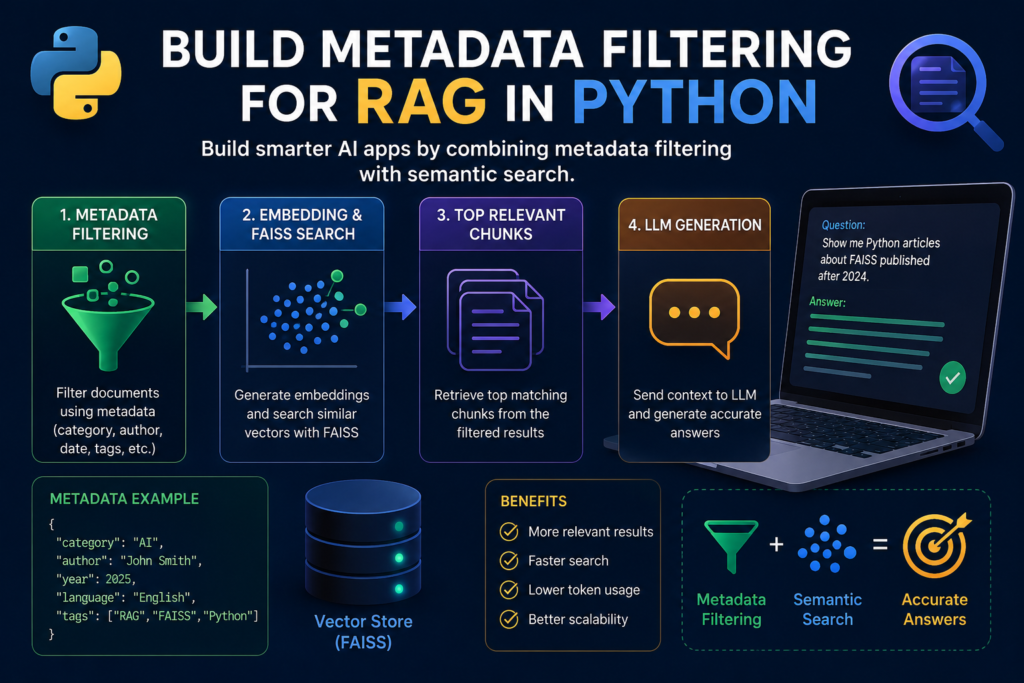
In this tutorial, you will build metadata filtering for RAG in Python to improve document retrieval before semantic search begins. Instead of searching every document in your knowledge base, your Retrieval-Augmented Generation (RAG) system will first narrow the search using metadata such as categories, authors, dates, languages, or document types.
Metadata filtering is one of the most important techniques used in production RAG systems. It reduces the search space, improves retrieval accuracy, lowers the chance of irrelevant results, and helps large language models generate more reliable responses.
By the end of this tutorial, your RAG application will combine metadata filtering with FAISS vector search, allowing it to retrieve only the most relevant documents before performing semantic similarity search.
What You Will Learn
- What metadata is and why it matters in RAG systems
- How to store metadata together with document chunks
- How to filter documents before vector search
- How to combine metadata filtering with FAISS
- How to build a metadata-aware Retrieval-Augmented Generation (RAG) pipeline
Prerequisites
Before you build metadata filtering for RAG in Python, make sure you have completed the previous tutorials in this series. This guide extends the same Retrieval-Augmented Generation (RAG) application by improving how documents are selected before semantic search.
Your project should already include:
- Python 3.10 or later
- An OpenAI API key
- A FAISS vector index
- Sentence Transformers for generating embeddings
- A collection of indexed document chunks
Install the required libraries if they are not already available:
pip install openai sentence-transformers faiss-cpu pandasThe official OpenAI Developer Documentation provides API references, SDK examples, and authentication guides for integrating large language models into your Retrieval-Augmented Generation (RAG) applications.
To build metadata filtering for RAG in Python, each document chunk should already have an associated embedding and a set of metadata fields. In this tutorial, you’ll use that metadata to reduce the search space before performing semantic retrieval, resulting in faster searches and more accurate answers.
Step 1 — What Is Metadata?
The first step to build metadata filtering for RAG in Python is understanding what metadata actually is. Simply put, metadata is information that describes a document without being part of its main content. Instead of storing only text embeddings, a Retrieval-Augmented Generation (RAG) system also stores descriptive attributes that help narrow the search before semantic retrieval begins.
Consider a knowledge base containing thousands of documents. Without metadata filtering, every document becomes a candidate for vector search. While semantic search is powerful, searching the entire collection is often unnecessary and may return documents that are technically similar but belong to the wrong topic, department, or time period.
Typical metadata fields include:
- Category
- Author
- Publication date
- Language
- Document type
- Project or department
- Tags
For example, instead of storing only the document text:
{
    "text": "FAISS is a vector database library..."
}
Store the text together with its metadata:
{
    "text": "FAISS is a vector database library...",
    "metadata": {
        "category": "AI",
        "author": "John Smith",
        "language": "English",
        "year": 2025,
        "tags": ["RAG", "FAISS", "Python"]
    }
}
When you build metadata filtering for RAG in Python, these additional fields become extremely valuable. Before performing vector search, the system can immediately exclude documents that do not match the user’s requirements. For example, it can search only English documents, only documents published after 2024, or only documents tagged as “Python.”
Metadata does not replace semantic search—it makes semantic search smarter. Instead of comparing embeddings across the entire knowledge base, the Retrieval-Augmented Generation (RAG) pipeline searches only within a relevant subset of documents, improving both retrieval accuracy and search performance.
In the next step, you’ll learn how to store metadata together with document chunks so it can be used efficiently during retrieval.
Step 2 — Store Metadata with Document Chunks
After understanding what metadata is, the next step to build metadata filtering for RAG in Python is storing metadata together with every document chunk. This allows your Retrieval-Augmented Generation (RAG) pipeline to quickly identify which documents should participate in semantic search.
A common mistake is storing embeddings separately from document information. Instead, every chunk should contain its text, embedding, and metadata in a single structure or have a reliable link between them.
A simple document chunk may look like this:
document = {
    "id": 101,
    "text": "FAISS is a library for efficient similarity search.",
    "metadata": {
        "category": "AI",
        "language": "English",
        "author": "John Smith",
        "year": 2025,
        "tags": ["FAISS", "RAG", "Python"]
    }
}
When generating embeddings, store both the vector and the metadata:
embedding = model.encode(document["text"])

documents.append({
    "embedding": embedding,
    "text": document["text"],
    "metadata": document["metadata"]
})
If you are using FAISS, remember that it stores only vectors. The metadata should be kept in a separate collection that shares the same index as the FAISS vectors:
index.add(embedding.reshape(1, -1))

metadata_store.append({
    "text": document["text"],
    "metadata": document["metadata"]
})
This design keeps the vector index lightweight while allowing your application to retrieve all associated metadata after FAISS returns the nearest neighbors.
When you build metadata filtering for RAG in Python, keeping metadata synchronized with your vector index is essential. Every vector should correspond to exactly one document chunk and one metadata record. Otherwise, the Retrieval-Augmented Generation (RAG) pipeline may return incorrect document information even when the semantic search itself is accurate.
Now that every document contains searchable metadata, the next step is filtering documents before vector search begins. This simple optimization can dramatically reduce the search space and improve retrieval accuracy.
Step 3 — Filter Documents Before Vector Search
Now it’s time to build metadata filtering for RAG in Python by applying metadata before semantic search begins. Instead of comparing the user’s query against every document in your knowledge base, the system first removes documents that do not satisfy the requested criteria.
For example, imagine your knowledge base contains documents in multiple languages, several product categories, and content published over many years. If a user requests only English AI articles published after 2024, there is no reason to search documents that cannot possibly match those requirements.
Suppose your metadata store looks like this:
metadata_store = [
    {
        "text": "...",
        "metadata": {
            "category": "AI",
            "language": "English",
            "year": 2025
        }
    },
    {
        "text": "...",
        "metadata": {
            "category": "Finance",
            "language": "English",
            "year": 2023
        }
    }
]
A simple metadata filter can be implemented like this:
filtered_documents = [
    doc for doc in metadata_store
    if doc["metadata"]["category"] == "AI"
    and doc["metadata"]["language"] == "English"
    and doc["metadata"]["year"] >= 2025
]
Only the filtered documents will participate in the next retrieval step. This significantly reduces the number of candidate documents and improves the relevance of the search results.
In a production Retrieval-Augmented Generation (RAG) system, metadata filters are often created dynamically from the user’s request. For example:
User:
Show me Python articles written by John Smith.

↓

Metadata Filter

category = "Python"
author = "John Smith"

↓

Semantic Search

↓

LLM Response
When you build metadata filtering for RAG in Python, metadata acts as the first retrieval layer, while vector search becomes the second. Metadata answers “Which documents are eligible?”, and semantic search answers “Which of those documents are most relevant?”
This two-stage retrieval process is widely used in enterprise AI applications because it improves search accuracy, reduces unnecessary computations, and scales efficiently to millions of documents.
In the next step, you’ll combine metadata filtering with FAISS so that semantic search runs only on documents that satisfy the selected metadata conditions.
Step 4 — Combine Metadata Filtering with FAISS
After filtering documents by metadata, the next step to build metadata filtering for RAG in Python is combining those filters with FAISS semantic search. This creates a two-stage retrieval pipeline that is both efficient and highly accurate.
The retrieval process now consists of two separate stages:
- Filter documents using metadata.
- Perform semantic search only on the remaining documents.
The workflow becomes:
User Question
        │
        ▼
Metadata Filtering
        │
        ▼
Filtered Documents
        │
        ▼
Generate Query Embedding
        │
        ▼
FAISS Vector Search
        │
        ▼
Top Matching Chunks
        │
        ▼
LLM Response
Suppose the user requests only English AI documents. First, apply the metadata filter:
filtered_documents = [
    doc for doc in documents
    if doc["metadata"]["category"] == "AI"
    and doc["metadata"]["language"] == "English"
]
Next, create a temporary FAISS index containing only the filtered documents:
filtered_index = faiss.IndexFlatL2(dimension)

for doc in filtered_documents:
    filtered_index.add(
        doc["embedding"].reshape(1, -1)
    )
Now generate the embedding for the user’s question and search only the filtered index:
query_embedding = model.encode(user_question)

distances, indices = filtered_index.search(
    query_embedding.reshape(1, -1),
    k=5
)
This approach demonstrates the core idea behind build metadata filtering for RAG in Python. Metadata reduces the search space before semantic retrieval begins, allowing FAISS to compare vectors only within the documents that actually satisfy the user’s requirements.
In large production systems, the metadata filtering stage may reduce millions of documents to just a few thousand before vector search starts. This not only improves retrieval accuracy but also lowers memory usage and significantly speeds up the search process.
In the next step, you’ll combine metadata filtering, FAISS retrieval, and the language model into a complete metadata-aware RAG assistant capable of answering questions using both semantic similarity and structured document metadata.
Step 5 — Build a Metadata-Aware RAG Assistant
Now it’s time to combine everything you’ve built and complete your project. To build metadata filtering for RAG in Python, your assistant should perform three retrieval steps before generating a response: filter documents by metadata, perform semantic search with FAISS, and pass the retrieved context to the language model.
The complete Retrieval-Augmented Generation (RAG) pipeline now looks like this:
User Question
      │
      ▼
Metadata Filtering
      │
      ▼
Generate Query Embedding
      │
      ▼
FAISS Search
      │
      ▼
Retrieve Top Chunks
      │
      ▼
Build Prompt
      │
      ▼
OpenAI API
      │
      ▼
Generate Answer
The following simplified function demonstrates how the entire workflow fits together:
def ask_rag(user_question):

    filtered_documents = filter_documents(
        documents,
        category="AI",
        language="English"
    )

    index = build_faiss_index(filtered_documents)

    query_embedding = model.encode(user_question)

    distances, indices = index.search(
        query_embedding.reshape(1, -1),
        k=5
    )

    context = "\n\n".join(
        filtered_documents[i]["text"]
        for i in indices[0]
    )

    messages = [
        {
            "role": "system",
            "content": "Answer using the provided context."
        },
        {
            "role": "user",
            "content": f"""
Context:

{context}

Question:

{user_question}
"""
        }
    ]

    response = client.chat.completions.create(
        model="gpt-4.1-mini",
        messages=messages
    )

    return response.choices[0].message.content
This architecture demonstrates how to build metadata filtering for RAG in Python using a clean, production-oriented workflow. Metadata filtering reduces the number of candidate documents, FAISS identifies the most semantically relevant chunks, and the language model generates the final answer using only high-quality context.
This layered retrieval strategy offers several important advantages:
- More accurate document retrieval
- Fewer irrelevant search results
- Lower token usage
- Faster semantic search
- Better scalability for large knowledge bases
The same architecture is widely used in enterprise Retrieval-Augmented Generation (RAG) systems, where knowledge bases may contain millions of documents distributed across multiple departments, languages, products, and projects.
In the next section, you’ll test the metadata-aware RAG assistant with several real-world search scenarios to see how metadata filtering improves retrieval quality.
Test Metadata Filtering
After you build metadata filtering for RAG in Python, it’s important to verify that the retrieval pipeline returns only documents matching the requested metadata. The easiest way to do this is by comparing searches with and without metadata filtering.
Suppose your knowledge base contains documents from multiple categories and languages:
AI
├── Python
├── Machine Learning
└── RAG

Finance
├── Reports
└── Accounting

Marketing
├── SEO
└── Analytics
Now consider the following user request:
Show me Python articles about FAISS.Without metadata filtering, FAISS performs semantic search across the entire knowledge base. Although the retrieved documents may be semantically similar, some results could come from unrelated categories simply because they contain similar terminology.
With metadata filtering enabled, the retrieval process changes:
User Question
        │
        ▼
Category = AI
Tag = Python
        │
        ▼
Filtered Documents
        │
        ▼
FAISS Search
        │
        ▼
Top Matching Chunks
The assistant now searches only within documents that satisfy the metadata conditions before performing semantic similarity search. This significantly improves retrieval precision and reduces irrelevant results.
Another example demonstrates filtering by publication year:
User:
Show me RAG articles published after 2024.
The metadata filter becomes:
category = "AI"
tags = "RAG"
year >= 2025
Only documents matching these conditions are passed to FAISS for vector search.
These examples illustrate why developers build metadata filtering for RAG in Python. Metadata eliminates documents that cannot satisfy the user’s requirements, while semantic search identifies the most relevant documents within the remaining subset. Together, these two retrieval stages produce more accurate answers, lower computational costs, and better scalability than semantic search alone.
Your Retrieval-Augmented Generation (RAG) pipeline is now capable of combining structured filtering with semantic search, a pattern commonly used in production AI systems for enterprise search, document assistants, and knowledge management platforms.
In the next section, you’ll explore where to go next and continue improving your RAG system with hybrid search and reranking techniques.
Where to Go Next
Congratulations! You have successfully learned how to build metadata filtering for RAG in Python. Your Retrieval-Augmented Generation (RAG) system can now narrow the search space using structured metadata before performing semantic search, resulting in more accurate retrieval and better overall performance.
Metadata filtering is one of the key building blocks of production RAG systems, but it is only one part of an advanced retrieval pipeline. The next tutorials in this series will help you further improve search quality and build a scalable AI application.
Continue with these tutorials:
- Build a RAG System in Python — understand the complete Retrieval-Augmented Generation architecture.
- Build a Vector Search Engine with FAISS — create a high-performance semantic search engine.
- Build a Document Q&A Assistant in Python — answer questions using your own knowledge base.
- Add Conversation Memory to Your AI Assistant in Python — maintain context across multiple conversations.
- Build Hybrid Search for RAG in Python — combine keyword search with vector search for higher retrieval accuracy.
- Build Reranking for RAG in Python — reorder retrieved documents using a cross-encoder model.
- Deploy Your RAG Assistant with FastAPI — publish your assistant as a production-ready REST API.
By combining metadata filtering, semantic search, hybrid retrieval, reranking, and conversation memory, you’ll build a Retrieval-Augmented Generation (RAG) system that closely matches the architecture used in modern enterprise AI applications.
In the next tutorial, you’ll learn how to build Hybrid Search for RAG in Python by combining keyword matching with vector search to improve retrieval quality even further.
Frequently Asked Questions
Why should I build metadata filtering for RAG in Python?
Metadata filtering reduces the number of documents considered during retrieval before semantic search begins. This improves retrieval accuracy, reduces token usage, speeds up vector search, and helps large language models generate more relevant responses.
What metadata should I store in a RAG system?
Common metadata fields include category, author, publication date, language, document type, project, department, tags, and access permissions. The most useful metadata depends on your application and how users search your knowledge base.
Does metadata filtering replace semantic search?
No. Metadata filtering and semantic search solve different problems. Metadata filtering removes documents that do not satisfy specific conditions, while semantic search finds the most relevant documents within the filtered subset. Production Retrieval-Augmented Generation (RAG) systems typically use both techniques together.
Can I use metadata filtering with FAISS?
Yes. Although FAISS stores only vectors, you can keep metadata in a separate data structure linked to each vector. After applying metadata filters, perform semantic search only on the remaining documents or on a filtered FAISS index.
What is the best way to build metadata filtering for RAG in Python?
A production-ready approach stores metadata together with every document chunk, applies metadata filtering before vector search, retrieves the most relevant chunks with FAISS, and then sends only the filtered context to the language model. This architecture provides fast, accurate, and scalable retrieval for large knowledge bases.
Conclusion
Building metadata filtering for RAG in Python is one of the most effective ways to improve document retrieval in Retrieval-Augmented Generation (RAG) applications. Instead of searching an entire knowledge base, metadata filtering first selects only the documents that satisfy specific conditions, allowing semantic search to focus on the most relevant content.
In this tutorial, you learned how to:
- Understand the role of metadata in a RAG system.
- Store metadata alongside document embeddings.
- Filter documents before semantic search.
- Combine metadata filtering with FAISS.
- Build a complete metadata-aware retrieval pipeline.
- Test metadata filtering using real-world search scenarios.
This architecture improves retrieval precision, reduces computational costs, lowers token consumption, and scales efficiently as your knowledge base grows. Whether you’re building an internal document assistant, an enterprise search platform, or an AI-powered chatbot, metadata filtering helps ensure that users receive answers based on the most relevant documents available.
As your RAG system evolves, you can further enhance retrieval quality by combining metadata filtering with hybrid search, reranking models, conversation memory, and query rewriting. These techniques work together to create robust production-grade AI assistants capable of handling large and complex knowledge bases.
The next logical step is to implement Hybrid Search for RAG in Python, where keyword search and vector search complement each other to deliver even more accurate and reliable results.