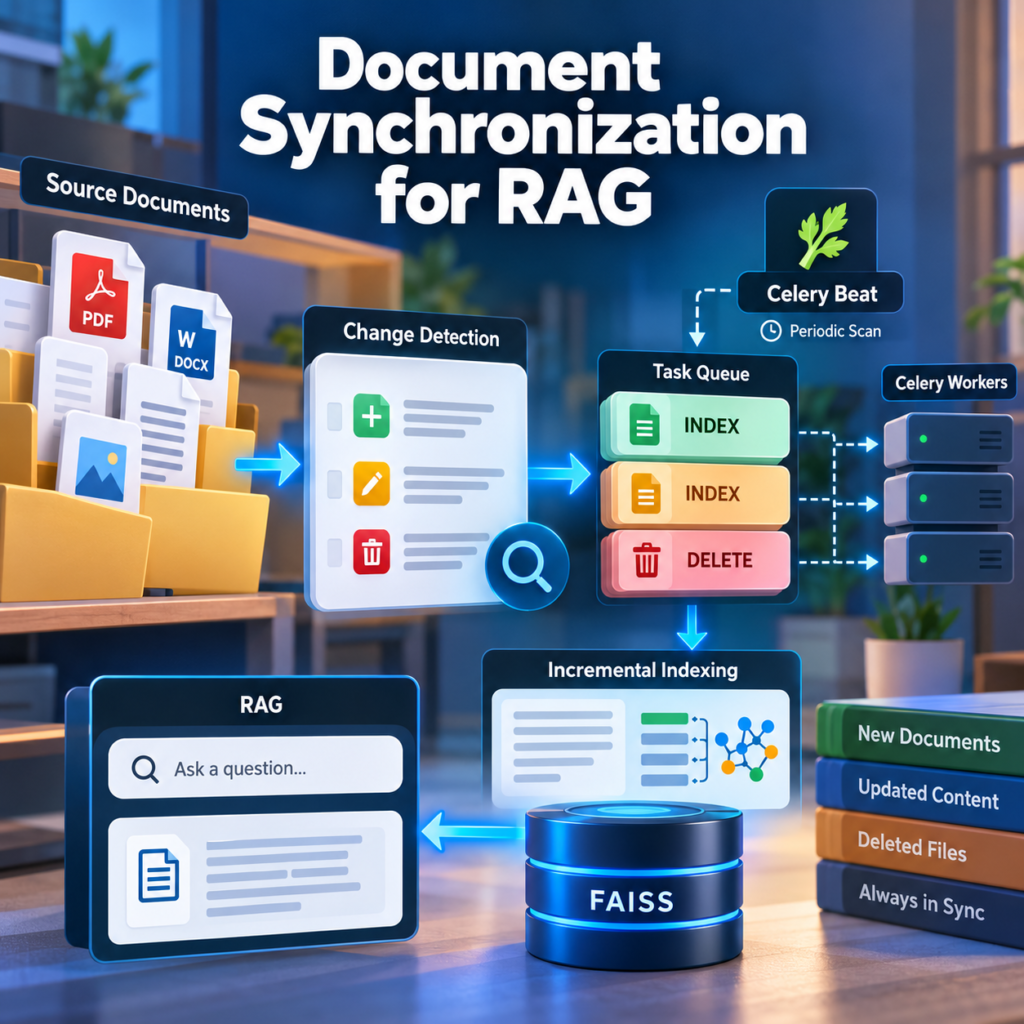
What You Will Build
A Retrieval-Augmented Generation (RAG) system is only as useful as the documents available in its knowledge base. When source documents change, the vector index must be updated to ensure that retrieval uses current information.
In our previous tutorial, we implemented incremental indexing to update changed document chunks without regenerating embeddings for the entire collection. However, that pipeline still required an explicit request to start processing.
In this tutorial, we will implement document synchronization for RAG using Python, Celery, Redis, and SQLite. Our application will automatically discover source documents, detect changes, and schedule the necessary indexing operations.
Automatic Document Synchronization Architecture
We will build a synchronization service that periodically scans a configured document directory and compares its contents with a persistent record of previously discovered files.
       Source Document Directory
                  |
                  v
          Scheduled File Scan
             (Celery Beat)
                  |
                  v
          Document Discovery
                  |
                  v
          Compare File State
                  |
          +-------+-------+
          |       |       |
          v       v       v
         New   Modified  Deleted
          |       |       |
          +---+---+       |
              |           |
              v           v
       Incremental     Document
         Indexing       Removal
              |           |
              +-----+-----+
                    |
                    v
             FAISS Index
                    |
                    v
          Updated Knowledge Base
The synchronization service will identify changes, while our existing incremental indexing pipeline will determine which chunks require new embeddings.
This separation is important. File discovery should not need to understand vector operations, and the indexing pipeline should not need to know how documents were discovered.
What We Will Implement
Our document synchronization for RAG workflow will include the following capabilities:
- Document discovery: scan a configured directory for supported PDF and TXT files.
- Change detection: identify new, modified, unchanged, and deleted source documents.
- Persistent synchronization state: track source paths, content hashes, and processing status in SQLite.
- Scheduled execution: use Celery Beat to trigger synchronization at configurable intervals.
- Incremental indexing: reuse existing embeddings and process only changed document content.
- Document removal: remove obsolete vectors and metadata when source documents are deleted.
- Failure recovery: retry failed operations without incorrectly marking documents as synchronized.
How It Extends Our Existing RAG Application
We will reuse the document ingestion and incremental indexing components developed in earlier tutorials.
The existing application already supports text extraction, chunking, embedding generation, FAISS vector storage, SQLite metadata, and asynchronous Celery tasks.
Our new synchronization layer will operate above those components, coordinating document discovery and indexing without duplicating their responsibilities.
We will also preserve stable document identifiers across synchronization runs. A modified file must update its existing document record rather than create an unrelated document with a new identifier.
Expected Result
By the end of this tutorial, our application will be able to maintain its document collection automatically.
Adding a supported file to the source directory will trigger indexing during the next synchronization cycle. Modifying an existing document will initiate an incremental update, while deleting a document will schedule removal of its associated vectors and metadata.
We will also address important reliability concerns, including incomplete file writes, overlapping synchronization runs, failed indexing tasks, and consistency between the source directory and the vector index.
The resulting document synchronization for RAG pipeline will provide a practical foundation for knowledge bases that must remain current as their source documents evolve.
Prerequisites
Before implementing document synchronization for RAG, we need a working document ingestion pipeline, persistent index storage, and a background task system.
This tutorial builds on our previous implementations of incremental indexing, FAISS vector storage, and asynchronous document processing with Celery and Redis.
Required Technologies
- Python 3.11+ — document discovery and synchronization logic.
- FAISS — storage and retrieval of document embeddings.
- Sentence Transformers — embedding generation for changed chunks.
- SQLite — persistent indexing and synchronization metadata.
- Celery — asynchronous document processing.
- Redis — message broker for Celery tasks.
- Celery Beat — periodic execution of synchronization jobs.
Install the required Python dependencies if they are not already available:
pip install celery redis faiss-cpu sentence-transformers numpyCelery Beat is included with Celery and does not require a separate package. SQLite, pathlib, and hashlib are part of Python’s standard library.
Update the Project Structure
We will extend the existing RAG application with a dedicated synchronization package.
rag-project/
├── main.py
├── document_api.py
├── document_processor.py
├── ingestion/
│   ├── __init__.py
│   ├── extractor.py
│   ├── cleaner.py
│   ├── chunker.py
│   ├── embeddings.py
│   ├── hashing.py
│   ├── registry.py
│   ├── chunk_diff.py
│   ├── vector_store.py
│   └── incremental_indexer.py
├── synchronization/
│   ├── __init__.py
│   ├── scanner.py
│   ├── state.py
│   └── service.py
├── tasks/
│   ├── __init__.py
│   ├── celery_app.py
│   ├── document_tasks.py
│   └── synchronization_tasks.py
├── data/
│   ├── sources/
│   └── indexes/
├── requirements.txt
└── docker-compose.yml
The new modules will have distinct responsibilities:
scanner.py— discover supported files and collect their attributes.state.py— maintain persistent synchronization records.service.py— compare source files with stored state and schedule operations.synchronization_tasks.py— execute periodic synchronization through Celery.
Prepare the Source Directory
Create a directory for documents managed by the synchronization service:
mkdir -p data/sourcesFor this tutorial, the directory will contain PDF and TXT documents. Each file will be identified by its normalized relative path within the managed source directory.
This allows the system to recognize the same document across synchronization runs, even if its contents change. Renaming a file will initially be treated as deleting the old source and adding a new one.
Configure Shared Storage
The synchronization worker and indexing worker must have access to the same source documents and persistent index storage.
When using Docker, mount the relevant directories as shared volumes. A file discovered by the synchronization worker must remain accessible when the indexing worker processes it.
The source directory should also be treated as an authoritative collection. A temporary filesystem error or unavailable volume must not be interpreted as deletion of every document.
Keep Indexing Operations Serialized
Our previous incremental indexing implementation uses versioned FAISS snapshots and SQLite metadata. It assumes that only one indexing operation modifies the collection at a time.
We will preserve this constraint by routing document indexing and deletion operations through a single dedicated writer queue.
The synchronization service may discover many changes, but it must not allow multiple workers to update the same FAISS collection concurrently.
Separate Discovery from Successful Processing
A fundamental requirement of reliable document synchronization for RAG is distinguishing a detected change from a completed update.
For example, discovering a modified PDF does not mean that its new contents have been successfully indexed.
Our synchronization state will therefore track pending, processing, completed, and failed operations separately. A document will be considered synchronized only after the indexing pipeline confirms successful completion.
With the project structure and processing constraints established, we can begin designing the synchronization architecture and its interaction with the existing RAG pipeline.
Step 1 — Design the Document Synchronization Architecture
Before writing the synchronization service, we need to define how it interacts with document storage, background workers, and the existing vector index.
A reliable document synchronization for RAG workflow must distinguish three independent operations: discovering source changes, scheduling indexing jobs, and confirming that those jobs have completed successfully.
Separate Synchronization into Three Layers
Our architecture will use three logical layers.
- Discovery layer: scans the source directory, identifies supported files, and calculates their content hashes.
- Coordination layer: compares discovered files with persistent synchronization state and determines which operations should be scheduled.
- Indexing layer: processes document updates and deletions through the existing incremental indexing pipeline.
The synchronization service will not generate embeddings or modify FAISS directly. Those responsibilities remain inside the indexing layer.
Define the Processing Workflow
                  Celery Beat
                       |
                       v
              Synchronization Task
                       |
                       v
                Directory Scanner
                       |
                       v
               Source File Inventory
                       |
                       v
               Synchronization State
                       |
              +--------+--------+
              |        |        |
              v        v        v
             NEW    MODIFIED  DELETED
              |        |        |
              +--------+        |
                       |        |
                       v        v
                  Indexing Queue
                       |
                       v
               Single Index Writer
                       |
                 +-----+-----+
                 |           |
                 v           v
            Incremental   Document
              Update       Removal
                 |           |
                 +-----+-----+
                       |
                       v
                 FAISS + SQLite
                       |
                       v
                Job Completion
                       |
                       v
             Synchronization State
Celery Beat will periodically trigger the discovery task. The discovery task will compare the current file inventory with the last successfully synchronized state.
When changes are detected, the coordination layer will schedule indexing or deletion operations.
Use Stable Document Identifiers
Every managed document needs a stable identifier that remains unchanged when its content is modified.
For our directory-based implementation, we will derive the identifier from the file’s normalized relative path.
import hashlib


def create_document_id(relative_path: str) -> str:
    normalized = relative_path.replace("\\", "/")

    return hashlib.sha256(
        normalized.encode("utf-8")
    ).hexdigest()
For example, the source path manuals/installation.pdf will always produce the same document ID within the managed collection.
In applications with multiple source collections, the identifier should also include a stable collection ID to prevent collisions between identical relative paths.
This strategy treats a file rename as a deletion followed by a new document. More advanced systems can implement rename detection using persistent source identifiers.
Define Synchronization States
A document should not be marked as synchronized merely because an indexing task has been submitted.
We will distinguish the following states:
| State | Meaning |
|---|---|
PENDING | A source change has been detected and requires processing. |
PROCESSING | An indexing or deletion operation is being executed. |
SYNCED | The requested source version has been successfully committed. |
FAILED | The operation failed and requires retry or investigation. |
The synchronization registry will also store the desired source hash and the last successfully indexed hash.
Keeping these values separate is essential. If a document changes while an earlier indexing task is running, the completion of that task must not incorrectly mark the newer version as synchronized.
Prevent Duplicate and Overlapping Jobs
Scheduled synchronization runs can overlap when a scan takes longer than the configured interval.
Our coordination layer will therefore need an exclusive synchronization lock or an equivalent database-backed coordination mechanism.
It will also use persistent operation records to avoid scheduling duplicate work for the same document version.
Celery task delivery should be treated as potentially duplicated. The indexing operations must be idempotent, and completion handlers must verify that the completed operation still matches the desired source version.
Handle Deletions Carefully
For document synchronization for RAG, deletion detection requires special care.
A missing file should trigger removal only after a successful scan of the complete authoritative source directory. An inaccessible directory, permission error, or incomplete scan must not cause mass deletion.
When a valid deletion is detected, the coordination layer will schedule a document removal operation through the same serialized indexing queue used for document updates.
The indexing worker must remove the document’s vectors and metadata in a coordinated generation update before the synchronization registry marks the deletion as complete.
Define the Consistency Model
Our system will provide eventual consistency between the source directory and the searchable knowledge base.
Changes will become visible after the next successful scan, background processing, and index generation commit.
A synchronization interval of one minute, for example, does not guarantee that every update becomes searchable within exactly one minute. Processing time, queue delays, and retries also affect synchronization latency.
This architecture establishes a clear separation of responsibilities and provides the foundation for automatic, recoverable document synchronization for RAG.
Step 2 — Scan and Discover Source Documents
The first component of document synchronization for RAG is a directory scanner. It discovers supported documents and collects the information needed to detect changes.
Our scanner will identify files by their relative paths, calculate SHA-256 hashes, and return a complete source inventory.
Create the Document Scanner
Create synchronization/scanner.py:
from dataclasses import dataclass
from pathlib import Path

from ingestion.hashing import calculate_file_hash


SUPPORTED_EXTENSIONS = {".pdf", ".txt"}


@dataclass
class SourceDocument:
    relative_path: str
    absolute_path: str
    file_hash: str
    size: int


def scan_documents(
    source_dir: str = "data/sources"
) -> list[SourceDocument]:

    root = Path(source_dir).resolve(strict=True)

    if not root.is_dir():
        raise NotADirectoryError(root)

    documents = []

    def on_scan_error(error):
        raise error

    for path in root.rglob("*", case_sensitive=None):
        if path.is_symlink():
            continue

        if not path.is_file():
            continue

        if path.suffix.lower() not in SUPPORTED_EXTENSIONS:
            continue

        relative_path = path.relative_to(root).as_posix()

        before = path.stat()

        file_hash = calculate_file_hash(path)

        after = path.stat()

        if (
            before.st_size != after.st_size
            or before.st_mtime_ns != after.st_mtime_ns
        ):
            raise RuntimeError(
                f"File changed during scanning: {relative_path}"
            )

        documents.append(
            SourceDocument(
                relative_path=relative_path,
                absolute_path=str(path),
                file_hash=file_hash,
                size=after.st_size
            )
        )

    return sorted(
        documents,
        key=lambda item: item.relative_path
    )
The scanner returns a structured record for every supported document. Its relative path will later be used to generate a stable document identifier.
For production use, directory traversal must also propagate permission and I/O errors rather than silently returning a partial inventory. Files should be published into the source directory through atomic renaming after their uploads finish.
Test Document Discovery
Place several files inside the source directory:
data/sources/
├── introduction.txt
├── manuals/
│   ├── installation.pdf
│   └── maintenance.pdf
└── images/
    └── diagram.png
Create a simple test:
from synchronization.scanner import scan_documents

documents = scan_documents()

for document in documents:
    print(
        document.relative_path,
        document.size,
        document.file_hash[:12]
    )
The scanner should discover three documents. The PNG file will be ignored because it is not a supported source format.
Why File Hashes Matter
File modification timestamps are useful for quick checks, but they cannot reliably establish whether content has changed. A file may be copied with a preserved timestamp or rewritten without meaningful content changes.
SHA-256 provides a stronger basis for document synchronization for RAG. An identical file produces the same hash regardless of its modification timestamp.
However, a different file hash does not necessarily mean that all extracted text has changed. Our incremental indexer will perform chunk-level comparisons before generating new embeddings.
Handle Incomplete Scans
Deletion detection requires a complete and trustworthy source inventory. If the source directory is unavailable, a scan fails, or a file changes while being read, the synchronization cycle must stop without scheduling deletions.
The current implementation checks file size and modification time before and after hashing. This catches many concurrent write scenarios, but it does not guarantee a fully consistent filesystem snapshot.
For reliable production synchronization, use atomic file publication and a source snapshot or manifest when available.
We now have the document discovery component needed to compare the current source directory with persistent synchronization state.
Step 3 — Detect New, Modified, and Deleted Files
The next component of document synchronization for RAG is a persistent state registry. It compares the latest source inventory with previously synchronized documents and identifies which operations are required.
We will store the desired source hash separately from the last successfully indexed hash. This prevents failed or unfinished jobs from being incorrectly marked as synchronized.
Create the Synchronization Registry
Create synchronization/state.py:
import sqlite3
from pathlib import Path


class SyncState:
    def __init__(
        self,
        db_path="data/indexes/sync.db"
    ):
        path = Path(db_path)
        path.parent.mkdir(
            parents=True, exist_ok=True
        )
        self.db_path = path

        with self.connect() as db:
            db.execute("""
                CREATE TABLE IF NOT EXISTS sources (
                    document_id TEXT PRIMARY KEY,
                    relative_path TEXT UNIQUE NOT NULL,
                    desired_hash TEXT,
                    indexed_hash TEXT,
                    status TEXT NOT NULL,
                    operation TEXT NOT NULL,
                    task_id TEXT
                )
            """)

    def connect(self):
        return sqlite3.connect(self.db_path)

    def get_sources(self):
        with self.connect() as db:
            db.row_factory = sqlite3.Row

            rows = db.execute(
                "SELECT * FROM sources"
            ).fetchall()

            return {
                row["document_id"]: dict(row)
                for row in rows
            }
The registry stores two independent versions of each document:
desired_hash— the latest version discovered in the source directory.indexed_hash— the version successfully committed to the vector index.
The operation field distinguishes indexing from deletion, while status tracks processing progress.
Compare the Source Inventory
Create synchronization/detector.py:
from dataclasses import dataclass

from synchronization.state import SyncState
from synchronization.scanner import (
    SourceDocument,
    scan_documents
)
from synchronization.ids import create_document_id


@dataclass
class SyncChange:
    document_id: str
    operation: str
    document: SourceDocument | None


def detect_changes(
    documents: list[SourceDocument],
    state: SyncState
) -> list[SyncChange]:

    stored = state.get_sources()
    discovered = {}

    changes = []

    for document in documents:
        document_id = create_document_id(
            document.relative_path
        )

        discovered[document_id] = document

        previous = stored.get(document_id)

        if previous is None:
            changes.append(
                SyncChange(
                    document_id,
                    "INDEX",
                    document
                )
            )
            continue

        if (
            previous["indexed_hash"] != document.file_hash
            or previous["operation"] != "INDEX"
            or previous["status"] != "SYNCED"
        ):
            changes.append(
                SyncChange(
                    document_id,
                    "INDEX",
                    document
                )
            )

    for document_id, previous in stored.items():
        if document_id not in discovered:
            if (
                previous["operation"] != "DELETE"
                or previous["status"] != "SYNCED"
            ):
                changes.append(
                    SyncChange(
                        document_id,
                        "DELETE",
                        None
                    )
                )

    return changes
Move the create_document_id() function from Step 1 into synchronization/ids.py so it can be imported by other modules.
The detector returns the required operations without modifying SQLite or submitting Celery tasks. This separation makes change detection easier to test.
Test Change Detection
Run the scanner and detector together:
from synchronization.scanner import scan_documents
from synchronization.state import SyncState
from synchronization.detector import detect_changes


state = SyncState()
documents = scan_documents()

changes = detect_changes(
    documents,
    state
)

for change in changes:
    print(
        change.document_id[:12],
        change.operation
    )
With an empty registry, every discovered document should produce an INDEX operation.
After successful indexing, unchanged files should produce no new operations. Modified documents should be indexed again, while missing documents should generate deletion requests.
Distinguish Detection from Scheduling
The current detector is intentionally read-only. It does not yet prevent duplicate tasks when two synchronization cycles run simultaneously.
In the next step, we will introduce transactional state updates and operation claims. A document must move to PENDING before a task is dispatched, and its state must be updated only when the corresponding operation has completed.
For reliable document synchronization for RAG, the service must also verify that a completed task processed the intended file version. If the source changes during processing, another synchronization operation will be required.
Step 4 — Build a Document Synchronization Service
Our scanner discovers documents, while the change detector identifies files requiring updates. The next step is to coordinate these components and prepare reliable background jobs.
A robust document synchronization for RAG service must persist pending operations before sending them to Celery. Otherwise, a failure between detecting a change and publishing a task could leave the document unsynchronized.
Create a Persistent Job Outbox
Extend the SyncState initialization in synchronization/state.py with an outbox table:
db.execute("""
    CREATE TABLE IF NOT EXISTS sync_outbox (
        job_id INTEGER PRIMARY KEY AUTOINCREMENT,
        document_id TEXT NOT NULL,
        operation TEXT NOT NULL,
        source_hash TEXT,
        source_path TEXT,
        status TEXT NOT NULL DEFAULT 'PENDING',
        attempts INTEGER NOT NULL DEFAULT 0,
        created_at TEXT DEFAULT CURRENT_TIMESTAMP
    )
""")

db.execute("""
    CREATE UNIQUE INDEX IF NOT EXISTS
    idx_active_sync_job
    ON sync_outbox(document_id)
    WHERE status IN ('PENDING', 'DISPATCHED', 'PROCESSING')
""")
Each job represents an indexing or deletion request. The unique index prevents multiple active jobs for the same document.
We will use the outbox as the durable source of pending operations. Celery will execute these jobs, but the database will determine which work still needs to be completed.
Register Detected Changes
Add the following method to SyncState:
def register_changes(self, changes):
    with self.connect() as db:
        db.execute("BEGIN IMMEDIATE")

        for change in changes:
            document = change.document

            source_hash = (
                document.file_hash
                if document else None
            )

            source_path = (
                document.absolute_path
                if document else None
            )

            relative_path = (
                document.relative_path
                if document else None
            )

            previous = db.execute(
                """
                SELECT relative_path
                FROM sources
                WHERE document_id = ?
                """,
                (change.document_id,)
            ).fetchone()

            if previous is None:
                if relative_path is None:
                    continue

                db.execute(
                    """
                    INSERT INTO sources (
                        document_id, relative_path,
                        desired_hash, indexed_hash,
                        status, operation
                    )
                    VALUES (?, ?, ?, NULL, 'PENDING', ?)
                    """,
                    (
                        change.document_id,
                        relative_path,
                        source_hash,
                        change.operation
                    )
                )
            else:
                db.execute(
                    """
                    UPDATE sources
                    SET desired_hash = ?,
                        operation = ?,
                        status = 'PENDING'
                    WHERE document_id = ?
                    """,
                    (
                        source_hash,
                        change.operation,
                        change.document_id
                    )
                )

            db.execute(
                """
                INSERT OR IGNORE INTO sync_outbox (
                    document_id, operation,
                    source_hash, source_path
                )
                VALUES (?, ?, ?, ?)
                """,
                (
                    change.document_id,
                    change.operation,
                    source_hash,
                    source_path
                )
            )
This method records detected changes and creates durable jobs in one SQLite transaction.
The unique index prevents duplicate active jobs. If a file changes again while an earlier job is active, the updated desired hash remains in the source registry. A later synchronization cycle can schedule the newer version.
Create the Synchronization Service
Create synchronization/service.py:
from synchronization.scanner import scan_documents
from synchronization.detector import detect_changes
from synchronization.state import SyncState


def synchronize_documents(
    source_dir="data/sources"
):
    state = SyncState()

    documents = scan_documents(source_dir)

    changes = detect_changes(
        documents,
        state
    )

    state.register_changes(changes)

    return {
        "documents_found": len(documents),
        "changes_detected": len(changes),
        "index_requests": sum(
            change.operation == "INDEX"
            for change in changes
        ),
        "delete_requests": sum(
            change.operation == "DELETE"
            for change in changes
        )
    }
The service scans the authoritative source directory, compares the results with stored state, and registers the required operations.
It does not generate embeddings or modify FAISS. Those operations remain the responsibility of our dedicated indexing worker.
Prepare Celery Dispatch
The next component will read pending outbox records and publish them to Celery.
A dispatcher must use stable job identifiers and support retries. Publishing a message and updating SQLite cannot be performed atomically, so duplicate delivery remains possible.
The indexing worker must therefore check whether a job has already been completed before applying its changes. After successful processing, it will update the synchronization state and mark the corresponding outbox record as completed.
We will also need to handle source files that change between discovery and execution. Before indexing, the worker should verify that the file still matches the hash recorded in the job, or process an immutable snapshot of the discovered version.
This gives our document synchronization for RAG system a durable coordination layer that can recover pending work after a service restart.
Step 5 — Schedule Synchronization with Celery Beat
Our synchronization service can discover document changes and save pending operations in SQLite. Now we will automate this process using Celery Beat.
For reliable document synchronization for RAG, we will separate periodic discovery from job dispatching. This allows pending operations to survive temporary Celery or Redis failures.
For more information about scheduling periodic tasks, see the official Celery documentation on periodic tasks .
Configure Periodic Tasks
Open tasks/celery_app.py and extend the existing Celery configuration:
from celery.schedules import crontab

celery_app.conf.beat_schedule = {
    "scan-rag-documents": {
        "task": "rag.synchronize_documents",
        "schedule": crontab(minute="*"),
        "options": {
            "queue": "synchronization"
        }
    },
    "dispatch-rag-jobs": {
        "task": "rag.dispatch_sync_jobs",
        "schedule": 15.0,
        "options": {
            "queue": "synchronization"
        }
    }
}

celery_app.conf.task_routes = {
    "rag.process_document": {
        "queue": "document_ingestion"
    },
    "rag.synchronize_documents": {
        "queue": "synchronization"
    },
    "rag.dispatch_sync_jobs": {
        "queue": "synchronization"
    },
    "rag.execute_sync_job": {
        "queue": "document_ingestion"
    }
}
The first task scans documents every minute. The second checks the persistent outbox every 15 seconds and submits pending indexing operations.
Create the Scheduled Scan Task
Create tasks/synchronization_tasks.py:
from tasks.celery_app import celery_app
from synchronization.service import synchronize_documents


@celery_app.task(
    name="rag.synchronize_documents"
)
def synchronize_documents_task():
    return synchronize_documents(
        source_dir="data/sources"
    )
Celery Beat schedules task execution but does not guarantee that a previous execution has finished. We must prevent overlapping scans from registering conflicting operations.
Prevent Overlapping Synchronization Runs
For a single-host deployment, we can use a filesystem lock. Install the filelock package:
pip install filelockUpdate the scheduled task:
from filelock import FileLock, Timeout


@celery_app.task(
    name="rag.synchronize_documents"
)
def synchronize_documents_task():
    lock = FileLock(
        "data/indexes/synchronization.lock"
    )

    try:
        with lock.acquire(timeout=0):
            return synchronize_documents(
                source_dir="data/sources"
            )
    except Timeout:
        return {
            "status": "SKIPPED",
            "reason": "Synchronization already running"
        }
This lock is suitable when all synchronization workers share a filesystem with reliable locking semantics. Distributed deployments should use a database-backed or distributed lock.
Dispatch Pending Jobs
Add a method to SyncState that retrieves pending outbox records:
def get_pending_jobs(self, limit=20):
    with self.connect() as db:
        db.row_factory = sqlite3.Row

        rows = db.execute(
            """
            SELECT *
            FROM sync_outbox
            WHERE status = 'PENDING'
            ORDER BY job_id
            LIMIT ?
            """,
            (limit,)
        ).fetchall()

        return [dict(row) for row in rows]
Next, add the dispatcher task to tasks/synchronization_tasks.py:
from synchronization.state import SyncState


@celery_app.task(
    name="rag.dispatch_sync_jobs"
)
def dispatch_sync_jobs():
    state = SyncState()

    jobs = state.get_pending_jobs()

    dispatched = 0

    for job in jobs:
        celery_app.send_task(
            "rag.execute_sync_job",
            args=[job["job_id"]],
            queue="document_ingestion"
        )

        dispatched += 1

    return {
        "jobs_dispatched": dispatched
    }
This is the basic dispatch mechanism. A production dispatcher must also atomically claim pending jobs, record their delivery state, and recover claims after worker failures.
Without those safeguards, repeated dispatcher runs can publish the same job multiple times. The unique outbox constraint prevents duplicate database records, but not duplicate Celery messages.
Start the Scheduler and Workers
Run Celery Beat as a separate process:
celery -A tasks.celery_app:celery_app beat --loglevel=INFOStart the synchronization worker:
celery -A tasks.celery_app:celery_app worker \
  --queues=synchronization \
  --concurrency=1 \
  --loglevel=INFO
Start the dedicated indexing worker:
celery -A tasks.celery_app:celery_app worker \
  --queues=document_ingestion \
  --concurrency=1 \
  --loglevel=INFO
Only one scheduler instance should manage this periodic schedule. Multiple Beat instances can generate duplicate scheduled tasks.
The indexing queue must also have a single active consumer because our FAISS persistence implementation assumes serialized writes.
Verify Automatic Scheduling
Add a TXT document to data/sources and monitor the synchronization worker logs.
Within the next scheduled scan, the service should discover the document and create a pending outbox record. The dispatcher should then publish the corresponding indexing job.
At this stage, job execution and completion tracking are not yet connected. We will implement those operations next.
With Celery Beat configured, our document synchronization for RAG system can discover changes automatically without requiring manual API requests.
Step 6 — Connect Synchronization to Incremental Indexing
Our synchronization service can now discover changes and publish background jobs. The next step is to connect these jobs to the existing incremental indexing pipeline.
For reliable document synchronization for RAG, each job must identify the intended source version, execute the appropriate indexing operation, and record its result.
Load and Claim Synchronization Jobs
First, extend SyncState with a method that claims a job before execution. This prevents two workers from processing the same outbox record simultaneously.
def claim_job(self, job_id: int):
    with self.connect() as db:
        db.execute("BEGIN IMMEDIATE")

        db.row_factory = sqlite3.Row

        job = db.execute(
            """
            SELECT * FROM sync_outbox
            WHERE job_id = ?
            """,
            (job_id,)
        ).fetchone()

        if job is None:
            raise ValueError("Unknown synchronization job")

        if job["status"] != "PENDING":
            return None

        db.execute(
            """
            UPDATE sync_outbox
            SET status = 'PROCESSING',
                attempts = attempts + 1
            WHERE job_id = ?
            """,
            (job_id,)
        )

        return dict(job)
The transaction ensures that only one execution can claim a pending job. Duplicate Celery messages will not cause the same operation to run concurrently.
The dispatcher from Step 5 currently leaves jobs in PENDING after publishing. This means repeated dispatch cycles can still generate duplicate messages. Job claiming prevents duplicate execution, but we will improve delivery tracking and recovery in Step 7.
Verify the Source Version
A document may change between discovery and execution. Before indexing, verify that its current content matches the hash stored in the job.
from pathlib import Path

from ingestion.hashing import calculate_file_hash


def verify_source(job):
    path = Path(job["source_path"])

    if not path.is_file():
        raise FileNotFoundError(path)

    current_hash = calculate_file_hash(path)

    if current_hash != job["source_hash"]:
        raise ValueError(
            "Source changed after synchronization scan"
        )

    return str(path)
This check detects changes before processing begins. For stronger consistency, production systems should index an immutable file snapshot rather than a mutable source path.
Execute Incremental Indexing
Create tasks/sync_execution.py:
from tasks.celery_app import celery_app

from synchronization.state import SyncState
from synchronization.verification import verify_source
from ingestion.incremental_indexer import index_document


@celery_app.task(
    name="rag.execute_sync_job",
    bind=True
)
def execute_sync_job(self, job_id: int):
    state = SyncState()

    job = state.claim_job(job_id)

    if job is None:
        return {
            "job_id": job_id,
            "status": "ALREADY_CLAIMED"
        }

    try:
        if job["operation"] == "INDEX":
            file_path = verify_source(job)

            result = index_document(
                document_id=job["document_id"],
                file_path=file_path
            )

        elif job["operation"] == "DELETE":
            result = delete_indexed_document(
                job["document_id"]
            )

        else:
            raise ValueError(
                "Unsupported synchronization operation"
            )

        state.complete_job(job_id)

        return result

    except Exception as error:
        state.fail_job(
            job_id,
            str(error)
        )
        raise
Place verify_source() in synchronization/verification.py.
The methods complete_job() and fail_job() will be implemented in Step 7. They must update synchronization state without confusing the completed source version with a newer version discovered while processing.
Implement Document Removal
Our previous incremental indexer handled document updates, but not complete document deletion.
Add a deletion function to ingestion/incremental_indexer.py:
def delete_indexed_document(document_id: str):
    registry = DocumentRegistry()

    document = registry.get_document(document_id)

    if document is None:
        return {
            "document_id": document_id,
            "status": "ALREADY_DELETED"
        }

    generation = registry.get_generation()

    store = VectorStore(
        generation=generation
    )

    records = registry.get_chunks(document_id)

    vector_ids = [
        record["vector_id"]
        for record in records
    ]

    removed = store.remove_vectors(vector_ids)

    if removed != len(vector_ids):
        raise RuntimeError(
            "FAISS deletion count mismatch"
        )

    new_generation = generation + 1

    store.save_generation(new_generation)

    registry.commit_document_deletion(
        document_id=document_id,
        expected_generation=generation,
        new_generation=new_generation
    )

    return {
        "document_id": document_id,
        "status": "DELETED",
        "vectors_removed": removed
    }
The deletion function uses the same versioned FAISS snapshot strategy as incremental indexing.
Add the corresponding transactional method to DocumentRegistry:
def commit_document_deletion(
    self,
    document_id: str,
    expected_generation: int,
    new_generation: int
):
    with self.connect() as db:
        db.execute("BEGIN IMMEDIATE")

        current = db.execute(
            "SELECT generation FROM index_state WHERE id = 1"
        ).fetchone()[0]

        if current != expected_generation:
            raise RuntimeError(
                "Index generation changed"
            )

        db.execute(
            "DELETE FROM chunks WHERE document_id = ?",
            (document_id,)
        )

        db.execute(
            "DELETE FROM documents WHERE document_id = ?",
            (document_id,)
        )

        db.execute(
            """
            UPDATE index_state
            SET generation = ?
            WHERE id = 1
            """,
            (new_generation,)
        )
Maintain Synchronization Consistency
A successful indexing operation commits the new FAISS generation before the synchronization registry is updated. This means a crash between these steps can leave the vector index updated while the synchronization job still appears unfinished.
The worker must therefore support safe retries and reconciliation with the committed index state. For an already indexed document, comparing the committed file hash can prevent unnecessary reprocessing.
Deletion also needs idempotent behavior: attempting to delete an already removed document should succeed without modifying unrelated vectors.
With these operations connected, our document synchronization for RAG system can automatically index new files, update modified documents, and remove deleted content from the knowledge base.
Step 7 — Handle Failed Jobs and Synchronization State
Background tasks can fail because of temporary filesystem errors, worker crashes, unavailable services, or changes to source files. Reliable document synchronization for RAG must recover from these failures without losing updates or creating inconsistent synchronization records.
Track Job Completion
Add the following method to SyncState. It marks a job as completed and updates the source record only when the completed operation still matches the desired state.
def complete_job(self, job_id: int):
    with self.connect() as db:
        db.execute("BEGIN IMMEDIATE")

        db.row_factory = sqlite3.Row

        job = db.execute(
            "SELECT * FROM sync_outbox WHERE job_id = ?",
            (job_id,)
        ).fetchone()

        if job is None:
            raise ValueError("Unknown job")

        if job["status"] == "COMPLETED":
            return

        if job["status"] != "PROCESSING":
            raise RuntimeError("Job is not processing")

        db.execute(
            """
            UPDATE sync_outbox
            SET status = 'COMPLETED'
            WHERE job_id = ?
            """,
            (job_id,)
        )

        source = db.execute(
            """
            SELECT desired_hash, operation
            FROM sources
            WHERE document_id = ?
            """,
            (job["document_id"],)
        ).fetchone()

        if source is None:
            return

        matches = (
            source["desired_hash"] == job["source_hash"]
            and source["operation"] == job["operation"]
        )

        if matches:
            if job["operation"] == "INDEX":
                db.execute(
                    """
                    UPDATE sources
                    SET indexed_hash = ?,
                        status = 'SYNCED'
                    WHERE document_id = ?
                    """,
                    (
                        job["source_hash"],
                        job["document_id"]
                    )
                )
            else:
                db.execute(
                    """
                    UPDATE sources
                    SET indexed_hash = NULL,
                        status = 'SYNCED'
                    WHERE document_id = ?
                    """,
                    (job["document_id"],)
                )
The version check prevents an older indexing job from marking a newer source version as synchronized. A subsequent scan can schedule any remaining changes.
Record Failed Operations
Add a failure handler to the same class:
def fail_job(self, job_id: int, error: str):
    with self.connect() as db:
        db.execute(
            """
            UPDATE sync_outbox
            SET status = 'FAILED'
            WHERE job_id = ?
              AND status = 'PROCESSING'
            """,
            (job_id,)
        )

        db.execute(
            """
            UPDATE sources
            SET status = 'FAILED'
            WHERE document_id = (
                SELECT document_id
                FROM sync_outbox
                WHERE job_id = ?
            )
            AND status != 'SYNCED'
            """,
            (job_id,)
        )
For production monitoring, extend the outbox schema with an error_message column and store the failure reason there. Avoid placing sensitive document contents or credentials in error logs.
Retry Failed Jobs
Transient failures should be retried with increasing delays. However, retrying the same job immediately is not always appropriate: a source file may have changed, or the requested document may no longer exist.
Add a retry preparation method:
def retry_failed_jobs(self, max_attempts=3):
    with self.connect() as db:
        db.execute("BEGIN IMMEDIATE")

        db.execute(
            """
            UPDATE sync_outbox
            SET status = 'PENDING'
            WHERE status = 'FAILED'
              AND attempts < ?
            """,
            (max_attempts,)
        )
The dispatcher can then publish these pending jobs again. In a production implementation, use a next_retry_at timestamp to implement exponential backoff instead of retrying every failed operation immediately.
The existing claim_job() method increments the attempt counter whenever a job begins processing. After the configured maximum, the operation should remain failed until an administrator intervenes or a newer source version replaces it.
Recover Interrupted Jobs
A worker may terminate after claiming a job but before reporting completion. Such a job can remain in PROCESSING indefinitely.
To detect abandoned work, add a processing timestamp to the outbox:
ALTER TABLE sync_outbox
ADD COLUMN claimed_at TEXT;
Update claim_job() so that claiming a job also sets claimed_at = CURRENT_TIMESTAMP.
A recovery process can identify jobs whose processing leases have expired. Before resetting them to PENDING, it must establish that the original worker is no longer executing the operation.
A timeout alone does not prove that a worker has stopped. Production systems should use renewable leases with ownership tokens or equivalent worker coordination to prevent two writers from modifying FAISS simultaneously.
Reconcile Indexing Results
Another failure scenario occurs when the indexing worker successfully commits a FAISS generation but crashes before calling complete_job().
Before repeating the operation, the worker should inspect the committed document registry:
def is_already_indexed(registry, job):
    document = registry.get_document(
        job["document_id"]
    )

    return (
        document is not None
        and document["status"] == "READY"
        and document["file_hash"] == job["source_hash"]
    )
For deletion jobs, the absence of the document from the committed registry indicates that removal has already been completed.
This reconciliation reduces unnecessary work after failures and helps make synchronization operations idempotent.
Complete the Reliability Model
Our tutorial implementation demonstrates the main recovery mechanisms, but several production safeguards remain necessary: atomic dispatch claims, renewable processing leases, safe cleanup of orphaned FAISS snapshots, and coordinated handling of source changes during active jobs.
In particular, the basic dispatcher from Step 5 must be extended to track published messages and recover abandoned delivery attempts. Its current implementation may publish duplicate messages, although job claiming prevents simultaneous execution of the same record.
With persistent state, version-aware completion, retries, and recovery procedures, document synchronization for RAG can continue operating when individual background tasks fail.
Test Automatic Document Synchronization
Now that our components are connected, we can test document synchronization for RAG from file discovery to vector index updates.
We will verify that new documents are indexed, modified files trigger incremental updates, deleted documents are removed, and unchanged content does not generate unnecessary embeddings.
Test 1 — Discover and Index a New Document
Create a new file inside the monitored directory:
echo "RAG combines document retrieval with language generation." \
  > data/sources/test.txt
Run the synchronization service manually:
from synchronization.service import synchronize_documents

result = synchronize_documents()

print(result)
The result should report a detected indexing request. Verify that a corresponding PENDING record exists in sync_outbox.
After the indexing worker successfully completes the job, the source record should have status SYNCED, and the document should appear in the committed FAISS index.
Test 2 — Detect a Modified Document
Modify the contents of test.txt and run another synchronization cycle.
The scanner should calculate a different file hash, and the synchronization service should register a new indexing operation.
Our incremental indexer should preserve embeddings for unchanged chunks and generate new embeddings only for changed content.
Compare the indexing result before and after the update:
{
    "status": "INDEXED",
    "chunks_reused": 3,
    "embeddings_generated": 1,
    "vectors_removed": 1
}
This is an illustrative result. Actual counts depend on the document content and chunk boundaries.
Test 3 — Detect Document Deletion
Remove the test file:
rm data/sources/test.txtAfter the next successful scan, the service should register a DELETE operation.
The indexing worker must remove the document’s vectors and metadata before marking the deletion as synchronized.
Verify that the document no longer appears in retrieval results and that unrelated documents remain available.
Test 4 — Verify Unchanged Documents
Run synchronization again without modifying any files.
The service should detect no new operations for documents already marked SYNCED. No additional embeddings should be generated.
Test 5 — Simulate a Failed Job
Temporarily make a source document unreadable or simulate an exception during indexing.
The job should enter FAILED rather than COMPLETED. Its source record must not incorrectly report successful synchronization.
After restoring normal conditions, verify that retry processing can complete the operation.
Verify FAISS and SQLite Consistency
Finally, compare the vector identifiers stored in SQLite with those in the committed FAISS generation.
import faiss

from ingestion.registry import DocumentRegistry
from ingestion.vector_store import VectorStore


registry = DocumentRegistry()

store = VectorStore(
    generation=registry.get_generation()
)

with registry.connect() as db:
    rows = db.execute(
        "SELECT vector_id FROM chunks"
    ).fetchall()

database_ids = {
    int(row[0]) for row in rows
}

index_ids = {
    int(value)
    for value in faiss.vector_to_array(
        store.index.id_map
    )
}

assert database_ids == index_ids

print("Index synchronization verified")
This verifies that every stored vector has a corresponding metadata record and that no chunk references a missing vector.
These tests demonstrate the expected behavior of document synchronization for RAG. They should be supplemented with automated integration tests for concurrent updates, worker interruptions, and recovery from partially completed operations.
Before production deployment, complete the dispatch-claim, lease-recovery, and immutable-source safeguards described in the previous sections. The current tutorial code is an architectural prototype rather than a fully fault-tolerant synchronization service.
Production Considerations
A production document synchronization for RAG system must remain reliable as document collections grow, multiple services interact, and background operations occasionally fail.
Optimize Document Scanning
Calculating SHA-256 for every document during each scan provides reliable change detection, but requires reading the entire collection repeatedly.
For large repositories, consider a two-stage approach:
- Compare file size and modification time to identify likely changes.
- Calculate content hashes for files requiring verification.
- Perform periodic full-hash audits to detect changes missed by metadata checks.
Metadata comparisons improve performance but cannot guarantee content equality. Hash verification remains important for correct synchronization.
Protect Against Incomplete Scans
A missing document should trigger deletion only after a successful scan of the entire authoritative source collection.
If a directory becomes inaccessible, a network mount disconnects, or a filesystem traversal fails, the service must abort the synchronization cycle rather than interpret missing files as deleted.
Use filesystem traversal that reports errors explicitly. For Python 3.11 compatibility, also remove the case_sensitive argument from the earlier Path.rglob() example.
Use Immutable Document Versions
Source files can change while an indexing job is running. Checking their hash before processing reduces this risk, but does not eliminate it.
A stronger approach is to copy each discovered version into immutable staging storage and index that snapshot. The synchronization registry should reference the exact version being processed.
Only acknowledge successful indexing after the corresponding FAISS generation and metadata have been committed.
Scale Background Processing Carefully
Document extraction, text cleaning, and embedding generation can be parallelized across multiple workers.
However, our current FAISS implementation requires a single writer to coordinate index modifications and generation commits.
As workloads grow, consider separating parallel document preprocessing from serialized index updates. Alternatively, use a vector database that supports concurrent updates and transactional coordination.
Monitor Synchronization Health
Track operational metrics such as:
- Time since the last successful complete scan.
- Pending, processing, and failed job counts.
- Delay between source modification and successful indexing.
- Index generation and document counts.
- Retry frequency and processing duration.
Configure alerts for growing queues, repeated failures, expired processing leases, and missing scheduled scans.
Deploy with Docker
For containerized deployments, run Celery Beat, synchronization workers, and the indexing worker as separate services.
Use persistent storage for SQLite, FAISS snapshots, and synchronization state. Ensure that every worker accesses the same authoritative source collection.
Run only one active Beat scheduler and maintain exclusive ownership of FAISS writes. Avoid sharing SQLite over network filesystems that do not provide reliable locking.
Finally, validate file paths, restrict access to source directories, and limit document size and processing time to protect the ingestion pipeline from malformed or untrusted files.
These practices help transform an experimental document synchronization for RAG pipeline into a maintainable production service.
Where to Go Next
Automatic document synchronization completes an important part of the RAG ingestion workflow. Instead of manually uploading and reindexing documents, the system can discover source changes and update its knowledge base automatically.
However, document synchronization for RAG is only one component of a complete production architecture. Several related techniques can improve reliability, performance, and scalability.
Extend the Document Ingestion Pipeline
Our synchronization service builds on the document extraction, cleaning, chunking, and embedding stages introduced in How to Build a Document Ingestion Pipeline for RAG in Python .
You can extend that pipeline to support additional formats, including DOCX, HTML, and structured data sources. Each new format should produce consistent document metadata and stable identifiers.
Improve Incremental Indexing
For efficient updates, continue developing the techniques covered in How to Build Incremental Indexing for RAG in Python .
Useful improvements include content-aware chunk matching, embedding caches, immutable index snapshots, and automated cleanup of obsolete index generations.
Scale Background Processing
As document collections grow, separate CPU-intensive extraction, GPU-based embedding generation, and vector index updates into independent processing stages.
Our earlier tutorial, How to Build a RAG API with Background Tasks , provides a foundation for asynchronous document processing.
A natural next step is to introduce event-driven synchronization using filesystem notifications, object storage events, or webhooks. Periodic scans can remain as a reconciliation mechanism to detect missed events.
Together, these techniques provide the foundation for a RAG knowledge base that stays current as its source documents evolve.
Frequently Asked Questions
What is document synchronization for RAG?
Document synchronization for RAG is the process of detecting changes in source documents and updating the retrieval index automatically. It ensures that new, modified, and deleted documents are reflected in the knowledge base.
How often should a RAG system synchronize documents?
The appropriate interval depends on how frequently documents change. A scan every few minutes may be sufficient for a small knowledge base, while frequently updated repositories may benefit from event-driven synchronization combined with periodic verification.
Does document synchronization require rebuilding the entire FAISS index?
No. Incremental indexing can update only the affected documents and vectors. Unchanged embeddings can be reused, reducing processing time and embedding generation costs.
How can a RAG system detect deleted documents?
The synchronization service compares the latest complete source inventory with its persistent document registry. Documents that were previously indexed but are no longer present can be scheduled for deletion.
Deletion must be disabled when a scan fails or the source collection is temporarily unavailable.
Can Celery Beat synchronize RAG documents automatically?
Yes. Celery Beat can schedule periodic scanning tasks, while Celery workers process indexing and deletion jobs. Persistent synchronization state is still required to track progress, handle failures, and prevent duplicate processing.
What happens if a document changes during indexing?
The system should verify the document version before processing and acknowledge only the version successfully indexed. Using immutable source snapshots provides stronger consistency than reading files that may change during execution.
How do you recover failed RAG synchronization jobs?
Store job status, retry attempts, and processing timestamps in a persistent database. Failed operations can then be retried, while interrupted jobs can be recovered using processing leases and reconciliation with the committed vector index.
Can document synchronization for RAG work with cloud storage?
Yes. The same architecture can synchronize documents from Amazon S3, Google Cloud Storage, or other repositories. Replace the local filesystem scanner with a source-specific connector while preserving stable document identifiers, version tracking, and incremental indexing.
Conclusion
Building automatic document synchronization for RAG allows a knowledge base to stay up to date without manually rebuilding its vector index whenever source documents change.
In this tutorial, we designed a Python synchronization pipeline that discovers new, modified, and deleted files, tracks their state in SQLite, schedules background operations with Celery Beat, and connects those operations to incremental FAISS indexing.
We also examined important reliability mechanisms, including persistent job queues, version-aware completion, retries, failure recovery, and protection against incomplete scans. The implementation provides a foundation for further development; production deployment requires the additional coordination safeguards discussed above.
The key principle is simple: detect changes independently, process them asynchronously, and acknowledge synchronization only after the corresponding index update succeeds.
With this architecture, a RAG system can evolve from a static document collection into a continuously maintained knowledge base.